7-8
Modulon DPH Series
No. Icon/ Text
Button
Function
(Yes or
No)
Text/
Digital
Display
(Yes or No)
Symbol
Display
(Yes or
No)
Description
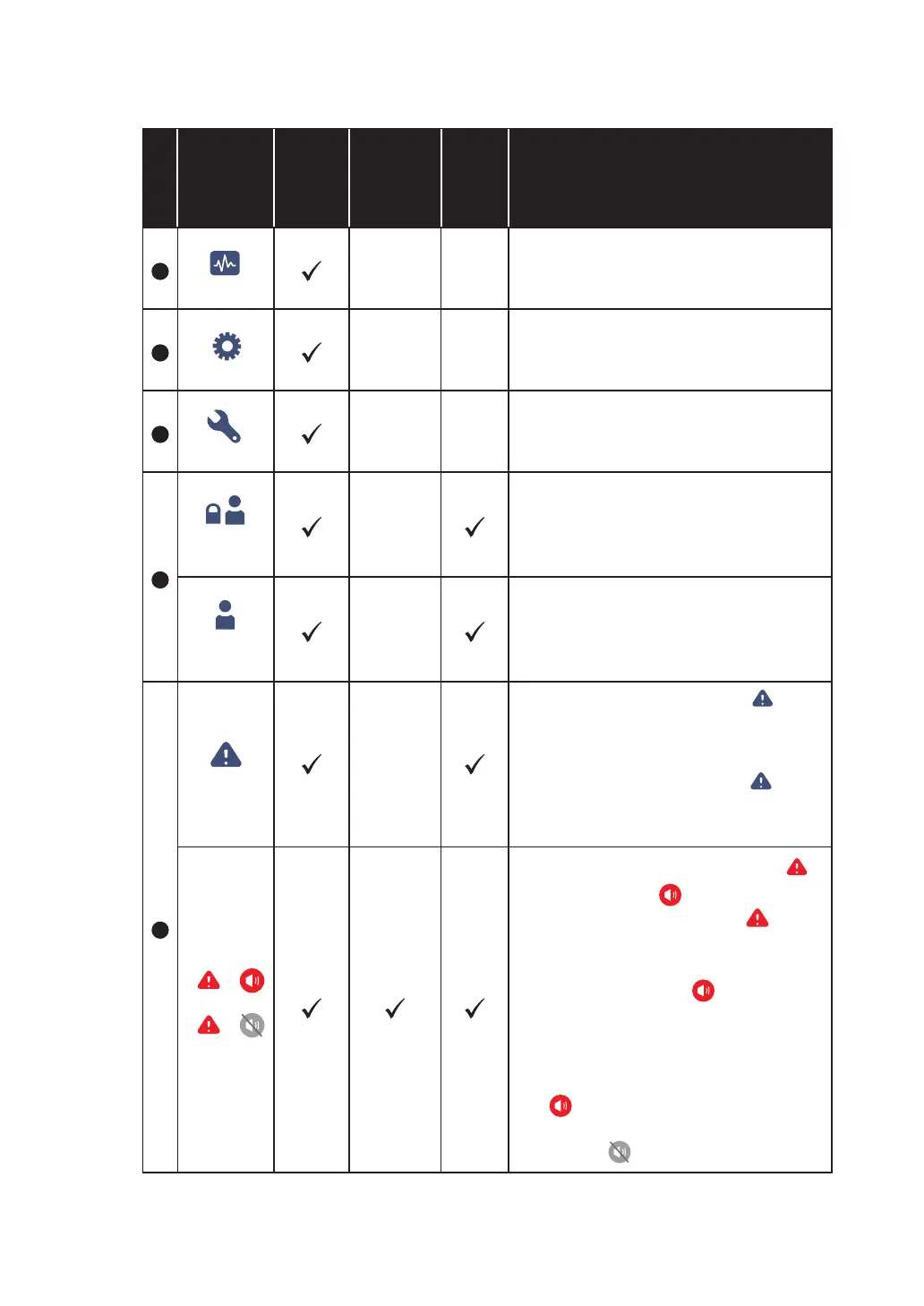
2
MEASUREMENT
Shortcut button for the measurement
menu. For more information, please refer
to 7.9 Check System Readings.
3
SETUP
Shortcut button for the setup menu. For
more information, please refer to 7.10
UPS Settings.
4
MAINTENANCE
Shortcut button for the maintenance
menu. For more information, please
refer to 7.11 System Maintenance.
5
LOG IN
User
Indicates login by User. The button
can be pressed to change the login
permission. For more information,
please refer to 7.5 Password Entry.
LOG IN
Administrator
Indicates login by Administrator. The
button can be pressed to change the
login permission. For more information,
please refer to 7.5 Password Entry.
6
EVENT LOG
1. Event log shortcut button (
EVENT LOG
).
Press the button to check the total
event logs.
2. When the warning symbol (
)
is blue, it indicates that there is no
warning.
2
WARNING
2
WARNING
:DUQLQJHYHQWVKRUWFXWEXWWRQ
2
WARNING
).
2. Buzzer button (
).
3. When the warning symbol (
) is red,
it indicates that there is a warning. At
this time, the buzzer will sound and
the buzzer symbol (
) will appear
and light up. The numerical value at
the right of the red warning symbol
indicates the total number of warning
events. By clicking the buzzer button
(
), the buzzer will be muted.
At this time, the buzzer disabled
symbol (
) will appear.




 To Next Page