4-3
4
ௐ
ௐ
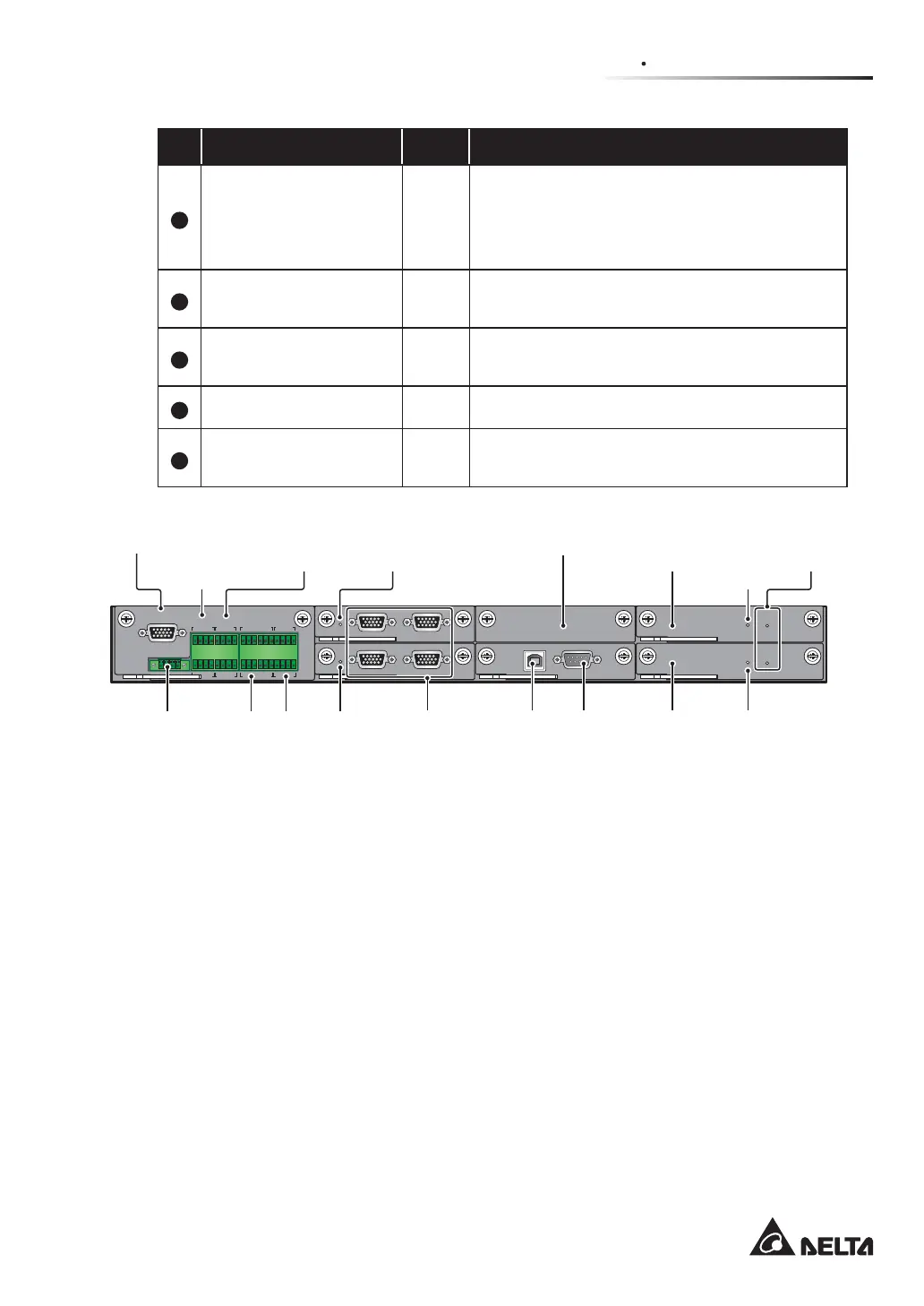
Communication Interfaces
No. Item Q’ty Description
1
Dry Contact Card 1 PC
Includes a display port, REPO dry contacts,
external battery temperature dry contacts,
external switch/ breaker status dry contacts,
output dry contacts and input dry contacts.
2
Parallel Communication
Card
2 PCS
Each card includes two parallel ports and one
LED indicator.
3
SMART Slot 1 PC
You can install the optional Relay I/O card for
dry contact expansion.
4
System Control Card 1 PC Includes a USB port and an RS-232 port.
5
Auxiliary Power Card 2 PCS
Each card includes a LED indicator and a
battery start button.
DISPLAY
REPO
NC NO
EXT. BATT
TEMP.
BT1 BT2
EXT.SWITCH
STATUS
S1 S2
S3 S4
BT3
BT4
O/P DRY
CONTACT
USB RS-232
P1 P2 P3
P4
P5 P6
I/P DRY
CONTACT
P1 P2
BATT.
START
BATT.
START
P3
P4
PAR ALL EL
PARALLEL
Display
Port
REPO
Dry
Contacts
External
Battery
Temperature
Dry Contacts
Auxiliary
Power
Card’s LED
Indicator
Auxiliary Power
Card’s LED
Indicator
Master
Parallel
Communication
Card’s LED Indicator
USB
Port
Battery
Start
Button
RS-232
Port
Auxiliary
Power
Card
Auxiliary
Power Card
Parallel
Ports
SMART
Slot
Input
Dry
Contacts
Backup Parallel
Communication
Card’s LED Indicator
External Switch/
Breaker Status
Dry Contacts
Output
Dry
Contacts
(Figure 4-3: Communication Interfaces Functions)
4.1.1 Display Port
Before shipment, the display port has been connected to the 10” touch panel with the
designated cable in Delta factory.
4.1.2 REPO Dry Contacts
The REPO dry contacts provide you with quick and convenient interfaces to shut down the
UPS safely when an emergency occurs. Connect the REPO dry contacts to a user-supplied
switch and you can remotely shut down the UPS. The REPO dry contacts provide normally
open (NO) and normally closed (NC) these two options for use.













 To Next Page