3-6
Modulon DPH Series
3.1.3 Bypass Mode_ Single Input_ Single Unit
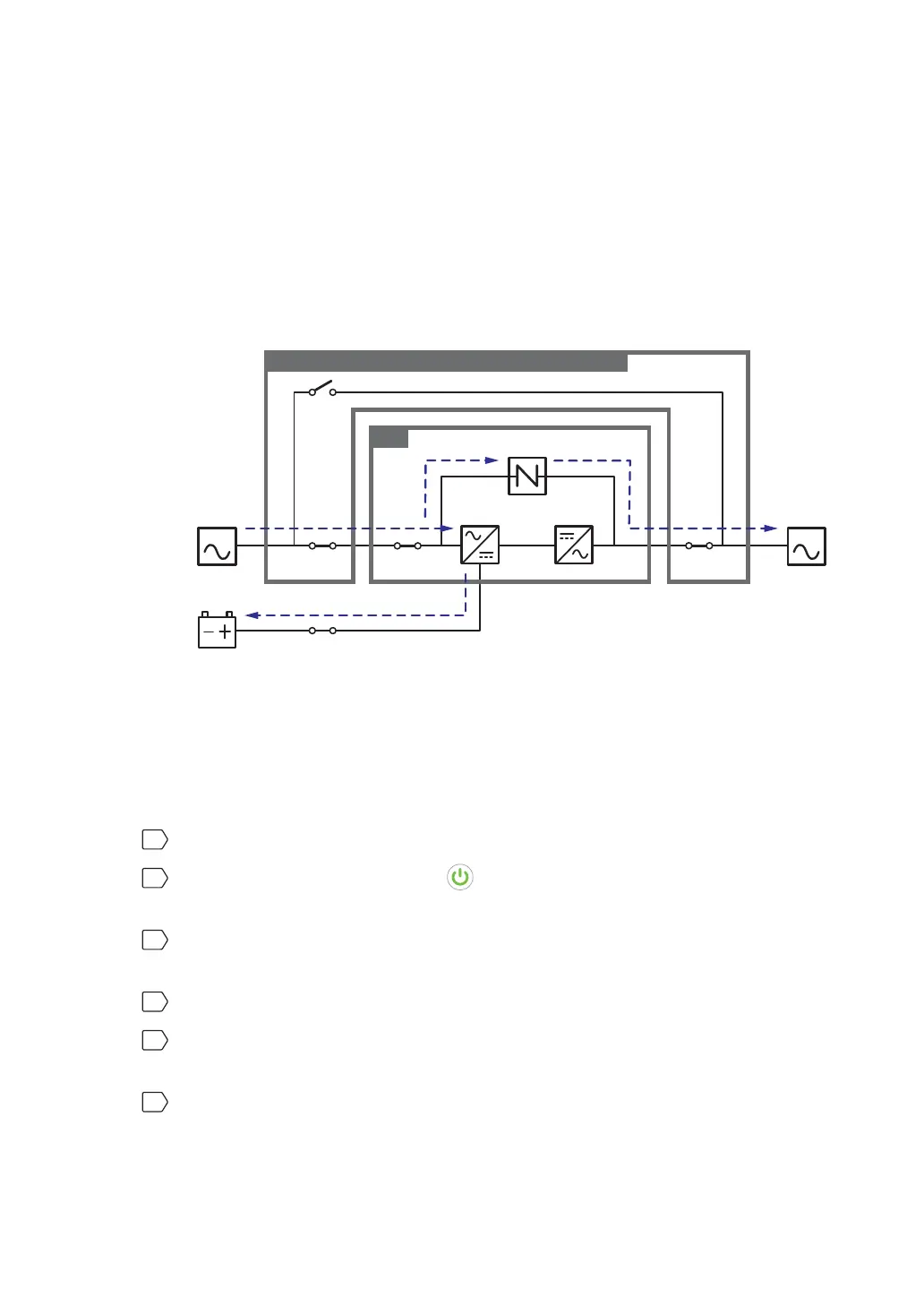
When the inverter encounters abnormal situations such as over temperature, overload, short
circuit, abnormal output voltage or low battery, it will automatically shut itself down. If the
UPS detects the bypass AC source is normal, it will automatically switch to bypass mode to
protect the connected critical loads from power interruption. Please refer to Figure 3-5. After
the above-mentioned abnormalities are eliminated, the UPS will switch back to online mode
from bypass mode. During bypass mode, the UPS’s tri-color LED illuminates yellow and the
text ‘Bypass’ appears in the upper right corner of the screen.
MAIN LOAD
Q1 Q0 Q4
Q3
UPS
Q5
Rectifier Inverter
Static Switch
Delta or non-Delta External Maintenance Bypass Cabinet
Batteries
(Figure 3-5: Bypass Mode Diagram_ Single Input Single Unit)
3.1.4 Manual Bypass Mode_ Single Input_ Single Unit
When the UPS needs maintenance, you can manually switch the UPS to manual bypass
mode. To let the UPS run in manual bypass mode, please follow the procedures below:
1
Confirm that the bypass AC source and the STS module are normal.
2
Press the LCD's ON/ OFF button ( ) once and the ‘POWER OFF?’ screen will pop
up to ask you if you want to power off the inverter. Please select ‘YES’.
3
Turn on the Delta or non-Delta external maintenance bypass cabinet’s Manual Bypass
Breaker or Switch (Q3).
4
Turn off the UPS’s Bypass Switch (Q0).
5
Turn off the Delta or non-Delta external maintenance bypass cabinet’s Input Breaker or
Switch (Q1) and Output Breaker or Switch (Q4).
6
Turn off each external battery cabinet’s breaker (Q5).













 To Next Page