Original User Guide | Pedelec Impulse Evo / Impulse Evo Next Version 4 EN-99
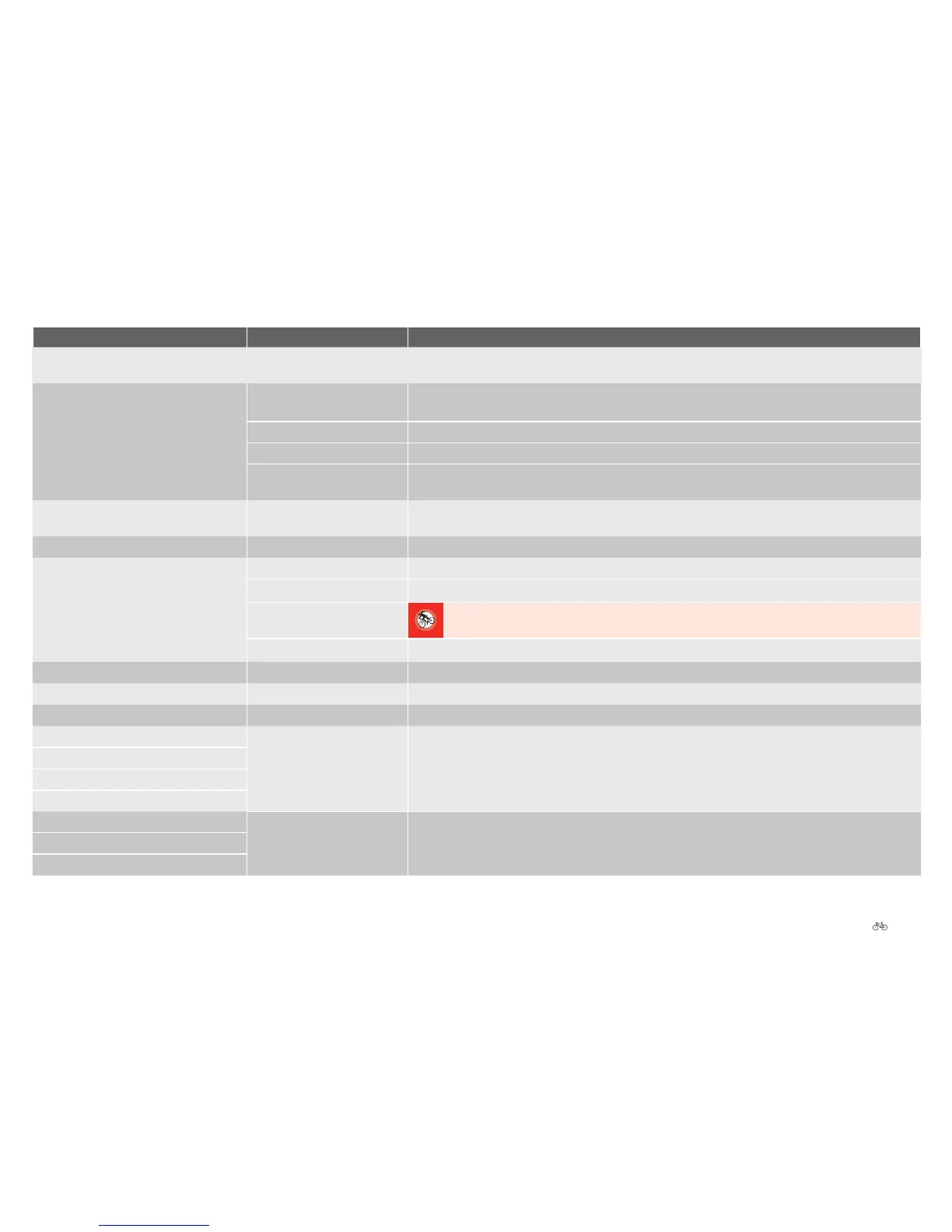
Display message Cause Remedy
“Setting cannot be requested from/by
motor.”
Cable connection defective. Contact your cycle dealer to have the cable connection checked and/or repaired.
“Check speed sensor” a) The spoke magnet has
slipped.
a) Check whether the spoke magnet has slipped. It should be as close as possible to the speed sensor on the
chain stay (max. 10 mm). Align the magnet with the marker point on the speed sensor.
b) The speed sensor is faulty. b) Contact your cycle dealer to have the speed sensor replaced.
c) Spoke magnet missing. c) Contact your cycle dealer. He will be able to replace the spoke magnet.
d) Assist mode is queried at
standstill.
d) The message should disappear when travelling at over 6 km/h.
“Back pedal sensor: \n“\ /Hardware
defective”
Coaster sensor defective. Contact your cycle dealer. The motor may have to be replaced.
“Waiting for drive” Motor is not ready yet. The message should disappear after 5 to 6 seconds.
“No 36 V battery voltage” a) No connection to battery. a) Remove battery and reinsert it.
b) Dirty contacts. b) Clean the battery discharge plug and docking station contacts with a soft, dry cloth.
c) The battery is damaged.
c) Damaged batteries must not be charged or used for any other purpose. Contact your cycle dealer.
The battery may have to be replaced.
d) Battery not charged. d) Charge the battery.
“Fault with rotor magnet” The motor unit is faulty. Contact your cycle dealer. The motor may have to be replaced.
“Fault with rotor sensor” The motor unit is faulty. Contact your cycle dealer. The motor may have to be replaced.
“Back pedal sensor / range fault” Coaster sensor defective. Contact your cycle dealer. The motor may have to be replaced.
Start of transfer failed Transfer fault 1. Switch the system off and back on three times 6.3 Overview and basic functions Page EN-47.
Init. transfer failed
Data transfer failed
End transfer failed
Fault: Address not within permitted range Possibly out-dated software
version
1. Switch the system off and back on 6.3 Overview and basic functions Page EN-47. If the fault message
persists, contact your cycle dealer. The system software may need updating.
Fault: No address received
Fault: Unable to save data











 To Next Page