Replacing the battery
52 BEETLE /M-III - Service manual
19 Replacing the battery
Note system-specific BIOS settings in order to enter these again after replacing the battery.
Shut down the system. Remove the cable cover and pull the power plug at the rear.
Remove the housing cover.
Fold the hard disk holder upwards and set it aside.
NOTICE
Observe the instructions regarding electrostatic discharge-sensitive assemblies (see chapter "Electrostatic dis-
charge-sensitive components").
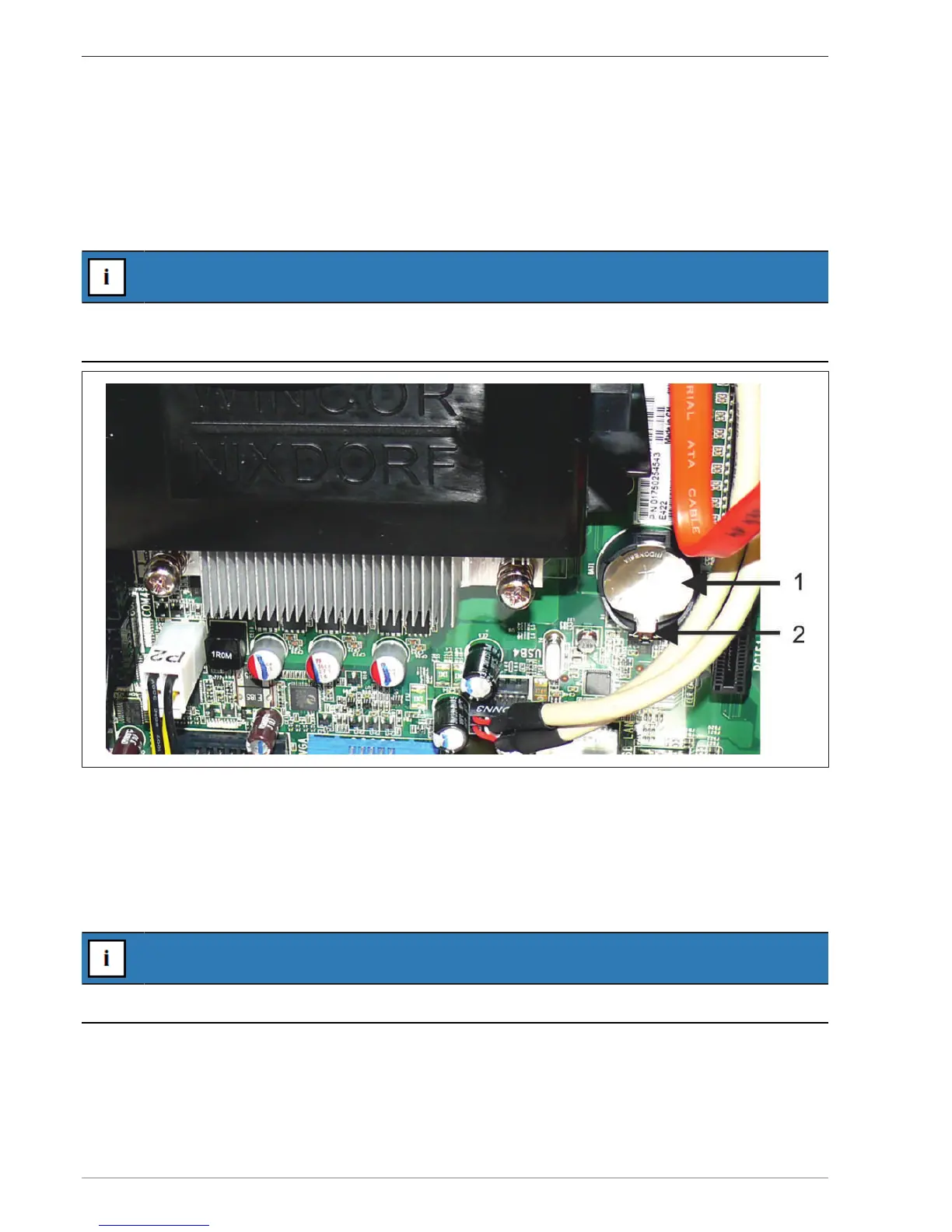
1 Battery 2 Latching mechanism
Disengage the battery-latching mechanism. Pull the tabs outwards and remove the battery.
Set the new battery in the base. Press the battery down until it snaps audibly into place. Ensure correct polarity
(plus pole faces upwards).
After the replacement of the battery, all BIOS settings are reset to the default values. Go into the BIOS setup (with
F2 key during the Boot phase) and re-enter the customer-specific BIOS settings.
NOTICE
The DMI data and the password are not deleted.


 To Next Page