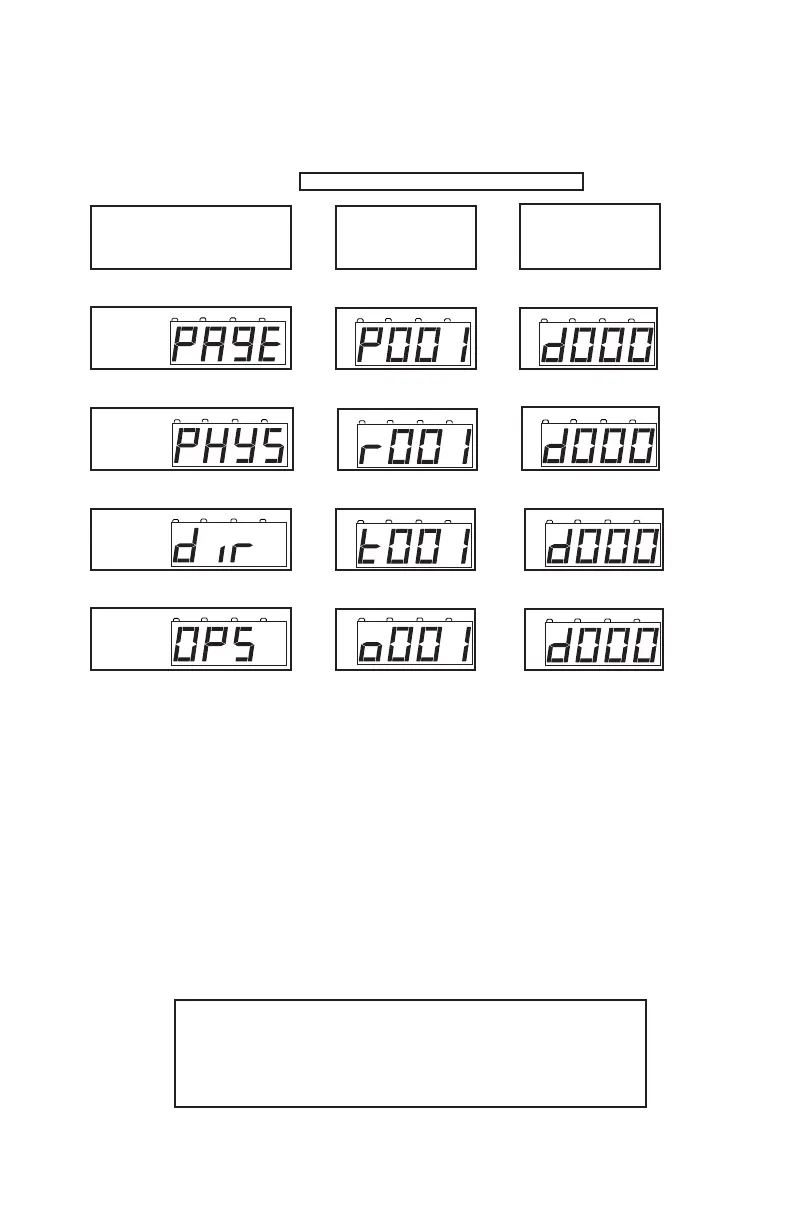
If you are using a programming mode other than Paged mode see the
chart below for the meanings of the screens you will see.
TABLE I: DCS50 Programming Display Table
Press PROG Key Press CV Key Press CV-RD Key
Press PROG Key Press CV Key Press CV-RD Key
Press PROG Key Press CV Key Press CV-RD Key
Press PROG Key Press CV Key Press CV-RD Key
13.4 Programming On The Mainline: Operations Mode
Programming
Operations mode programming lets you program CVs in DCC locomotives
equipped with Extended Packet Format decoders while they are on the main-
line. A typical use for Ops mode programming would be to change the acceler-
ation rate (CV03) or the deceleration rate (CV04) of your locomotives to simu-
late the weight and braking capability of the train to compensate for changing
the number of cars or power units on a train.
Your DCS50 can use ops mode programming to change the CV value in ANY
CV, including 2 digit and 4 digit addresses.
Ops mode programming can be performed by any
DCS50 or other LocoNet throttle, such as DT400,
DT300, UT1, etc., at any time since the throttles are not
competing for usage of the single programming track.



 To Next Page