EasyManua.ls Logo

Digitrax Zephyr - Adding Throttles: LocoNet & Jump Ports; Adding LocoNet Throttles and Using Jump Ports

Digitrax Zephyr
60 pages
Print Icon
To Next Page IconTo Next Page
To Previous Page IconTo Previous Page
Loading...
capacity for running up to 120 throttles. You can continue to use
your DCS50 as a throttle and booster with either set.
24.2 Jump™ Ports: Using A Smooth DC Power Pack As An
Additional Throttle
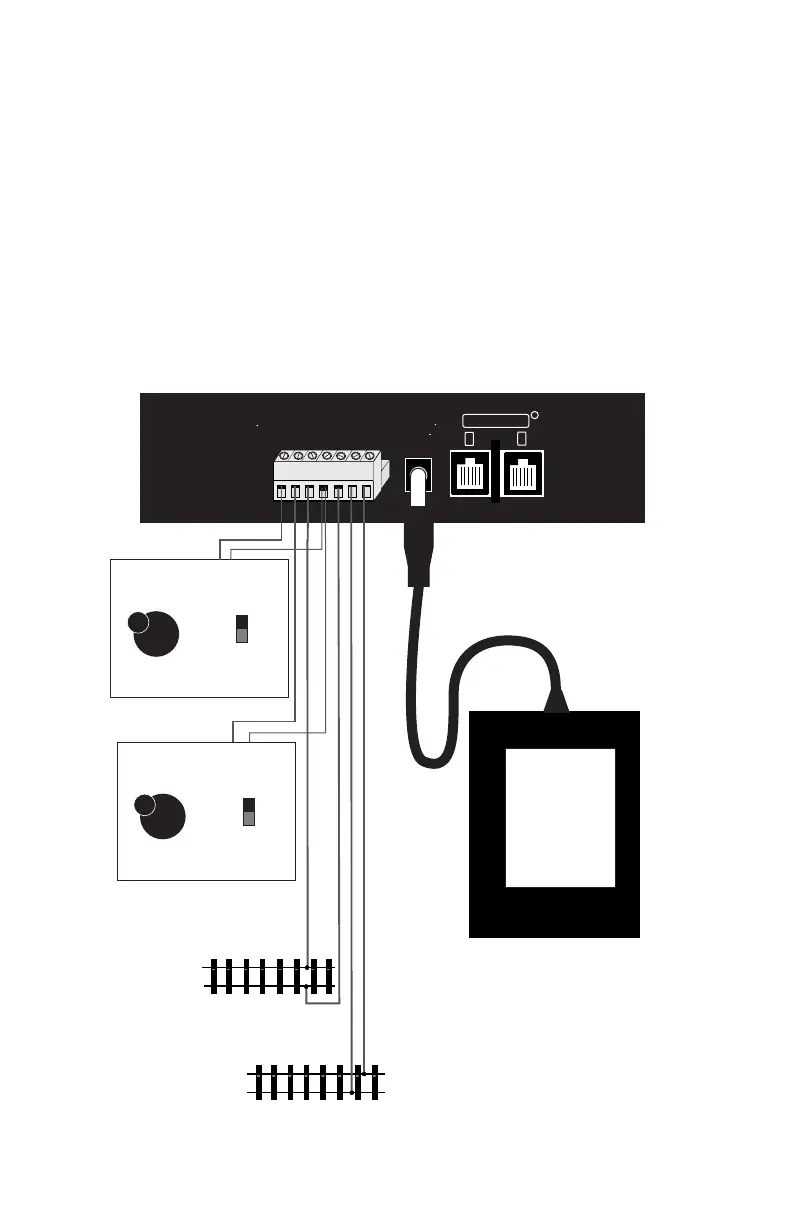
DCS50’s Jump A & B ports can host two DC power packs as additional
throttles.
Begin with an operating DCS50 attached to your layout.
Hook up one or two smooth DC power packs as shown here:
B
A
JUMP 1
GROUND
RAIL B
JUMP 2
PROG A
RAIL A
PROG B
LOCONET
R
POWER IN
15V AC
2.5 AMPS
DO NOT USE WITH TRACK
OVER 16 VOLTS
PS315
Power Supply
Plugged Into
Wall Outlet
Layout Power District
(Double Gapped)
Rail A
Rail B
Isolated Programming
Track
Rail A
Rail B
LocoNet Expansion
Ports for adding
handheld throttles and
other equipment.
Speed
Control
Direction
Control
Forward
Reverse
Smooth DC Power Pack
Plugged into a wall outlet
Jump 1
Jump 2
Speed
Control
Direction
Control
Forward
Reverse
Smooth DC Power Pack
Plugged into a wall outlet
DCS50 Rear Panel Hook Up Diagram
38

Table of Contents

Related product manuals