4 Configurations on Web Interface
DAG2000-24/32SUser Manual
Copyright©2011-2020 Dinstar
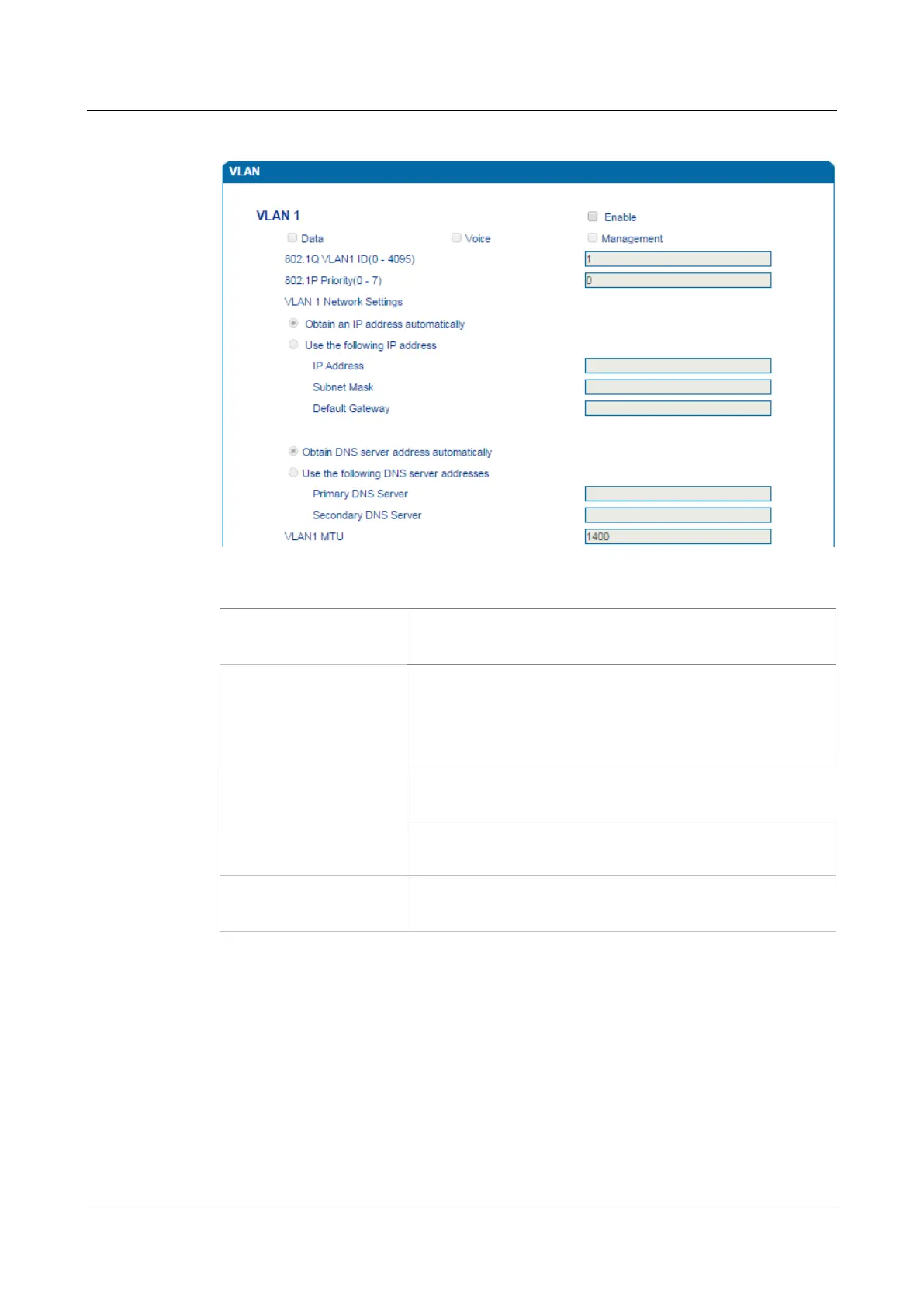
Figure 4-9 Configure VLAN
Table 4-2 Explanation of VLAN Parameters
VLAN1/VLAN2/VLAN3 The device supports three VLANs at most. Please enable VLAN
according to actual needs.
Data/Voice/Management S
elect what kind of messages are allowed to go through this
VLAN. For example, if the checkbox on the left of data is
selected, it means data messages are subject to the following
network setting of this VLAN.
802.1Q VLAN ID(0-4095) Set an ID to identify a VLAN based on 802.1Q protocol. Range is
from 0 to 4095.
802.1p Priority
0-7
Set the priority of a VLAN based on 802.1P protocol. 0 is the
highest priority.
Network Setting Set a DHCP IP address or static IP address for a VLAN, and set
the IP address of the DNS server used by the VLAN.
【Note】: After the configurations are finished, you need to restart the device for the configurations
to take effect.
4.4.3 DHCP Option
When the DAG2000 device works as a DHCP client and applies for an IP address, DHCP
server will return packets which include an IP address as well as configuration information of
enabled option fields.














 To Next Page