17
Loading Paper Roll and Ink Ribbon
Chapter 2 Preparations
• Do not grasp the paper too tightly or strike it against
a hard object, because the paper may tear or crease,
effecting the print quality.
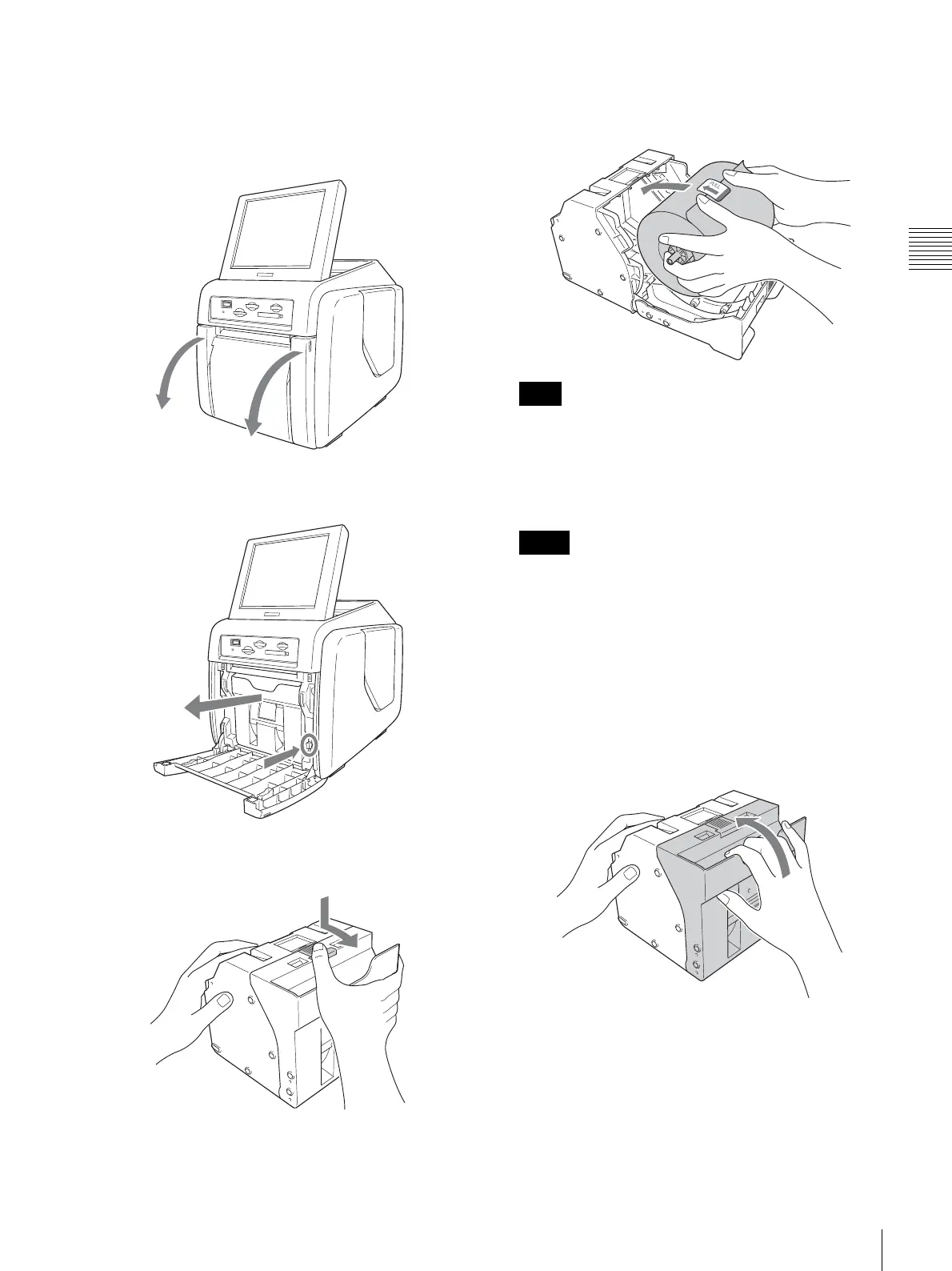
2
Open the front door.
3
Press the paper holder release button and pull the paper
holder out.
4
Press the latch on top of the paper holder and open the
holder.
5
Insert the paper roll into the paper holder.
The arrow on the label in the center of the paper roll
must point inwards.
When installing the paper roll, make sure the paper
holder is completely open. Otherwise a malfunction
may occur.
6
Remove the label in the center of the paper roll.
• Make sure to fully remove all labels from the paper
roll. If labels remain inside the printer, operation
problems may occur.
• After inserting the paper roll, do not touch the
printing surface (the inner surface of the rolled
paper). Fingerprints, sweat, creases etc. can lead to
reduced print quality.
• Insert the paper roll firmly and completely into the
paper holder.
7
Close the paper holder.
Note
Notes



 To Next Page