25
Displaying the Administration Screen
Chapter
Chapter 3 Setup
3
Setup
Language and operation mode selections, prices,
passwords and other settings for setting up the unit are
configured from the administration screen. You can also
change settings after setting up the unit and perform
maintenance from the administration screen.
Displaying the
Administration Screen
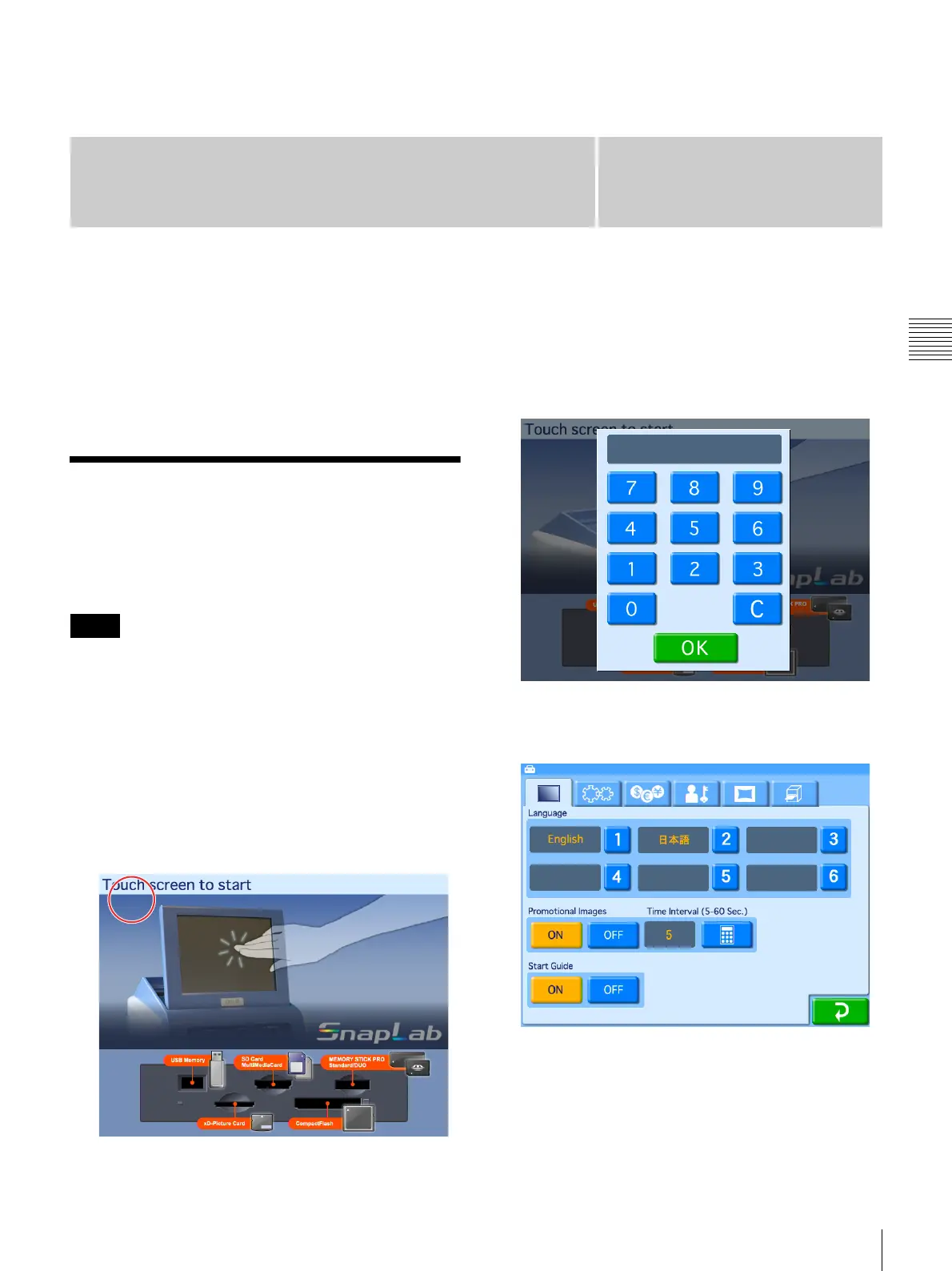
Proceed as follows to display the administration screen.
• Before you can make settings on the administration
screen, you must enter the administrator password. In the
factory default condition, the administrator password is
set to “9999.”
• If a memory card is inserted in any of the front-side
memory card slots of the unit, the administration screen
does not come up. Remove any memory cards first, and
then repeat the procedure.
1
At the Start Guide display, touch the top left corner of
the screen twice in succession.
The password entry screen appears.
2
Enter the administrator password using the numeric
keypad.
3
Touch the [OK] button.
The administration screen appears.
By touching one of the tabs at the top of this screen,
you can select the respective category to make
settings. For details on each category, see this section
and “Advanced Settings” on page 33.
Notes



 To Next Page