71
Troubleshooting
Appendix
Troubleshooting
Before sending the unit out for servicing, check the items
listed below. If you still cannot solve the problem, contact
your dealer.
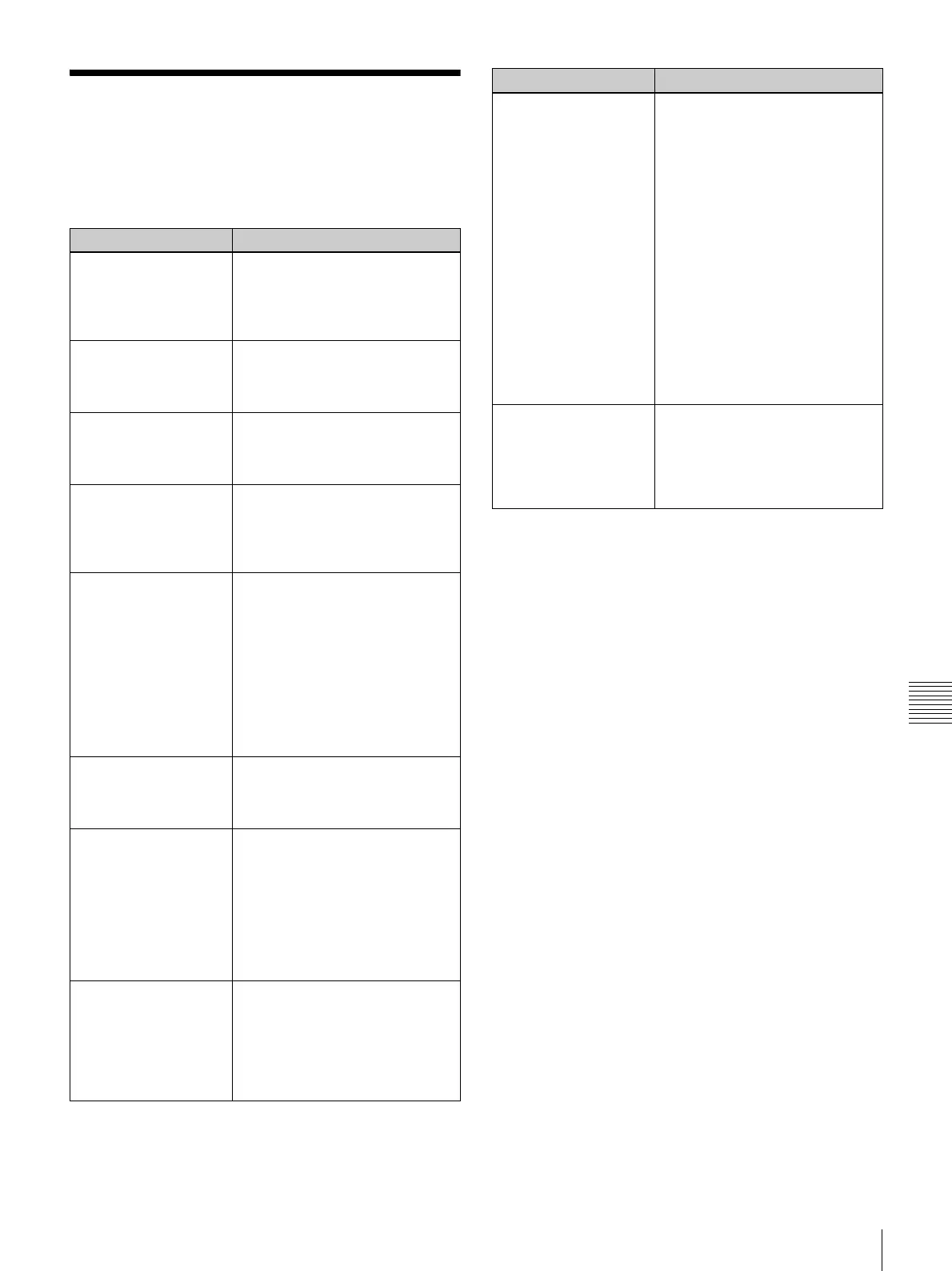
Symptom Cause/Remedy
Cannot load paper roll. Are you trying to load 2UPC-C13/
C15 series while adaptors are
mounted in the paper holder?
Remove the adaptors and then
load the paper roll (page 15).
Paper roll was loaded,
but “no paper” message
appears.
Paper roll may not have been
loaded correctly.
Ensure that paper roll is loaded
correctly (page 16).
Ink ribbon was loaded,
but “no ink ribbon”
message appears.
Ink ribbon may not have been
loaded correctly.
Ensure that ribbon is loaded
correctly (page 18).
Out of paper message
appears, but there is
still paper in the unit.
This is not a defect. Some spare
paper will be left over.
Remove the leftover paper and
load a new ink ribbon and
paper roll (page 15).
There is a white margin
on the printed image.
You may be trying to load a
printing pack that is 102 mm (4
inches) in width (2UPC-C14/C48
series) without the adapters
attached to the paper holder.
Attach the adapters to the
paper holder.
The print position may not be
correct.
Adjust the print position
(page 49).
A vertical white stripe
appears on the printout.
Dust may have accumulated on
the thermal head.
Clean the interior of the printer
(page 45).
Power does not switch
on.
The power cord may not be
connected.
Make sure that the power cord
is connected (page 14).
The POWER switch may not have
been pressed correctly.
Make sure to press the
POWER switch firmly
(page 22).
Display not on or
difficult to see.
Depending on the display angle,
the display may not be visible or
may be difficult to see.
The display angle can be
adjusted. Adjust the angle of
the display to improve the
display appearance (page 12).
Image data cannot be
read.
A mounted memory card does not
contain any data.
Insert a memory card that
contains image data.
Data has been recorded on a
memory card in a format that the
unit does not recognize.
Be sure to store image data in
a format that the unit can
recognize (page 9).
The memory card may not be
properly inserted.
Make sure that the memory
card is fully inserted.
The memory card may not be
inserted in the correct direction.
Set the memory card in the
direction shown on the
operation screen.
Cannot pull out the
paper holder.
There may be an excessive
accumulation of scraps in the
paper holder.
Even out the scraps in the
paper holder before pulling it
out.
Symptom Cause/Remedy



 To Next Page