20
Replacing the Paper Roll and Ink Ribbon
Chapter 2 Preparations
Replacing the Paper Roll
and Ink Ribbon
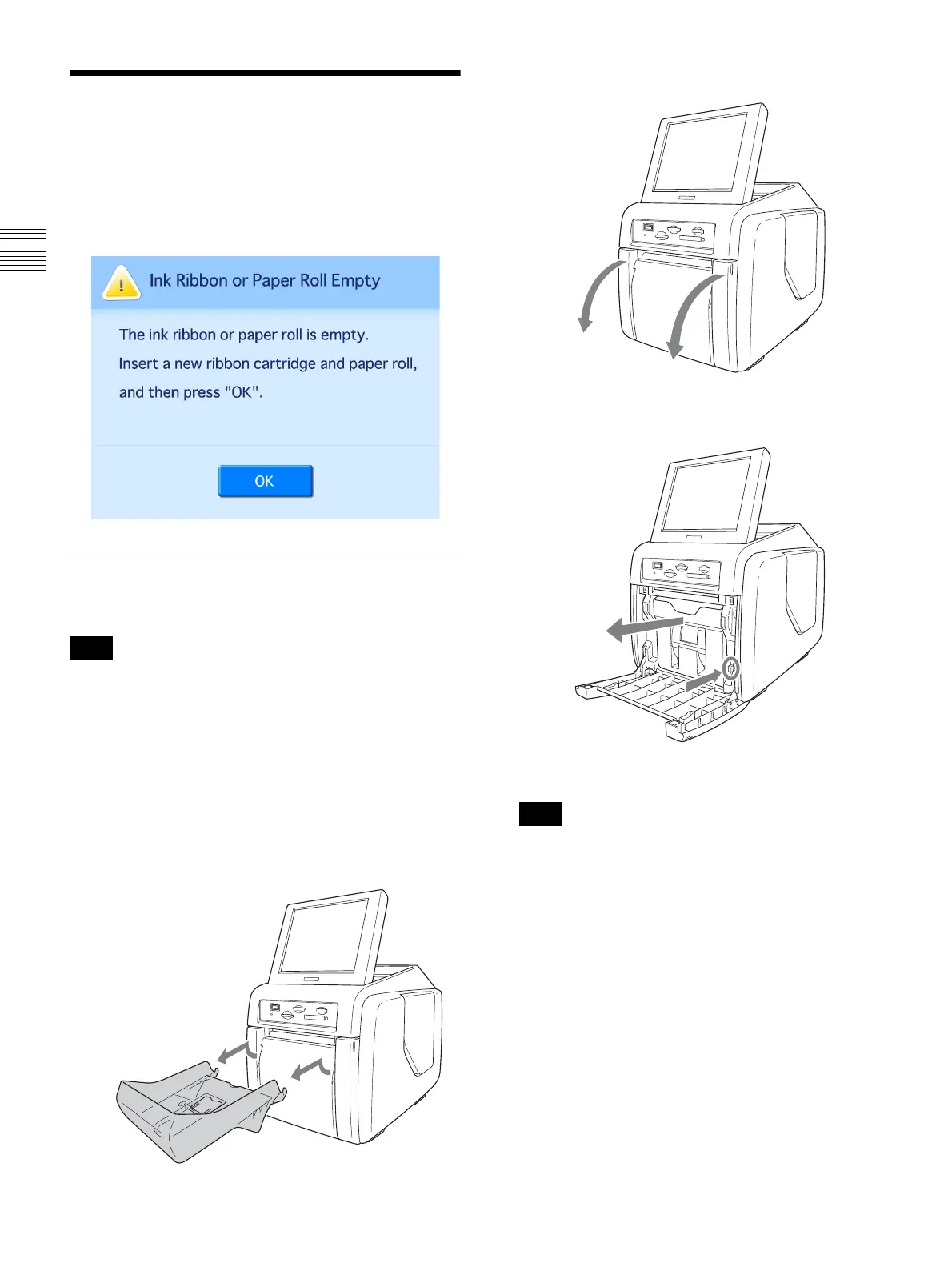
If the paper roll or ink ribbon runs out while printing, the
following error message appears. Proceed as follows to
replace the paper roll and ink ribbon.
Removing the paper roll and ink
ribbon
The ink ribbon and paper roll are not meant to be used
up completely. Even if there is some ink ribbon and
paper remaining, be sure to load a new ink ribbon and
paper roll as a set. Using leftover paper may result in
malfunction.
Removing the paper roll
1
Lift the paper tray so that it is level, and pull the paper
tray outward to remove it.
2
Open the front door.
3
Press the paper holder release button and pull the paper
holder out.
4
Remove any paper remnants from the paper holder.
If the paper holder becomes full, the paper remnants
that are cut off may not eject from the printer. These
remnants may get stuck inside the printer and cause a
malfunction. Be sure to remove any remnants from the
paper holder each time you replace the paper roll.
Note
Note



 To Next Page