16
Loading Paper Roll and Ink Ribbon
Chapter 2 Preparations
3
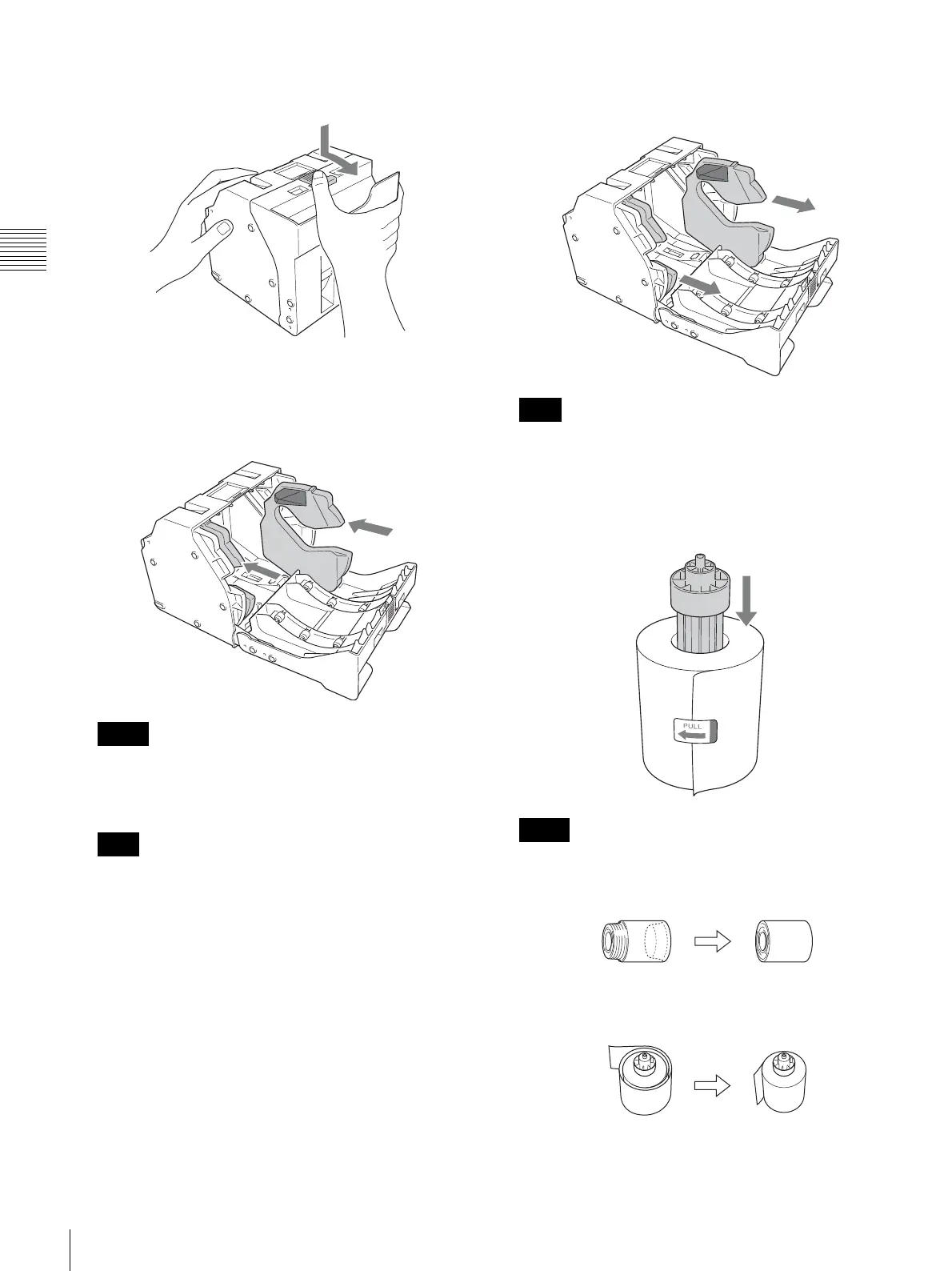
Press the latch on top of the paper holder and open the
holder.
4
Adjust the width of the paper holder.
When using the print pack 2UPC-C14 series or
2UPC-C48 series
Attach adaptors to both ends of the paper holder.
Make sure the color of the label on the upper part of the
adaptors matches the color of the label on the paper
holder.
Insert the adaptors firmly and completely into the
paper holder.
When using the print pack 2UPC-C13 series or
2UPC-C15 series
Remove the adaptors from the paper holder.
Store the adaptors in a safe place so as not to lose them.
Loading the paper roll
1
Insert the paper core into the paper roll.
• If the edges of the paper roll are uneven, make sure
to even them out before installing the paper roll.
Otherwise a malfunction may occur.
• If the paper is wound loosely around the core, make
sure to wind it tightly before installing the paper roll.
Otherwise a malfunction may occur.
Memo
Note
Note
Notes



 To Next Page