DOM Roq® Mounting and Connection of Pin Code Reader (Chip Reader) with DOM Roq®
61
DOM Roq® Smart Lock
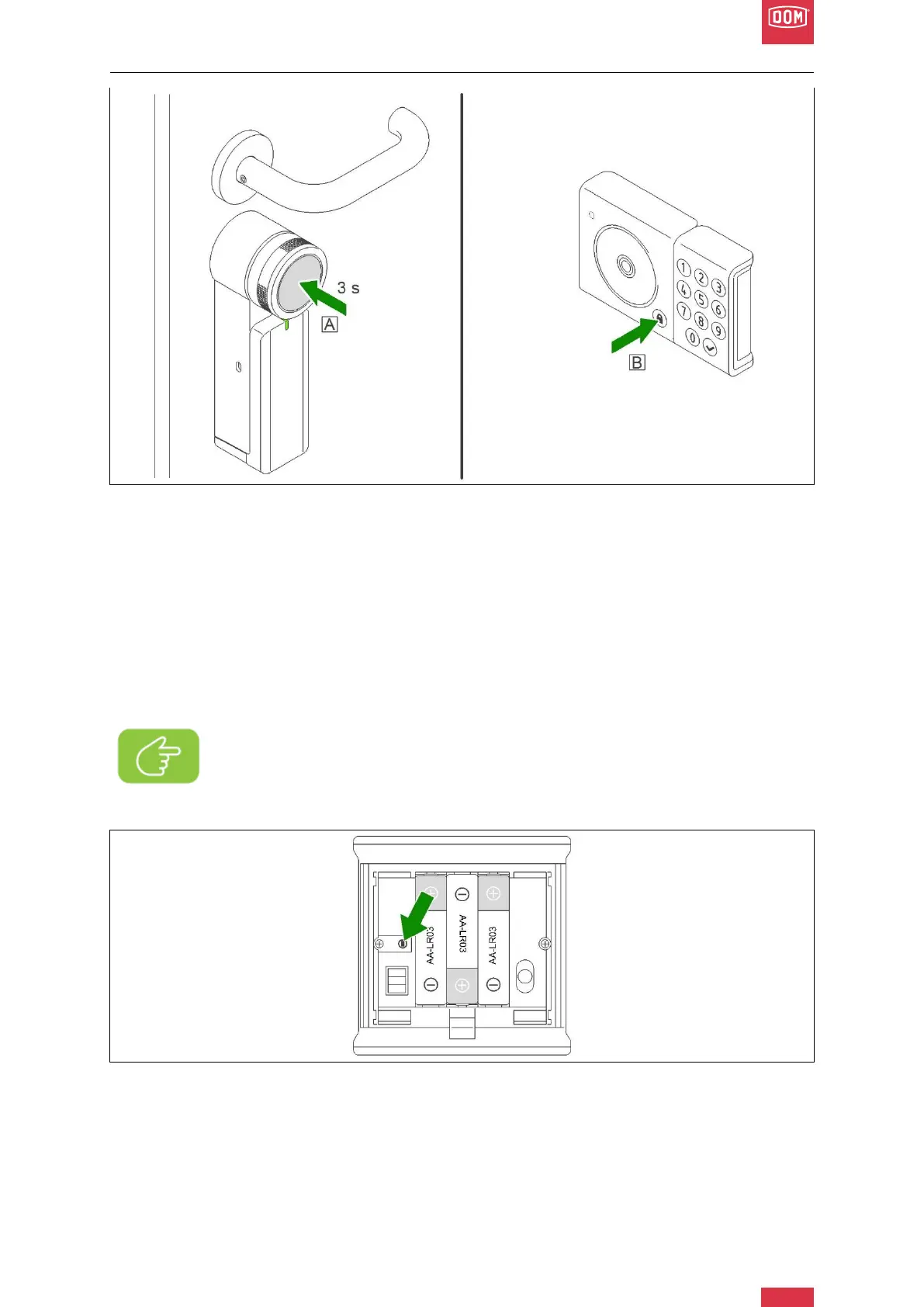
DOM Roq® Fig. 57: Mounting Instructions Pin Code Reader
16. Press (within the 30 seconds pairing mode of the Pin Code Reader) the push button
of the motor unit for 3 seconds (A) to enter the pairing mode of the motor unit. The
LED on the motor unit will now flash slowly white.
17. Now press the lock button on the chip reader (B) for 3 seconds to start the pairing.
18. The LED of the chip reader flashes green:
19. Correct pairing of the chip reader with the motor unit is confirmed by two beeps and a
steady green LED (continuous light for approx. 3 seconds) on the chip reader.
20. You have successfully coupled the chip reader with the DOMRoq® motor unit.
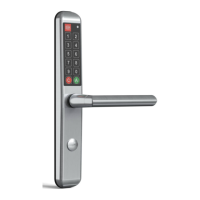
DOM Roq® Fig. 58: Pin Code Reader Reset Button
The reset button is located in the battery compartment.
Note!
If the procedure did not work, press the reset button for three seconds and then
remove the batteries for at least 15 seconds. Repeat the procedure from point
15.


 To Next Page