DOM Roq® Laser Sensor
67
DOM Roq® Smart Lock
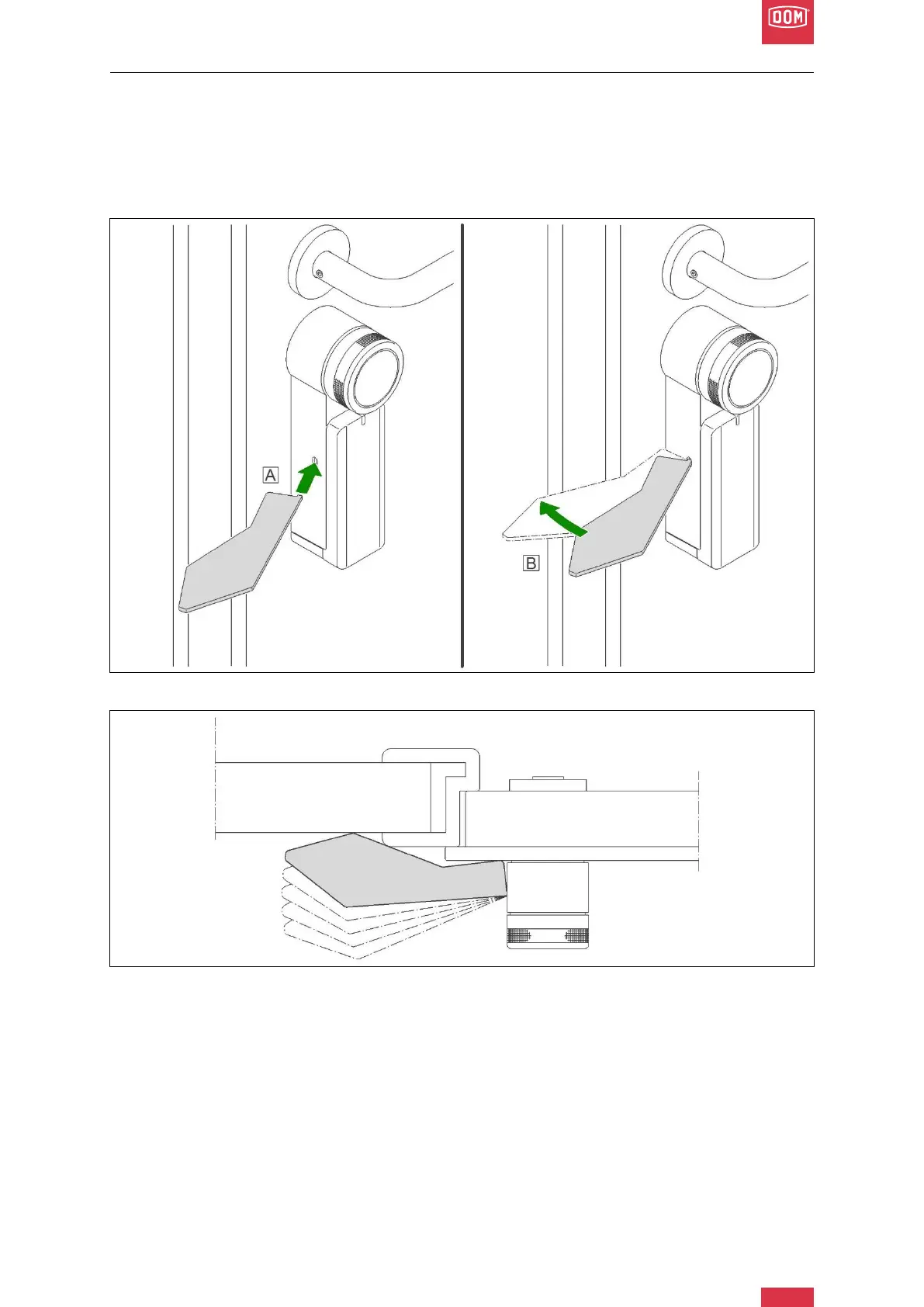
The DOM Roq® delivery package contains a paper template which, when inserted into the
"light shaft" of the laser, indicates which point / surface the laser will hit.
If there is a reflective/absorbent surface or glass, the functionality of the laser may be dis-
turbed. For this purpose, a reflector (with adhesive surface) is included in the delivery pack-
age, which you stick on the spot where the laser hits (to be determined via paper template).
DOM Roq® Fig. 64: Laser Sensor Template
DOM Roq® Fig. 65: Laser Sensor Template
1. Insert the laser template horizontally with the anchor into the slot for the laser beam
(A).
2. Swivel the laser template towards the wall (B)
3. Mark the point of contact between the template and the wall.
4. Attach the reflector to the marking point.


 To Next Page