Protections
057-233 ISSUE: 1 Page 72 of 90
5 PROTECTIONS
When an alarm is present, the Audible Alarm sounds and the Common alarm LED if configured
illuminates.
The audible alarm can be silenced by pressing the Alarm Mute
The LCD display jumps from the ‘Information page’ to display the Alarm Page
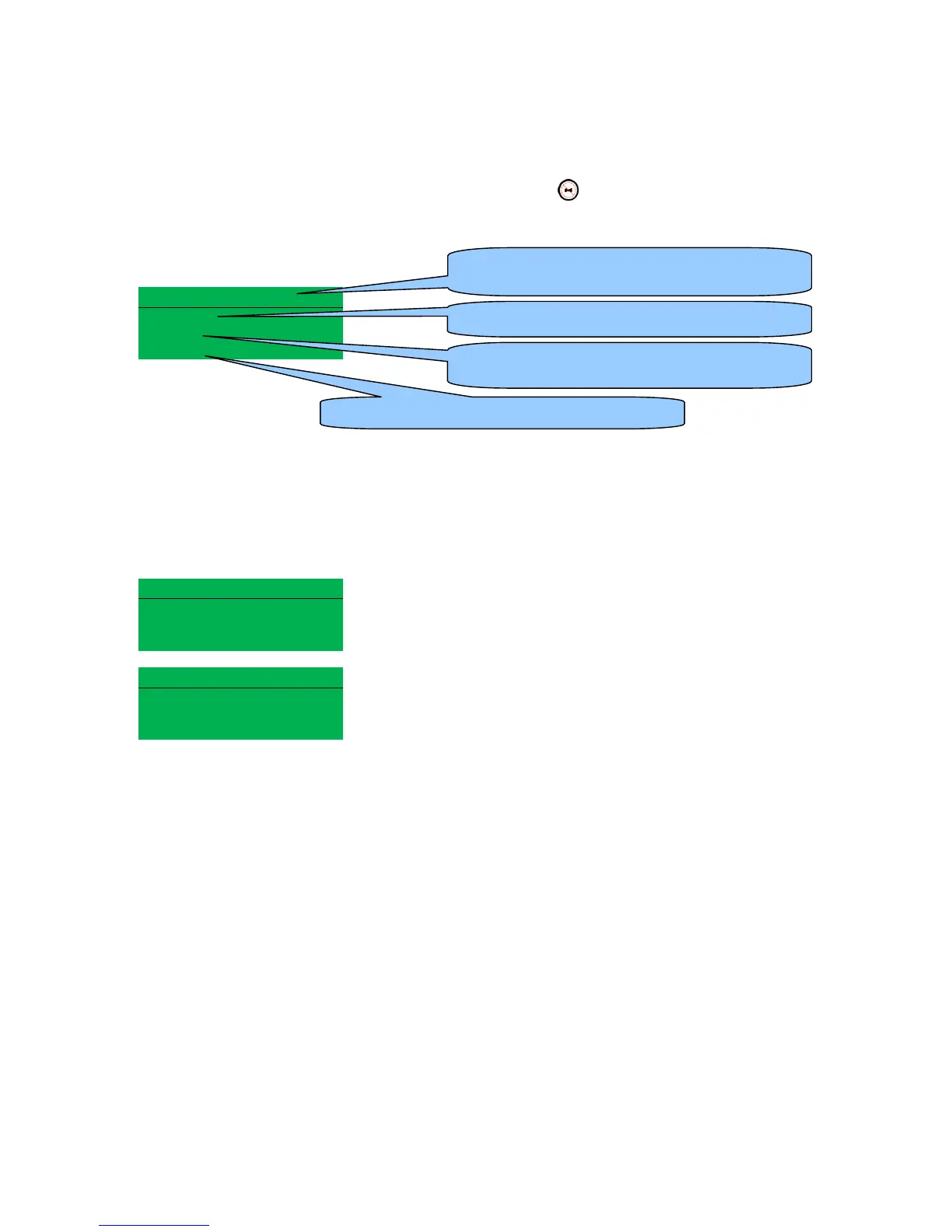
1/2 Alarm
S1 Failure
Latched
Warning
The LCD displays multiple alarms E.g. “S1 Failure Warning”, “Fail to Stop Warning” and “Digital Input
A Electrical Trip”. These automatically scroll in the order that they occurred.
In the event of a warning alarm, the LCD displays the appropriate text. If an electrical trip then occurs,
the module again displays the appropriate text.
Example:-
Alarm 1/2
Fail to Stop
Unlatched
Warning
Digital Input A
Unlatched
Electrical Trip
The nature of alarm, e.g. S1 Failure
The type of alarm. E.g. Electrical Trip or warning
Number of present alarms. This is alarm 1 of a
total of 2 present alarms
If the alarm automatically resets (unlatched) or
needs to be manually reset (latched).



 To Next Page