Lap
This function is present in the functions and trip info
menu only in Track Info Mode and allows you to
activate or deactivate the LAP time recording
function.
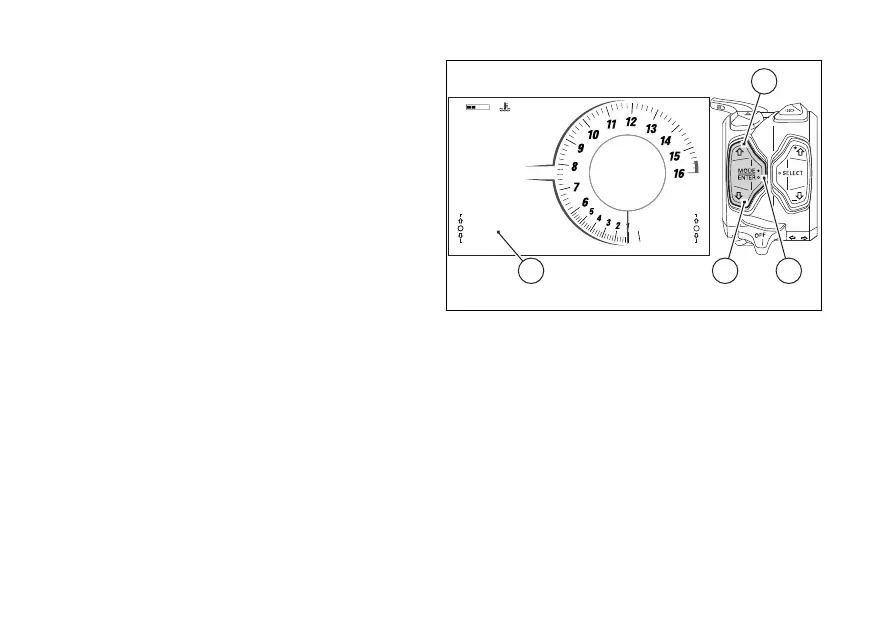
To select this function in the menu, scroll the items
available using (1) and (2) to display “LAP”
(A).
If the function is not active, the instrument panel
displays “LAP OFF”. Press the ENTER (3) to
switch it on.
If the function is active, the instrument panel
displays “LAP ON”. Press ENTER (3) to switch it
It is also possible to activate or deactivate lap
recording by means of the "Lap" function in the
Menu (see page 196).
LAP time recording
According to whether the GPS is installed or not, the
motorcycle can have two types of LAPs:
●
LAP BASIC if the GPS is missing or not installed
on the motorcycle in the basic version
●
LAP EVO if the motorcycle is equipped with the
GPS EVO
In both cases, upon the function activation the
display shows:
●
the timer at 0’00.00;
●
the LAP number from “Lap --/60” in
case of LAP BASIC;
●
the current session number with
“Session 1” and the LAP number with
“Lap --/60”, in case of LAP EVO.
0
11:34
A.M.
SPORT
RPM X 1000
Gear
km/h
N
DWC 3
DTC 3
DSC 2
LO HI
Lap Off
SETTING MENU
LAP OFF
CONS. I. km/L
13.2
A
1
32
Fig 74
121













 To Next Page