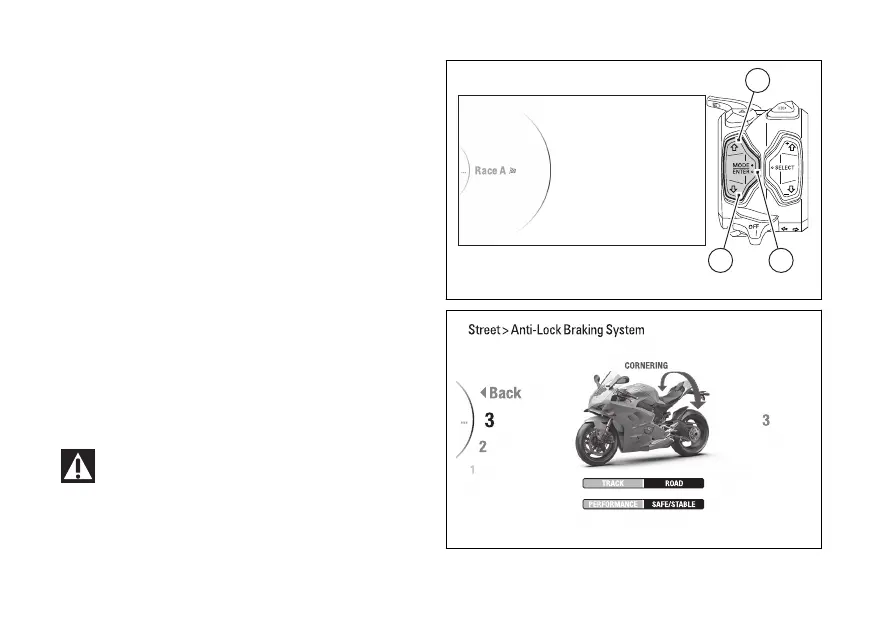
Menu - Riding Mode - ABS
This function allows the ABS intervention
level.
●
Enter the menu.
●
Use (1) and (2) to select item “Riding
Mode” and press the ENTER (3).
●
Select the Riding Mode you wish to customise
and press ENTER (3).
●
Select the “ABS” item and press ENTER (3).
Levels from 1 to 3 are displayed on the
side. While the currently set level is shown on the
right. The motorbike is shown in the middle with the
involved in the highlighted and the
reference indications.
Use (1) and (2) to scroll and select the desired
level. Press the ENTER (3) to confirm.
To exit the menu and return to the previous screen,
select the “Back” item and press the ENTER
(3).
In case of system malfunction, contact a Ducati
Dealer or Authorised Service Centre.
Using the brakes correctly under adverse conditions
is the hardest – and yet the most critical - skill to
Fig 109
Fig 110
155













 To Next Page