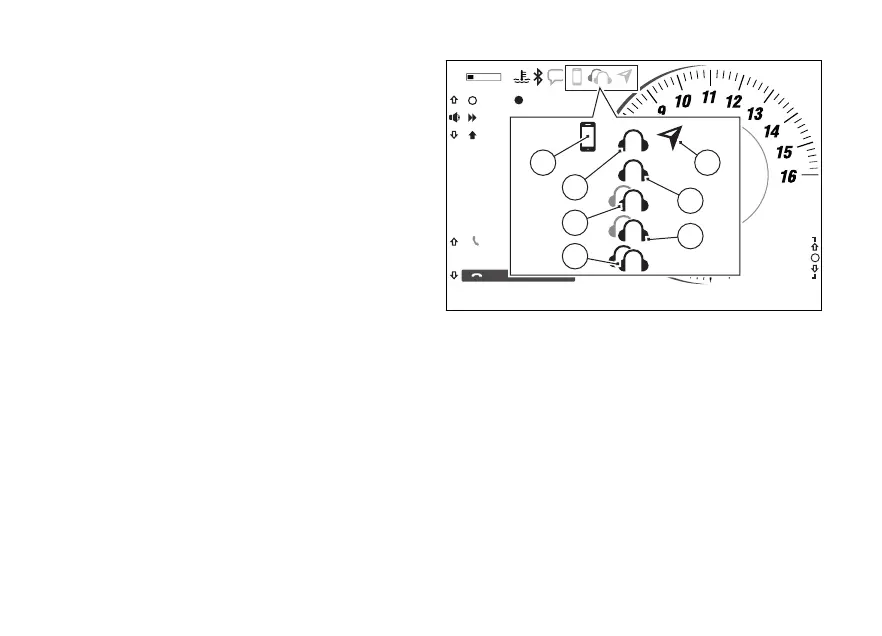
Paired Bluetooth device icons
Once paired, Bluetooth devices are displayed as
follows:
1) connected;
2) rider earphones connected;
3) passenger earphones connected;
4) rider earphones connected and passenger
earphones paired;
5) rider earphones paired and passenger
earphones connected;
6) rider and passenger earphones connected;
7) satellite navigator connected.
Icons are light blue if the corresponding device is
connected. They are grey if the corresponding device
is paired but not connected.
11:34
A.M.
SPORT
RPM X 1000
Gear
km/h
N
0
ACTIVE
END CALL
MARIO ROSSI
SKIP
PAUSE
TRACK 01 - U2
PLAYER CONTROL
>>>
2
DWC 3
DTC 3
DSC 2
LO HI
1
2
7
2
1
1
2
3
5
4
6
Fig 9
25













 To Next Page