2017-01 25 / 42
-4-
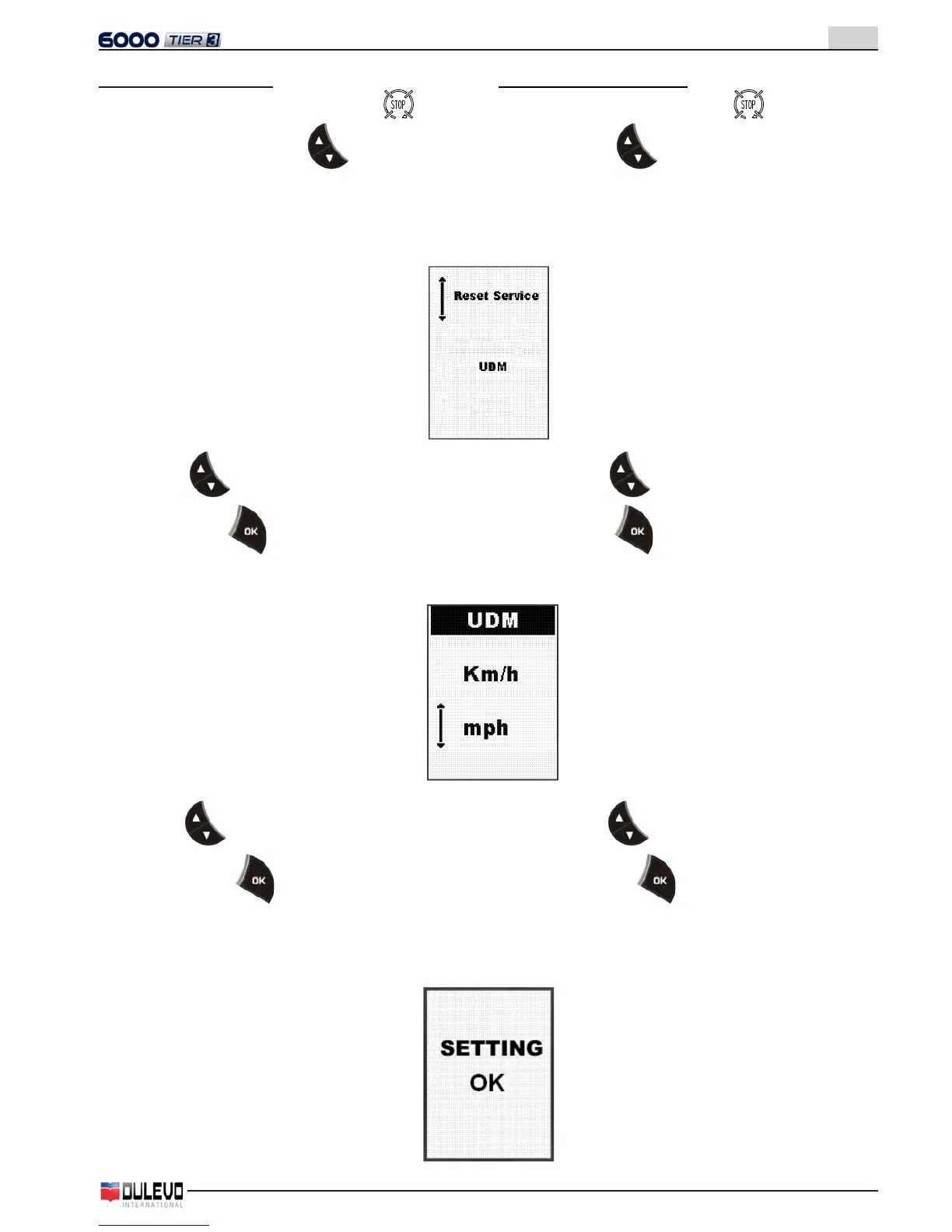
Settaggio unità di misura
- Con chiave di avviamento in posizione , premere
contemporaneamente i tasti e ruotare la chiave
in posizione “on”.
- Continuare a mantenere premuti i tasti per circa 10 se-
condi fi no alla visualizzazione della seguente pagina:
- Con i tasti
selezionare “UDM”.
- Premere il tasto per accedere alla pagina di sett-
taggio.
- Con i tasti
selezionare l’unità di misura e mantene-
re premuto il tasto per 5 secondi fi no alla comparsa
del messaggio di avvenuto settaggio.
Setting the unit of measure
- With the ignition key in position , simoultaneously
press the keys
and turn the key into position “on”.
- Keep the keys pressed for approx. 10 seconds until the
following page appears:
- Use the keys
to select “UDM”.
- Press the key to gain access to the setting page.
- Use the keys
to select the unit of measure
and keep the key pressed for 5 seconds until the
“successful reset” message appears.



 To Next Page