DUS 60 Digital Ultrasonic Diagnostic Imaging System User Manual Cardiology Measurements and Calculations
- 114 -
CO calculation is as below.
z Measurement and input items:
Measure LV;
Key in: HR
z To calculate CO:
1. In the B-cardiac measurement menu, roll the trackball to highlight Input. Then select the
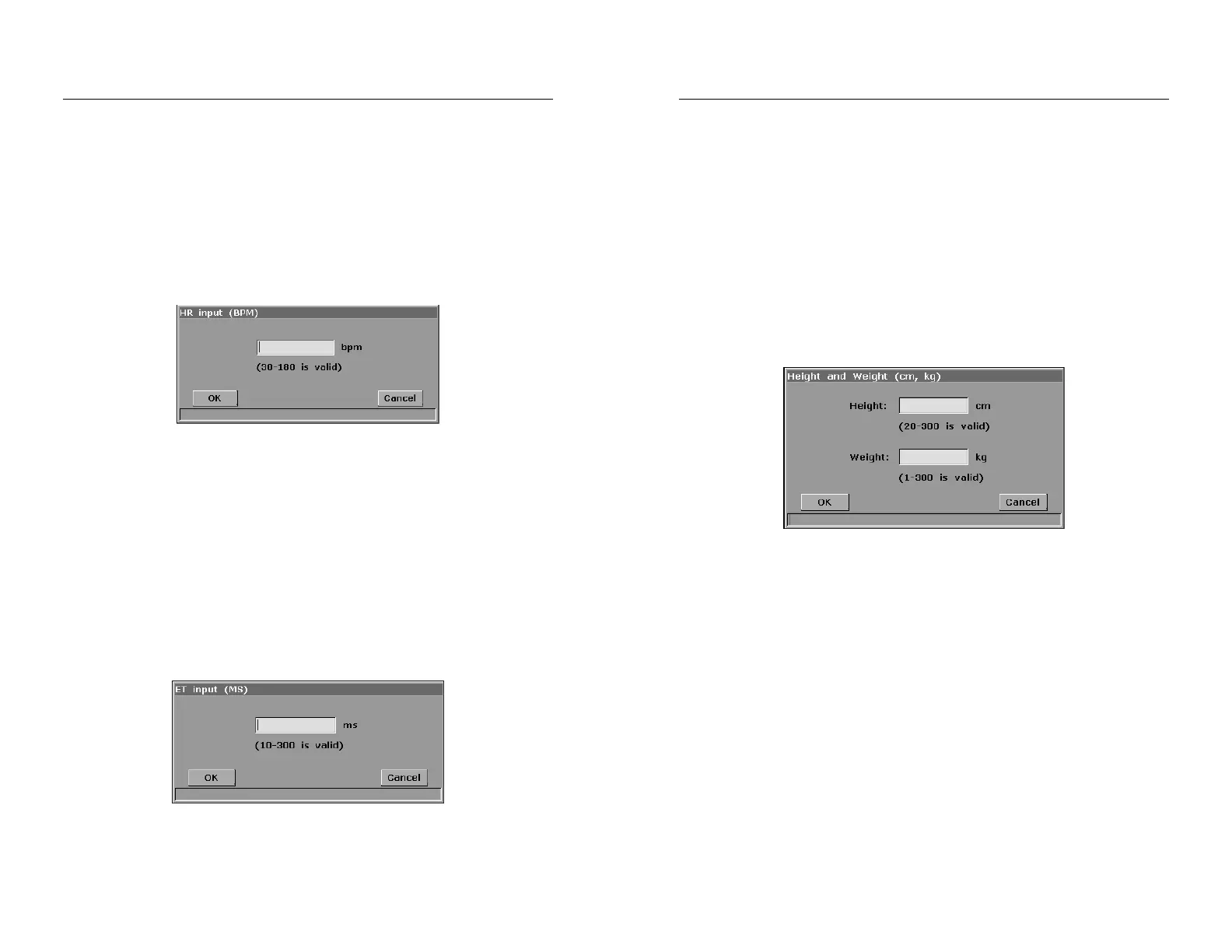
secondary menu Heart Rate and press Set to display an HR input dialog box, as shown
below.
Figure 8-6 HR Input Dialog Box
2. Input a suitable value in the HR (bpm) box.
3. Roll the trackball to highlight OK and press Set. After measuring LV, CO will be
displayed in the measurement result window.
MVCF calculation is as below.
z Measurement and input items:
Measure: LV;
Key in: LVET
z To calculate MVCF:
1. Move the cursor to Input. Then select the secondary menu LVET and press Set to
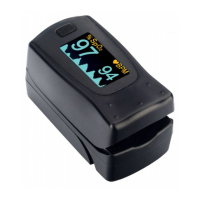
display an ET input dialog box, as shown below.
Figure 8-7 ET Input Dialog Box
DUS 60 Digital Ultrasonic Diagnostic Imaging System User Manual Cardiology Measurements and Calculations
- 115 -
2. Input a suitable value in the LVET (ms) box.
3. Roll the trackball to highlight OK and press Set. After measuring LV, MVCF will be
displayed in the measurement result window.
CI and SI calculations are as below.
z Measurement and input items:
Measure: LV and HR;
Key in: Height and Weight
z To calculate CI and SI:
1. In the B-cardiac measurement menu, roll the trackball to highlight Input. Then select the
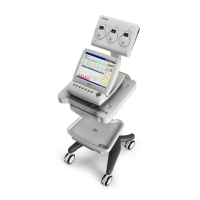
secondary menu Height & Weight and press Set to display a Height and Weight
entering dialog box, as shown below.
Figure 8-8 Height and Weight Input Dialog Box
2. Input suitable values in the Height (cm) and Weight (Kg) boxes.
3. Roll the trackball to highlight OK and press Set. BSA will be displayed in the
measurement result window. After measuring LV and HR, SI and CI will also be
displayed in measurement result window.
8.2.2. RV (Right Ventricle Internal Diameter)
1. In the B-cardiac measurement menu, roll the trackball to highlight RV.
2. Measure RV in the method of distance.
3. The result will be displayed in the measurement result window.
8.2.3. PA (Pulmonary Artery)
1. In the B-cardiac measurement menu, roll the trackball to highlight PA, and press Set to
display a “+” in the image area.


 To Next Page