EasyManua.ls Logo

Edge ED-DVR12004 - 2.2 Rear Panel

Edge ED-DVR12004
139 pages
Print Icon
To Next Page IconTo Next Page
To Previous Page IconTo Previous Page
Loading...
17
2.2 Rear Panel
2.2.1 ED-DVR24008
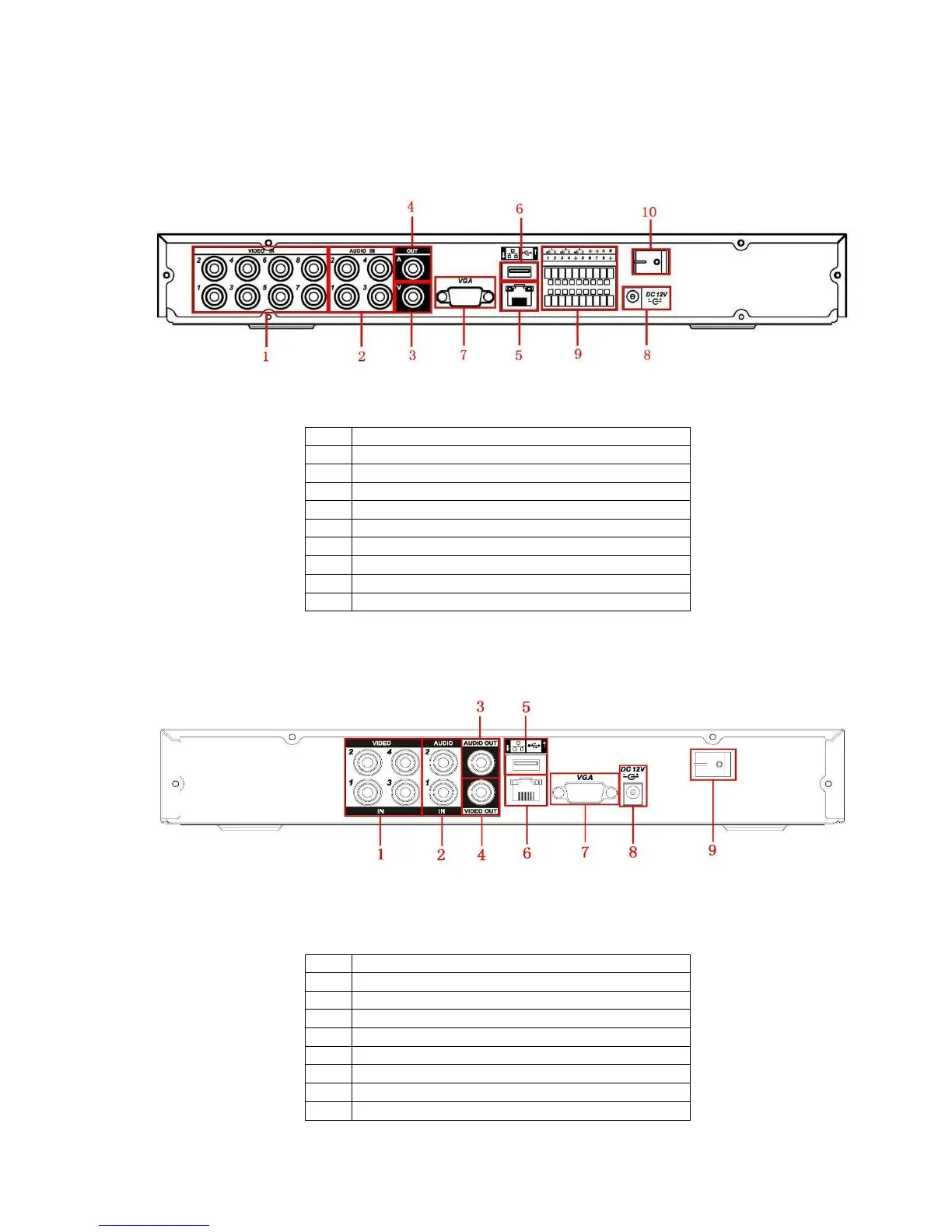
Simple entry level series real panel (8-channel) is shown as below. See Figure 2-4
Figure 2-1 8-channel
Please refer to the following sheet for detailed information.
1
Video input
2
Audio input
3
Video CVBS output
4
Audio output
5
Network port
6
USB port
7
Video VGA output
8
Power input port
9
Alarm input/alarm output/RS485 port
10
Power button
2.2.2 ED-DVR12004
ED-DVR12004 product rear panel is shown as in Figure 2-9.
Figure 2-9
Please refer to the following sheet for detailed information.
1
Video input
2
Audio input
3
Audio output
4
Video CVBS output
5
USB port
6
Network port
7
Video VGA output
8
Power input port
9
Power button
When connect the Ethernet port, please use straight cable to connect the PC and use the crossover
cable to connect to the switcher or router.

Table of Contents

Other manuals for Edge ED-DVR12004

Related product manuals