5.3.9 Display
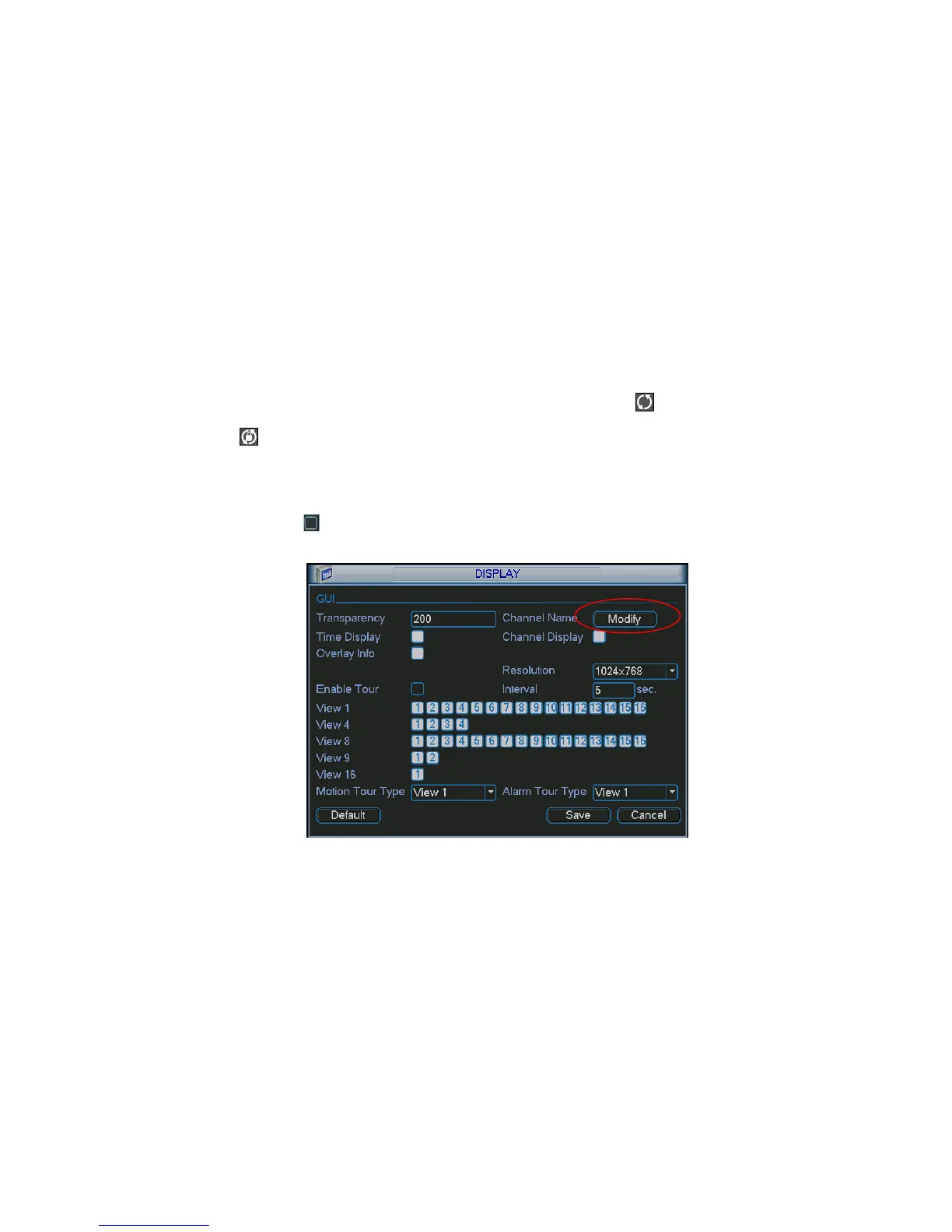
Display setup interface is shown as below. See Figure 5-20.
Transparency: Here is for you to adjust transparency. The value ranges from 128 to 255.
Channel name: Here is for you to modify channel name. System max support 25-digit (The value
may vary due to different series). Please note all your modification here only applies to DVR local
end. You need to open web or client end to refresh channel name.
Time display: You can select to display time or not when system is playback.
Channel display: You can select to channel name or not when system is playback.
Overlay information: System displays some information in the screen for your reference.
Resolution: There are four options: 1280×1024(default),1280×720,1024×768,800×600. Please
note system needs to reboot to activate current setup.
Enable tour: Activate tour function.
Interval: Input proper interval value here. The value ranges from 5-120 seconds. In tour process,
you can use mouse or click Shift to turn on window switch function. Stands for opening switch
function, stands for closing switch function.
Motion tour type: System support 1/8 window tour.
Alarm tour type: System support 1/8window tour.
Please highlight icon to select the corresponding function.
After completing all the setups please click save button, system goes back to the previous menu.
Figure 5-20
In Figure 5-20X, click modify button after channel. You can see an interface is shown as in Figure 5-21.
Please note all your modification here applies to local end only. You need to refresh web or client-end
to get the latest channel name. System max support 25-digital character.



 To Next Page