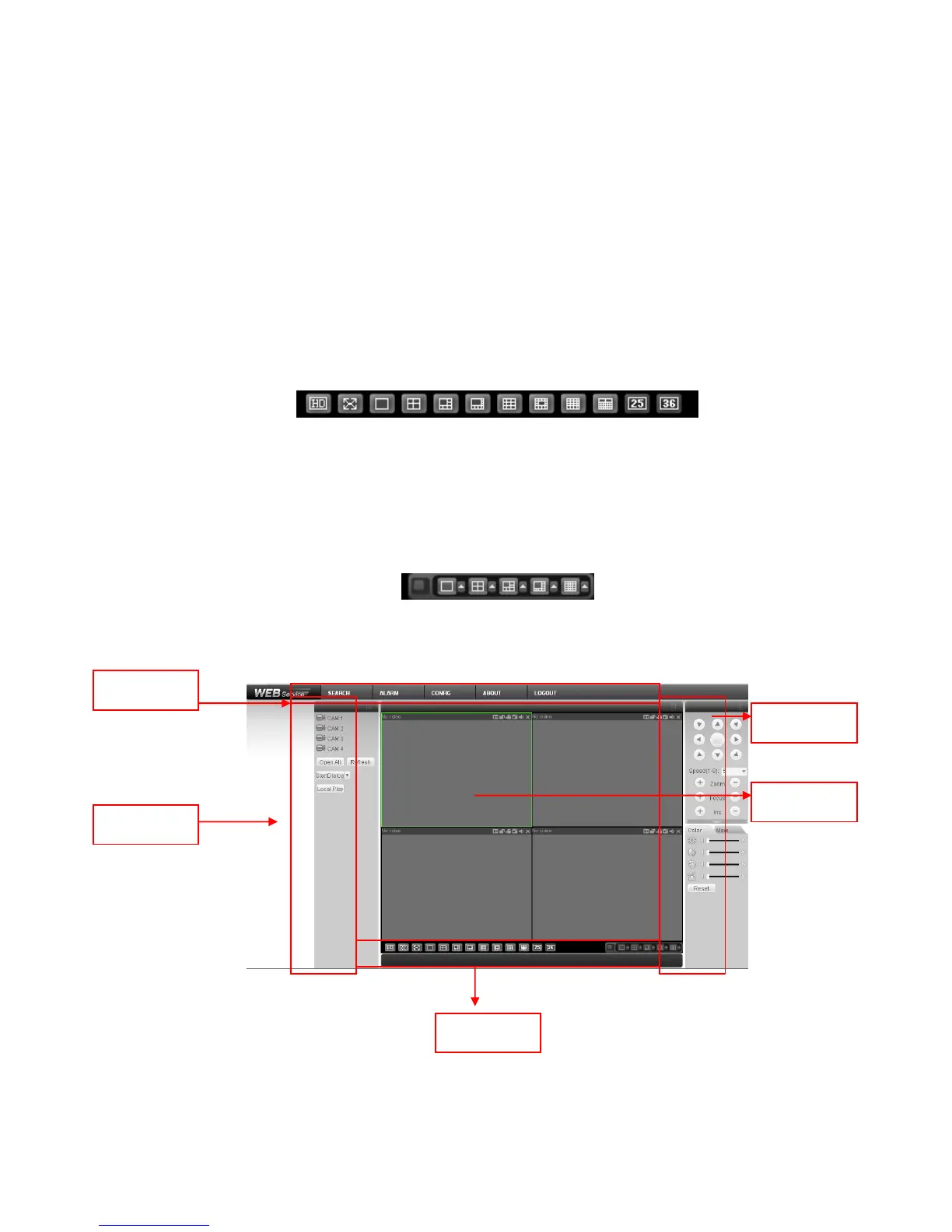
After you logged in, you can see the main window. See X431H431H431HFigure 7-6X.
This main window can be divided into the following sections.
Section 1: there are five function buttons: configuration (chapter 7.3), search (chapter 7.4), alarm
(chapter 7.5), about (chapter 7.6), log out (chapter 7.7).
Section 2: there are channel number and three function buttons: start dialog and local play, refresh.
Section3: there are PTZ (chapter 7.2.2), color (chapter 7.2.3) button and you can also select
picture path and record path.
Section 4:real-time monitor window. Please note current preview window is circled by a green
rectangle zone.
Section 5: Here you can view window switch button. You can also select video priority between
fluency or real-time.
System monitor window switch supports full screen/1-window/4-window/6-window/8-window/9-
window/13-window/16-window/20-window/25-window/36-window. See X432H432H432HFigure 7-4X.
Figure 7-4
Preview window switch. System support 1/4/8/9/16-window real-time preview. Please you need to
have the proper rights to implement preview operation. You can not preview if you have no right to
preview the either channel. See Figure 7-5. Please note this series device does not support this
function.
Figure 7-5
Figure 7-6



 To Next Page