Technical Support - MDM 27/97 599 76 11-68 Rev. 01
5 “DEMO” MODE
A special cycle is designed to demonstrate the operation of these appliances in shops, without connecting them
to the water mains. This way, any one of the programmes can be selected and, once the start button/sensor
has been pressed/touched (START/PAUSE), the appliance will only perform some of the phases of the
programme, skipping those which cannot be performed (water fill, drain, heating).
The cycle takes pace as follows:
The door lock is enabled regularly (door locked during operation, possibility of opening it at the end of the
cycle or when paused).
Motor: All low speed movements are enabled, the pulses and spin are disabled.
The water fill solenoid valves and the drain pump are disabled.
Display: as the cycle phases are very fast (one second in the demo cycle corresponds to approximately one
minute in the actual cycle) the end time decreases by 1 unit per second. Bear in mind that the end time
does not always correspond to the actual cycle time.
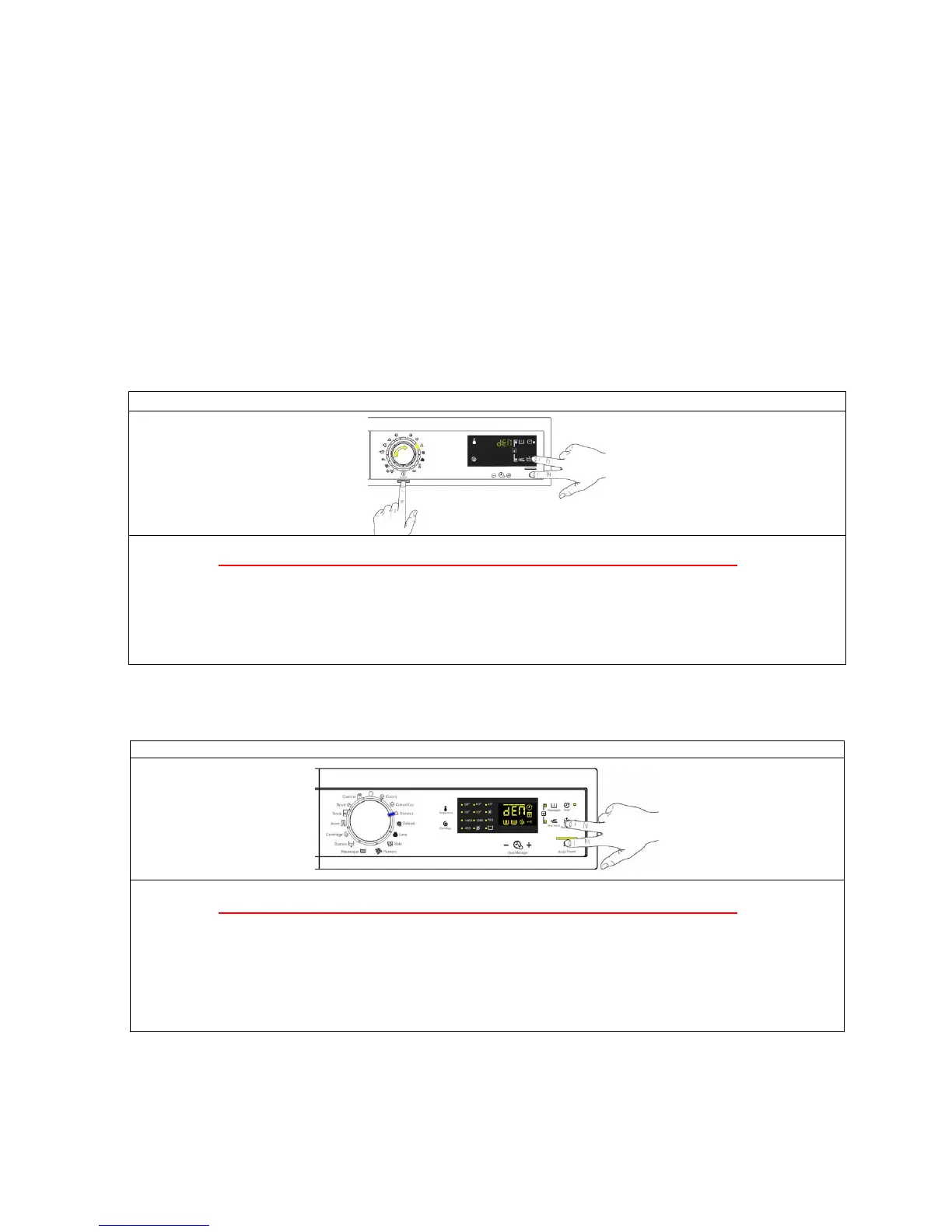
5.1 Accessing the DEMO setting for TC3 styling
The operations listed below must be carried out within 7 seconds.
Do not start the procedure with your fingers over the combination sensors
1. Switch on the appliance using the ON/OFF button.
2. Turn the selector clockwise until the third LED lights up.
3. Simultaneously press the START/PAUSE button and the nearest option sensor (as shown in
the diagram).
4. Hold your fingers over the sensors (approximately three/five seconds) until “dEM” flashes for a short time.
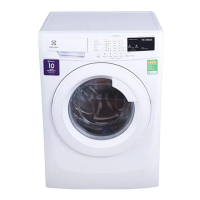
Do not start the procedure with your fingers over the combination sensors
1. Set the selector dial to position 0 (zero).
2. Turn the three position switch clockwise.
3. Simultaneously press the START/PAUSE button and the nearest option sensor (as shown in
the diagram).
4. Keep your finger above the sensors until the flashing wording “DEM” appears on the screen.
5.3 Exiting DEMO mode
To exit the demo mode, disconnect the plug from the power supply, because the ON/OFF pushbutton in the
TC3 styling and the rotation of the selector knob to position 0 (zero) for the TC4 styling have no function.




 To Next Page