Technical Support - MDM 35/97 599 76 11-68 Rev. 01
8 OPERATING TIME COUNTER
Using a specific procedure, the operator can display the total operating time for the appliance, which is counted
from the moment it is first switched on.
The unit can count up to a maximum of 6,550 hours of operating time.
Only the operating time of normal programmes (and not diagnostic cycles) is counted.
The actual operating time for the cycle is counted (which does not include pauses, delayed start time,
rinse hold time and soaking phases).
The precision of the counter is 30 seconds per programme.
Only whole hours of operation are counted (1 hr and 59 min = 1 hr).
8.1 Reading the operating time
8.1.1 Styling TC3
The operations listed below must be carried out within 7 seconds.
Do not start the procedure with your fingers over the combination sensors
1. Switch on the appliance using the ON/OFF button.
2. Turn the selector clockwise until the fifth LED lights up.
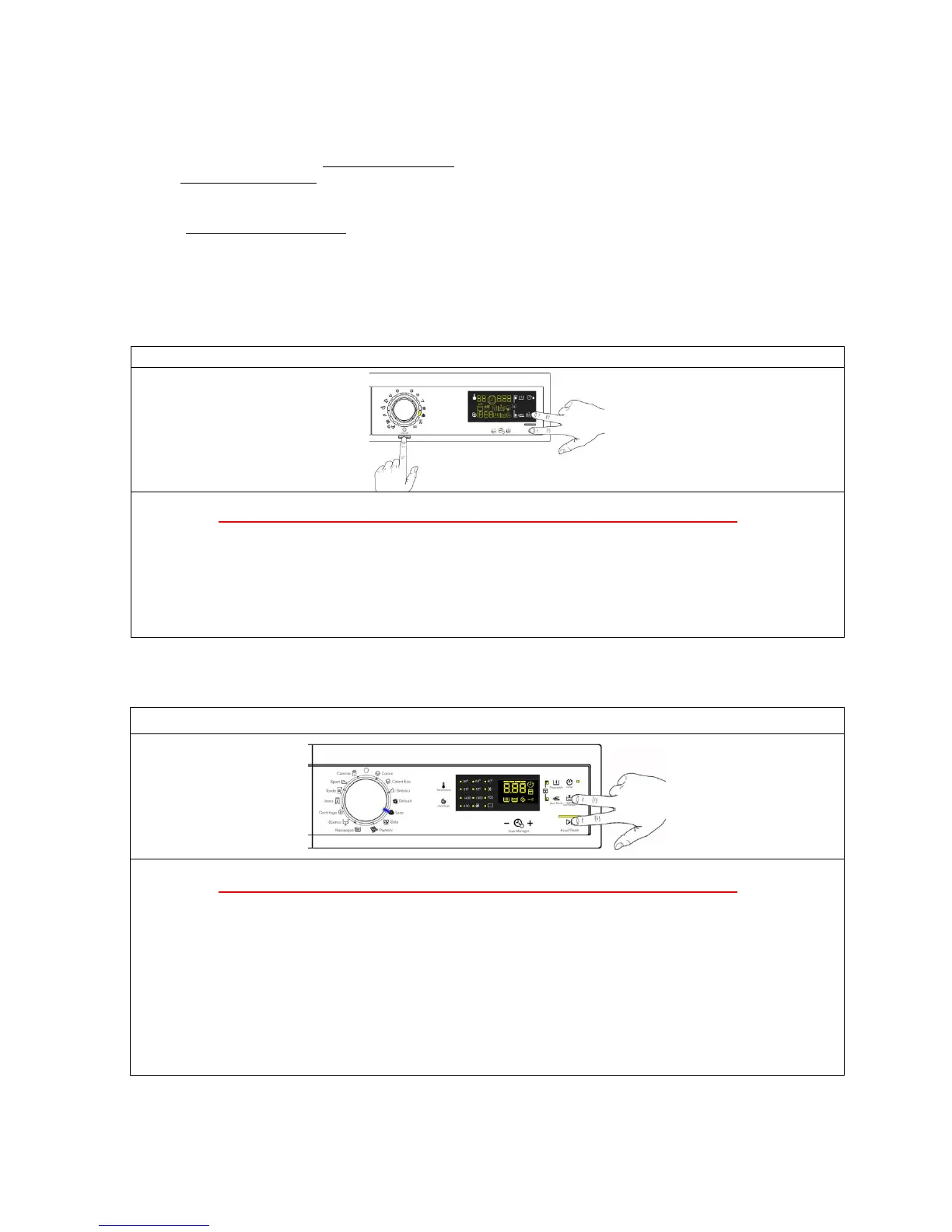
3. Simultaneously press the START/PAUSE button and the nearest option sensor (as shown in
the diagram).
4. Keep your fingers over the sensors until the hours of operation appear on the display (at least
5 seconds).
Do not start the procedure with your fingers over the combination sensors
1. Set the selector dial to position 0 (zero).
2. Rotate the programmes know clockwise as far as position five.
3. Simultaneously press the START/PAUSE button and the nearest option sensor (as shown in
the diagram).
4. Keep your fingers above the sensors until the LEDs and display symbols start flashing.
In the first position, the operation of the buttons and the related LEDs is checked; turn the programme
selector dial clockwise to run the diagnostic cycle for the operation of the various components and to
read any alarms.



 To Next Page