Technical Support - MDM 33/97 599 76 11-68 Rev. 01
7.2 Reading the alarms
The last three alarms stored in the FLASH memory of the PCB can be displayed:
Enter the diagnostic mode (para. 6.1 or para. 6.2).
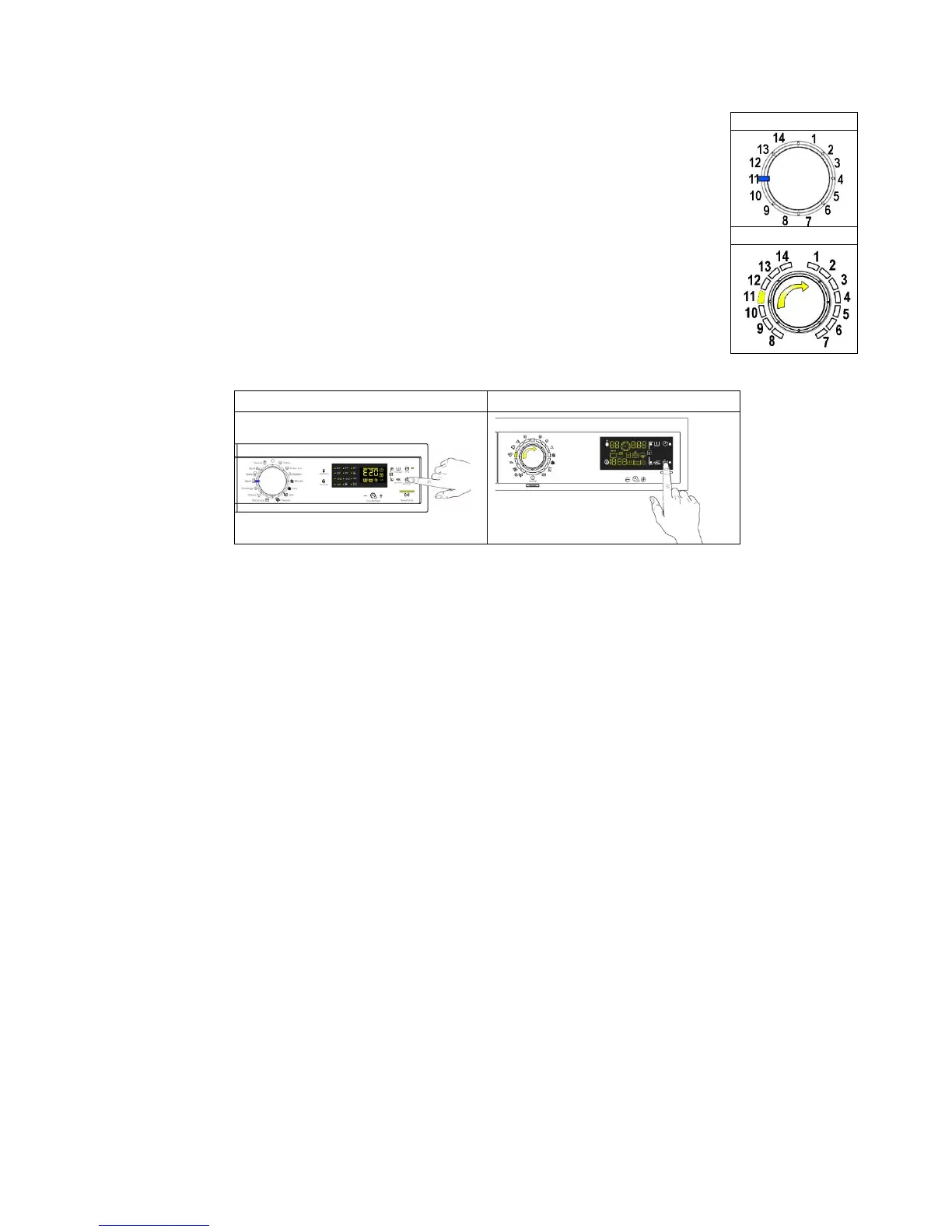
Irrespective of the type of PCB and configuration, turn the programme selector knob
clockwise to the eleventh position and the last alarm is displayed.
To display previous alarms, touch the sensor closest to the START/PAUSE sensor
in sequence (as shown in the figure).
To return to the last alarm, touch the START/PAUSE sensor.
7.3 Rapid reading of arms
It is possible to display the last alarm even if the selector is not in the eleventh diagnostics position or if the
appliance is in normal operating mode (for example when performing a wash programme):
→ Touch the START/PAUSE sensor and the nearest option sensor simultaneously (as if you were entering
DIAGNOSTIC mode) and hold for at least 2 seconds: the LCD display shows the last alarm.
→ The alarm will continue to be displayed until a sensor is touched.
→ The alarm reading system is as described in para. 7.2.
→ While the alarm is being displayed, the appliance continues to perform the cycle or, if in the programme
selection phase, it stores the previously selected options.



 To Next Page