3-10
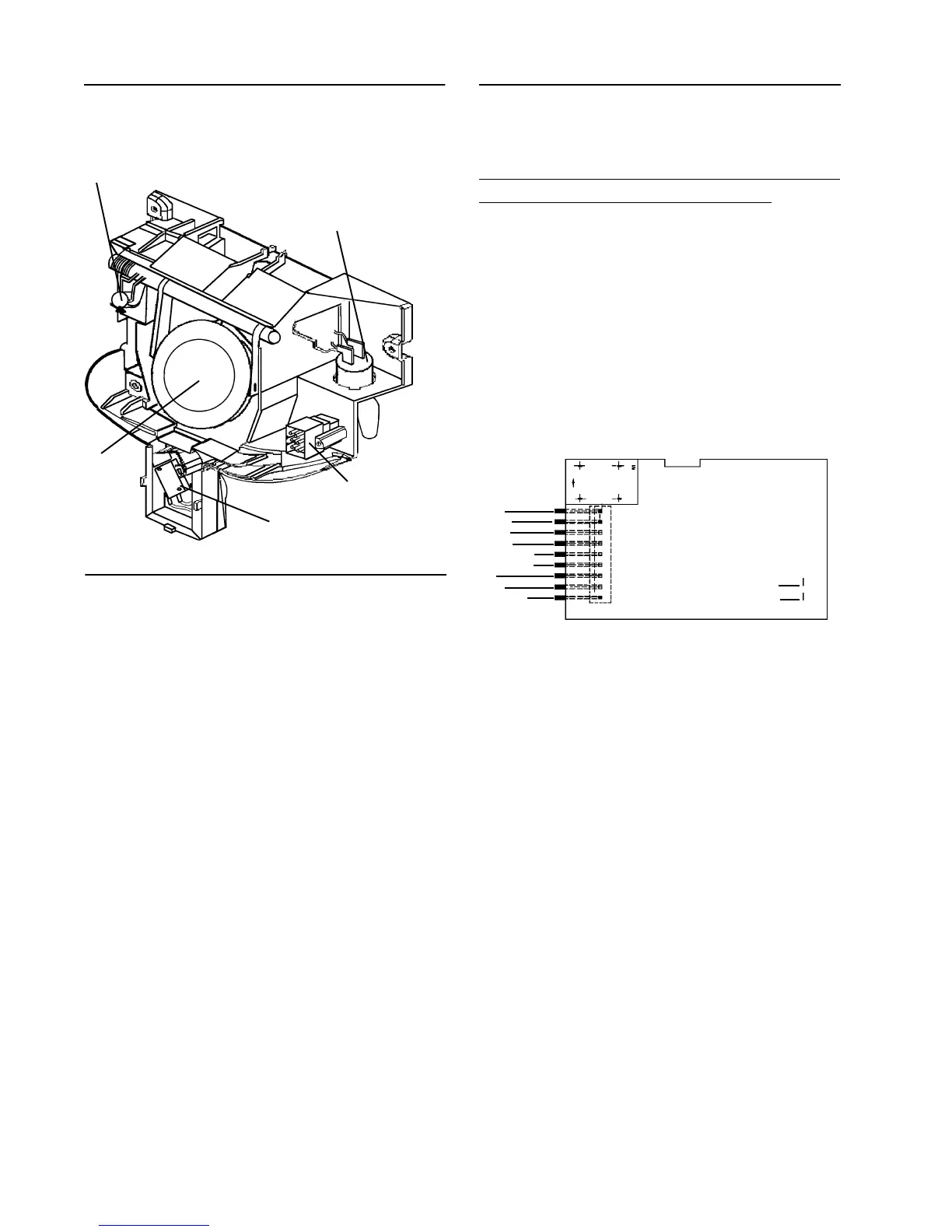
ICE DOOR
SOLENOID
ACTUATOR
SWITCH
Fountain Bracket Assembly
ICE DOOR
ELECTRICAL
CONNECTOR
FOUNTAIN LIGHT
SOCKET
Checking and Replacing the Actua-
tor Switch:
1. Disconnect the unit from the power
source.
2. Perform Steps 1 through 6 of Ice & Wa-
ter Foutain Bracket Removal.
3. Continuity check the switch. If defective,
go to step 4.
4. Remove the mounting screw.
5. Remove the switch.
6. Remove the wire leads.
7. Install the new switch in reverse order
of removal.
The following checks should only be made
by a Qualified Service Technician.
NO LED'S ILLUMINATED ON THE FOUN-
TAIN TOUCH PAD
1. Check ribbon cable/wire connection
between the two PC boards ("Mechani-
cally Tight").
2. Checking the AC line in fountain veri-
fies operation/closure of door interlock
switch.
WHITE (T1)
BLUE
N/C
RED/WHITE
RED/BLACK
VIOLET
BLACK
BLACK
PINK
3. Check fountain heater continuity. Un-
plug the unit. Check heater resistance
neutral to heater connection it should
read approximately 4800 ohms.
4. Replace LED/Switch board.
5. Replace fountain control board.
SOME LED'S WILL NOT LIGHT
1. Replace LED/Switch board.
2. Replace fountain control board.
FOUNTAIN LIGHT WILL NOT LIGHT
1. Check bulb and mechanical connec-
tions.
2. Does fountain light illuminate during a
dispense?
Electronic Control Board
Troubleshooting
JF1
JF2
BROWN
BROWN
TRACE SIDE OF PC FOUNTAIN CONTROL BOARD



 To Next Page