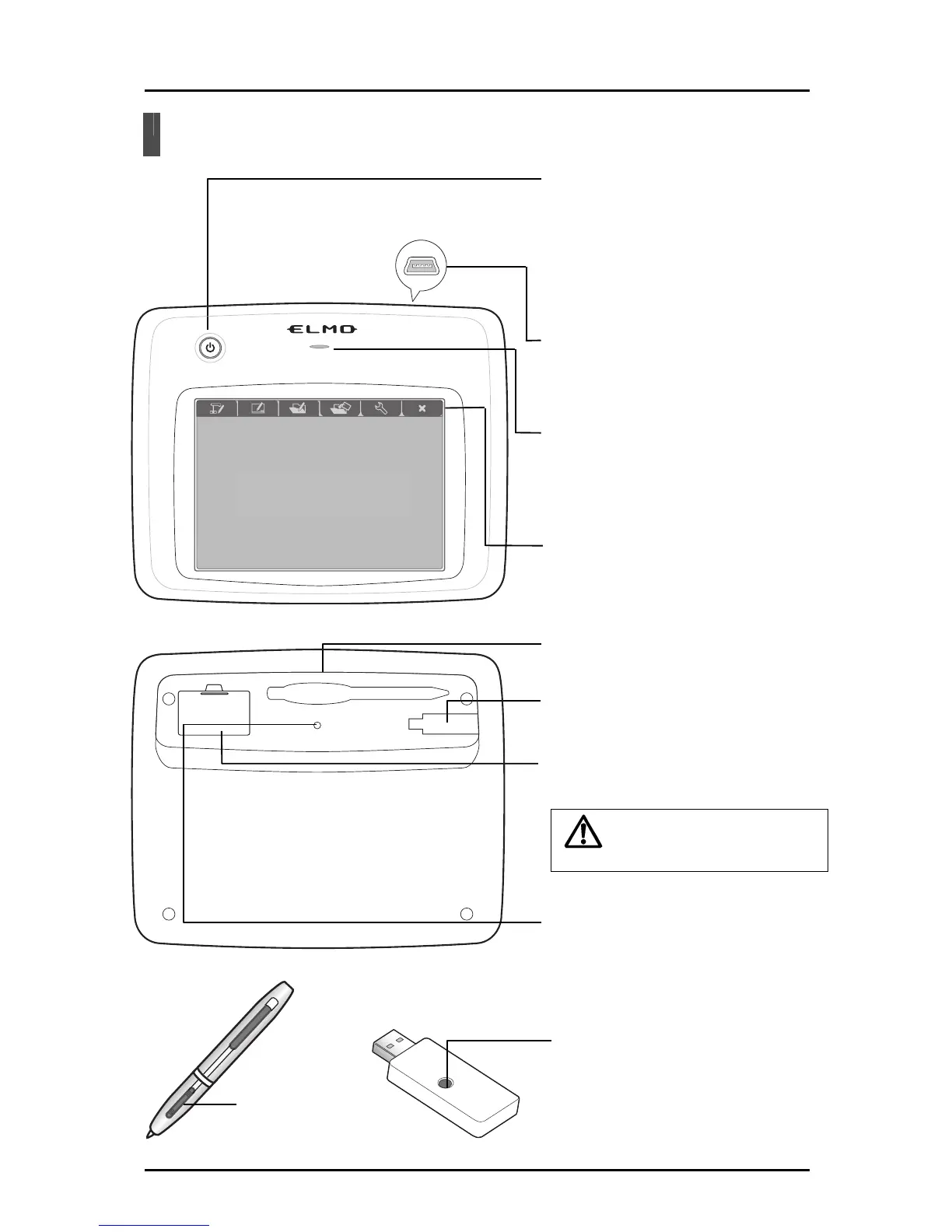
Part Names
Caution
Po
wer button
Turn the Tablet ON or OFF.
Press the button for 3 seconds or
more to turn OFF. <See “Operation”>
When the p
ower is ON, it is lit blue.
When the battery level is low, it
flashes.
Tablet
USB connector
Connect to your computer when charging
the Tablet.
<See “Inserting and Charging the Battery Pack”>
Status LED
Indicate the status of wireless and
battery level.
Operating area
<See “About the LEDs”>
Function key
s
Select the Tablet operations. See the
corresponding sections for more details.
Tablet underside
Pen slot
Store the pen.
Wireless settings button
Used when setting communication
with the wireless adapter.
<See “Wireless Communication
Settings for
the Tablet”>
Wireless adapter storage slot
Store the wireless adapter.
<See “Storing the Wireless Adapter and Pen”>
Battery box
Install the supplied battery pack.
<See “Inserting and Charging the Battery Pack”>
Only open when necessary.
Wireless adapter
Pen
Wireless settings button (LED)
Used when setting communication
with the tablet.
Eraser button <See “Wireless Communication
Settings for the Tablet”>
11



 To Next Page