Basic Tablet Operations
This section describes the basic Tablet operations, and the operation names.
Basic Pen Operations
T
ouch a menu button.
3. Select a menu button
Move while holding
slightly away from
the tablet.
tablet.
touching the
Move while
2. Move the cursor 1. Draw
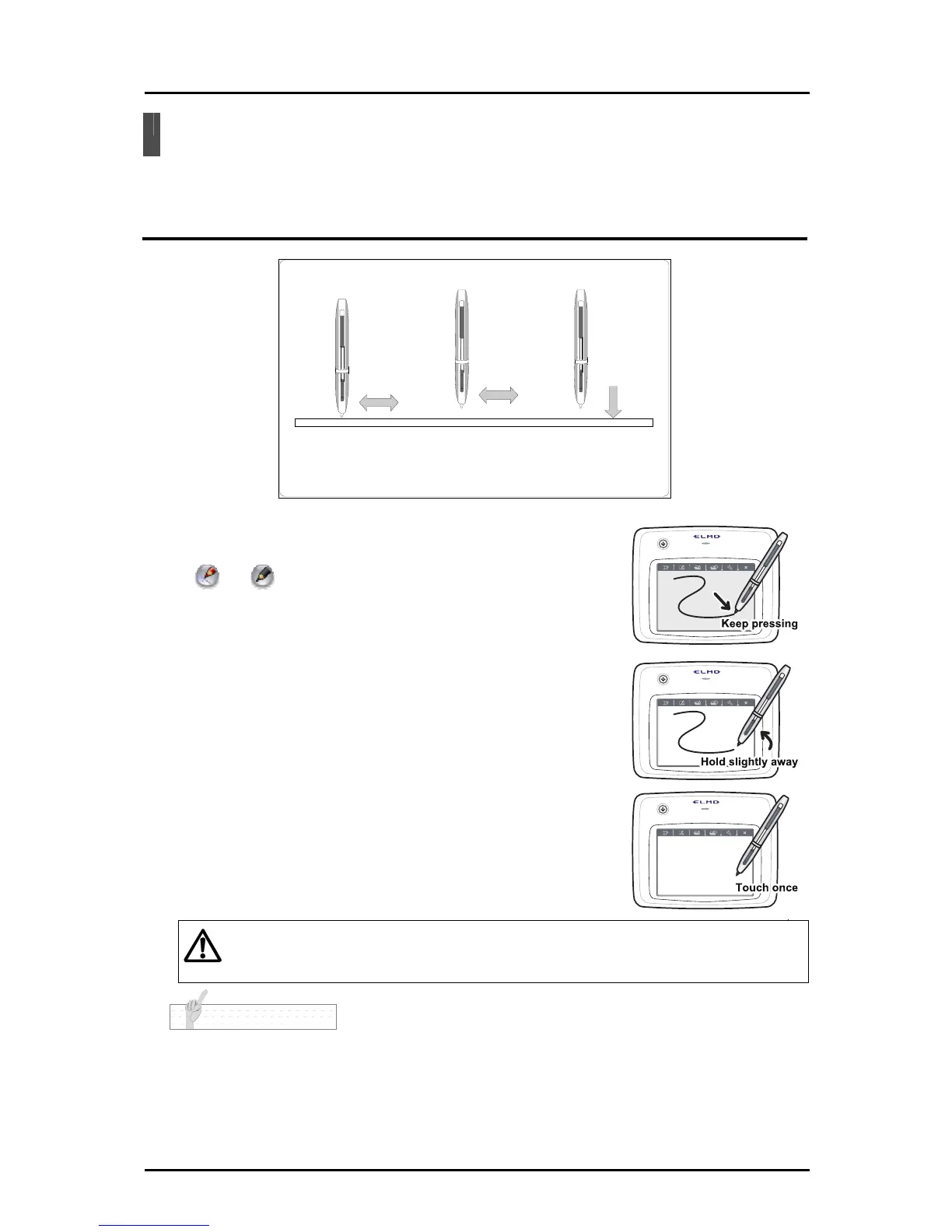
■Dragging (To draw or delete)
Move the pen while touching the tablet.
When
or is selected, a line is drawn according to the
pen movement.
■ Cursor movement (To move the cursor)
Move the pen while holding it slightly away from the tablet.
The cursor on the screen moves according to the pen movement.
■ Touching (To select a menu button)
Move the cursor while holding the pen slightly away from the
tablet, and touch the tablet within the operating area.
Caution
Do not apply excessive strength when touching the tablet with the pen.
N o t e
• If the pen is used at an acute angle, the pen position may not be recognized correctly. Use the pen
at a perpendicular angle as much as possible.
• If the pen is not used for a while, it automatically enters the power-saving mode. To reactivate the
pen, touch the pen tip once.
16



 To Next Page