58
ADVANCED
OPERATIONS
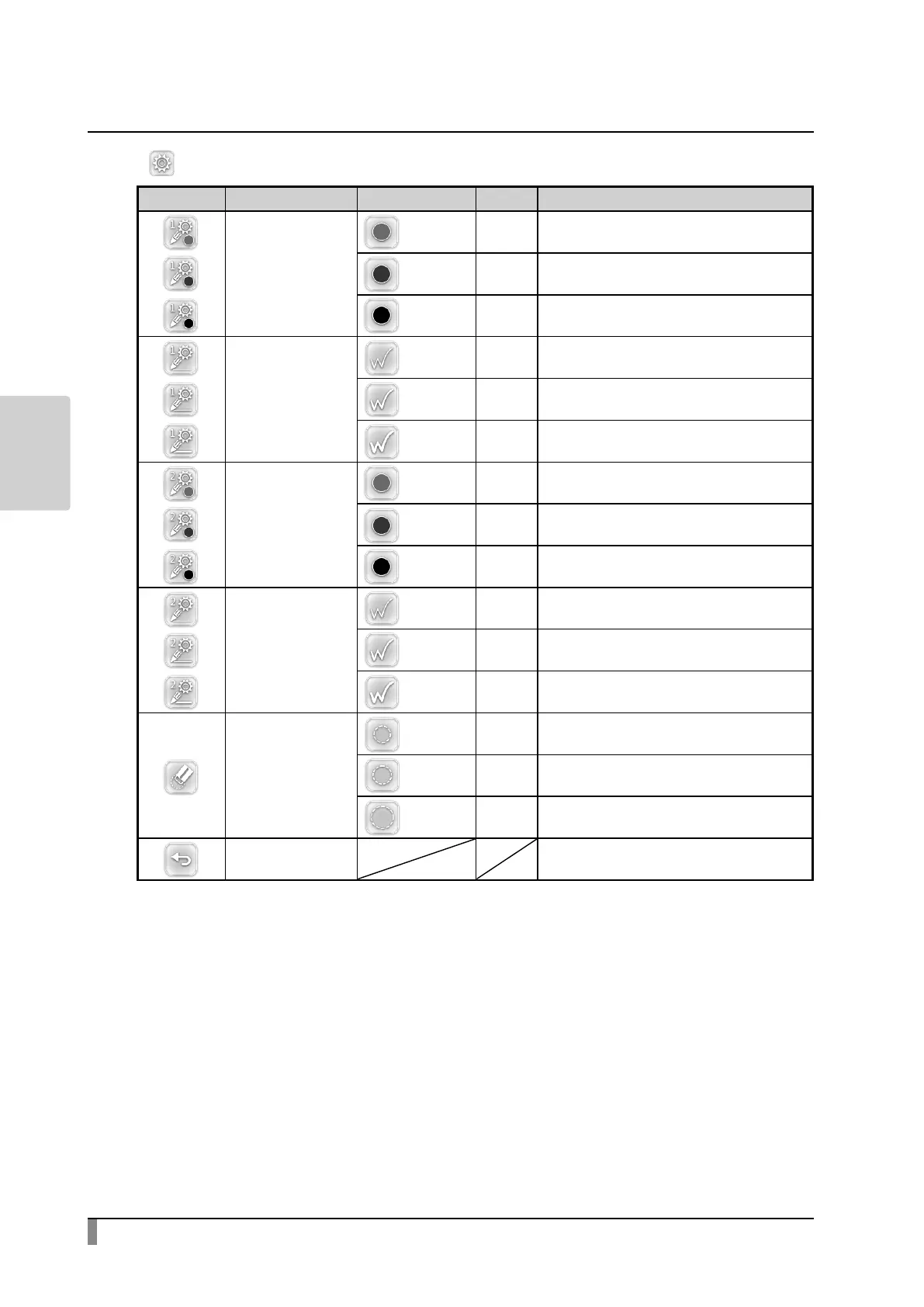
・ Setting menu
Icon Name Selection Item
Default
Function
Pen1Color
Red ✓ Tosetthepencolortored.
Blue Tosetthepencolortoblue.
Black Tosetthepencolortoblack.
Pen1Thickness
Thin Todecreasethepenthickness.
Medium ✓ Tosetthepenthicknesstomediumwidth.
Thick Toincreasethepenthickness.
Pen2Color
Red Tosetthepencolortored.
Blue Tosetthepencolortoblue.
Black ✓ Tosetthepencolortoblack.
Pen2Thickness
Thin Todecreasethepenthickness.
Medium ✓ Tosetthepenthicknesstomediumwidth.
Thick Toincreasethepenthickness.
EraceArea
Narrow Todecreasetheareaofpartialerasure.
Medium ✓
Tosettheareaofpartialerasuretothemedium
range.
Wide Toincreasetheareaofpartialerasure.
Exit Toreturntothepreviouslevelofmenu.


 To Next Page