40
Mechanical Adjustment
Automatic presser foot lifter initializing sensor position
To adjust:
1. Remove the top cover (see page 2).
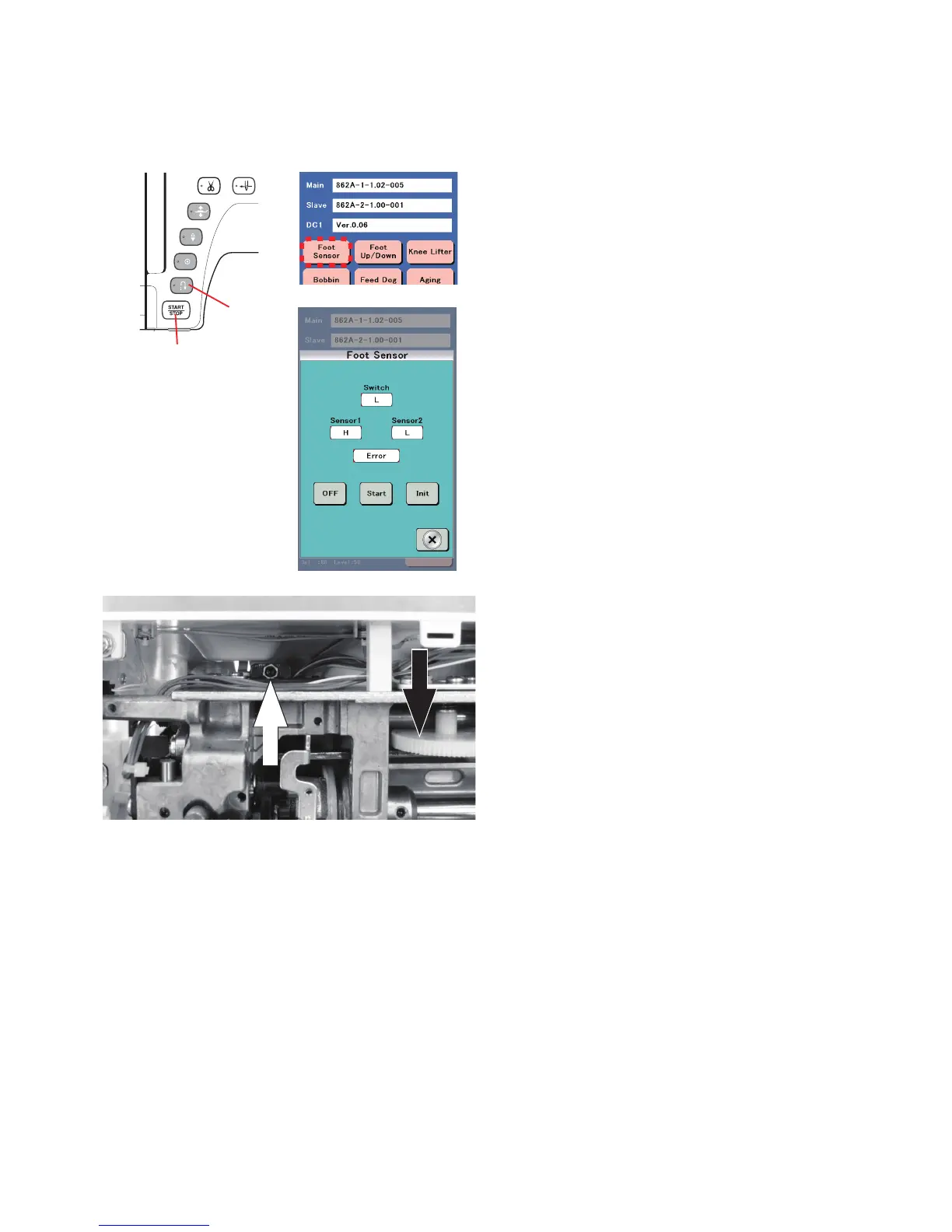
2. Turn the power switch ON while pressing the Start/Stop
button and the Reverse stitch button to enter the factory
setting mode.
Press "Foot Sensor" key.
Start/Stop button
Reverse
stitch button
3. Turn the gear A (indicated with black arrow) with your hand
to raise the presser foot.
4. Place a 13 mm thick spacer between the presser foot and
the needle plate. Lower the presser foot on the spacer
firmly by turning the gear A.
5. Be sure that the both Sensors 1 and Sensor 2 show “H”.
Press “Start” key
on the touch panel.
NOTE
: In case either Sensor 1 or Sensor 2 is not “H”, turn
the adjusting screw (indicated with white arrow) clockwise
(ue an Allen wrench of 2 mm width across flats) until the
both Sensor 1 and Sensor 2 show “H”.
6. Press “Start” key
on the touch panel.
Turn the adjusting screw counterclockwise until a beep
sound and the “OK” message is shown.















 To Next Page