46
1. Turn the power switch off. Attach the embroidery unit.
(Do not open the Y-carriage.)
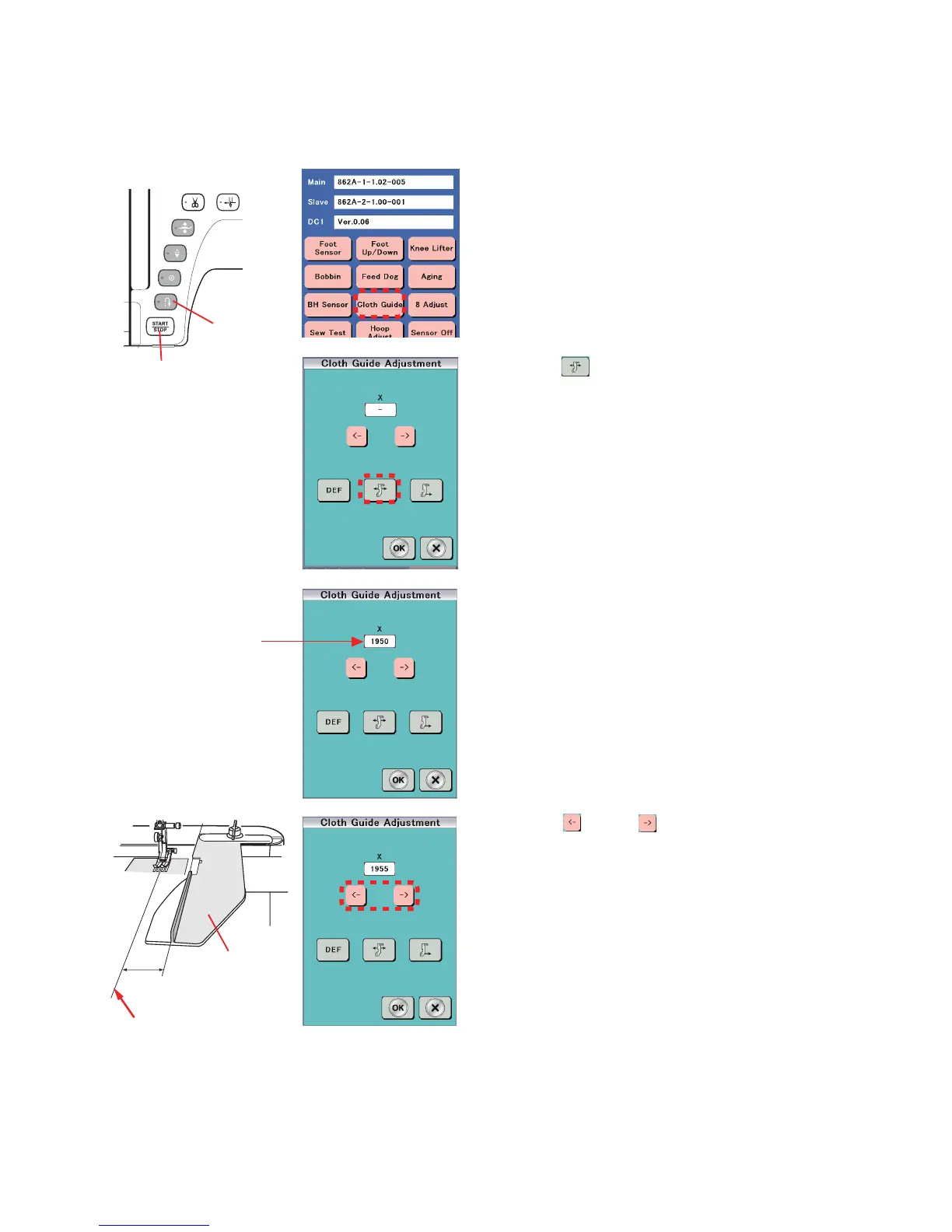
2. Attach the cloth guide to the embroidery carriage.
3. Turn the power switch ON while pressing the Start/Stop
button and the Reverse stitch button to enter the factory
setting mode.
Press "Cloth Guide" key.
4. Press " " key.
5. The cloth guide moves to the start position, and the initial
X value 1950 is indicated.
5. Press "
" key or " " to move the cloth guide to the
position 15 mm away from the center needle position.
NOTE:
Adjustable range is from 1900 to 2000.
6. Press "OK" key.
⇒ ⇒
⇒
Mechanical Adjustment
Cloth guide start position
The distance between the cloth guide and center needle position should be 15 mm when the cloth guide is at the start position.
X value
Cloth guide
15 mm
Center needle position
Start/Stop button
Reverse
stitch button















 To Next Page