42
⇒
⇒
⇒
Mechanical Adjustment
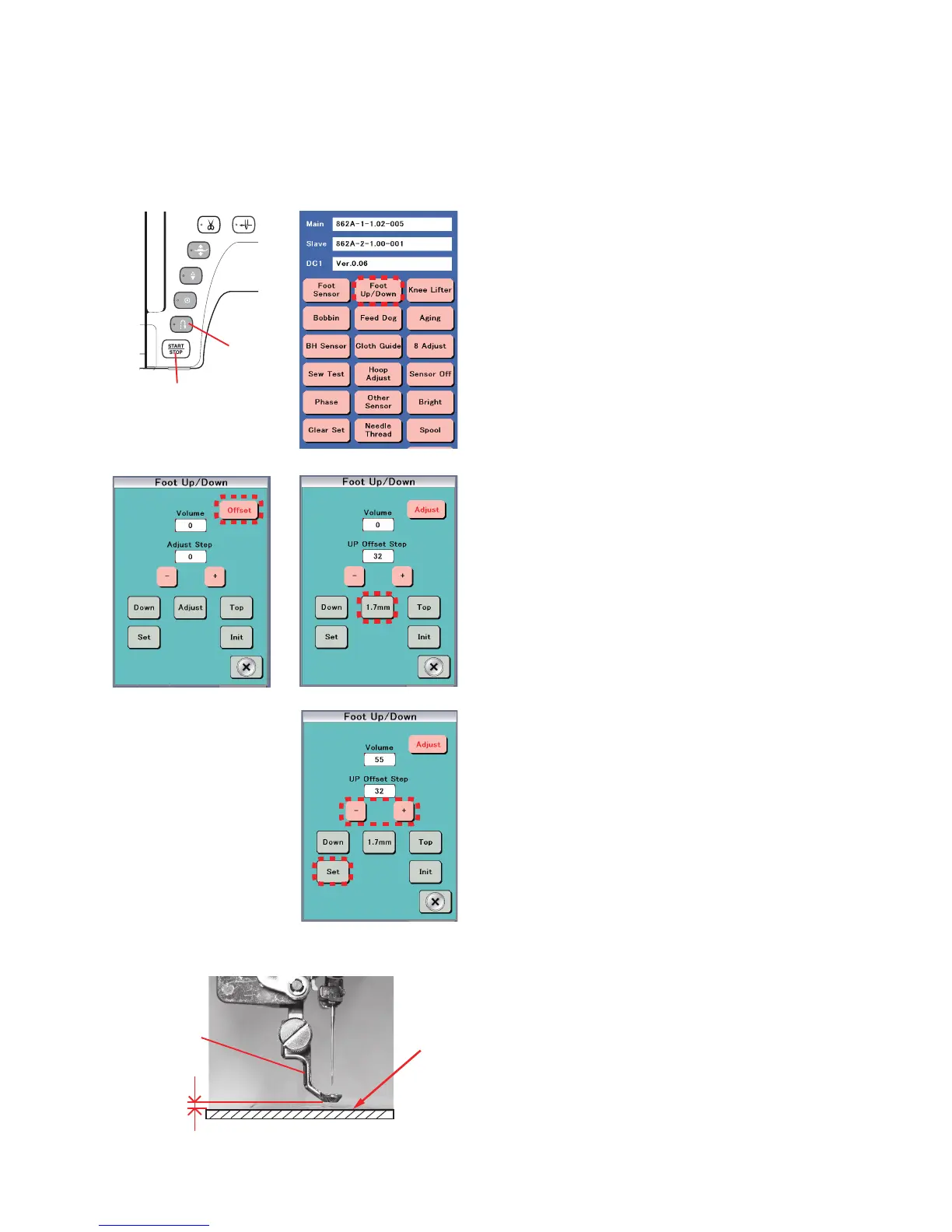
Embroidery foot height
The clearance between the embroidery foot and the surface of the needle plate should be in the range of 1.7 mm to 1.9 mm
when the presser bar is lowered.
To adjust:
1. Attach the embroidery foot (P).
2. Turn the power switch ON while pressing the Start/Stop
button and the Reverse stitch button to enter the factory
setting mode.
Press "Foot Up/Down" key.
* The presser foot will rise when it is lowered.
3. Press "Offset" key. The "Offset" key changes to "Adjust".
4. Press "1.7 mm". The embroidery foot will be lowered.
5. If the clearance is less than 1.7 mm, press the “–” key to
raise the foot until the clearance reaches 1.8 mm.
6. If the clearance is more than 1.9 mm, press the “+” key
to lower the foot until the clearance decrease to 1.7 mm
or less, then press the “–” key to raise the foot until the
clearance reaches 1.8 mm.
NOTE:
Always nish adjustment by pressing the “–” key.
7. Press "Set" key.
The embroidery foot height will be memorized.
Press "X" key to exit the adjusting mode.
Embroidery foot
1.8 mm
Surface of
needle plate
Start/Stop button
Reverse
stitch button















 To Next Page