GENERATORVOLTLEVEL
voltreset
Overvoltshutdown
Undervoltshutdown
Undervoltprealarm
Under
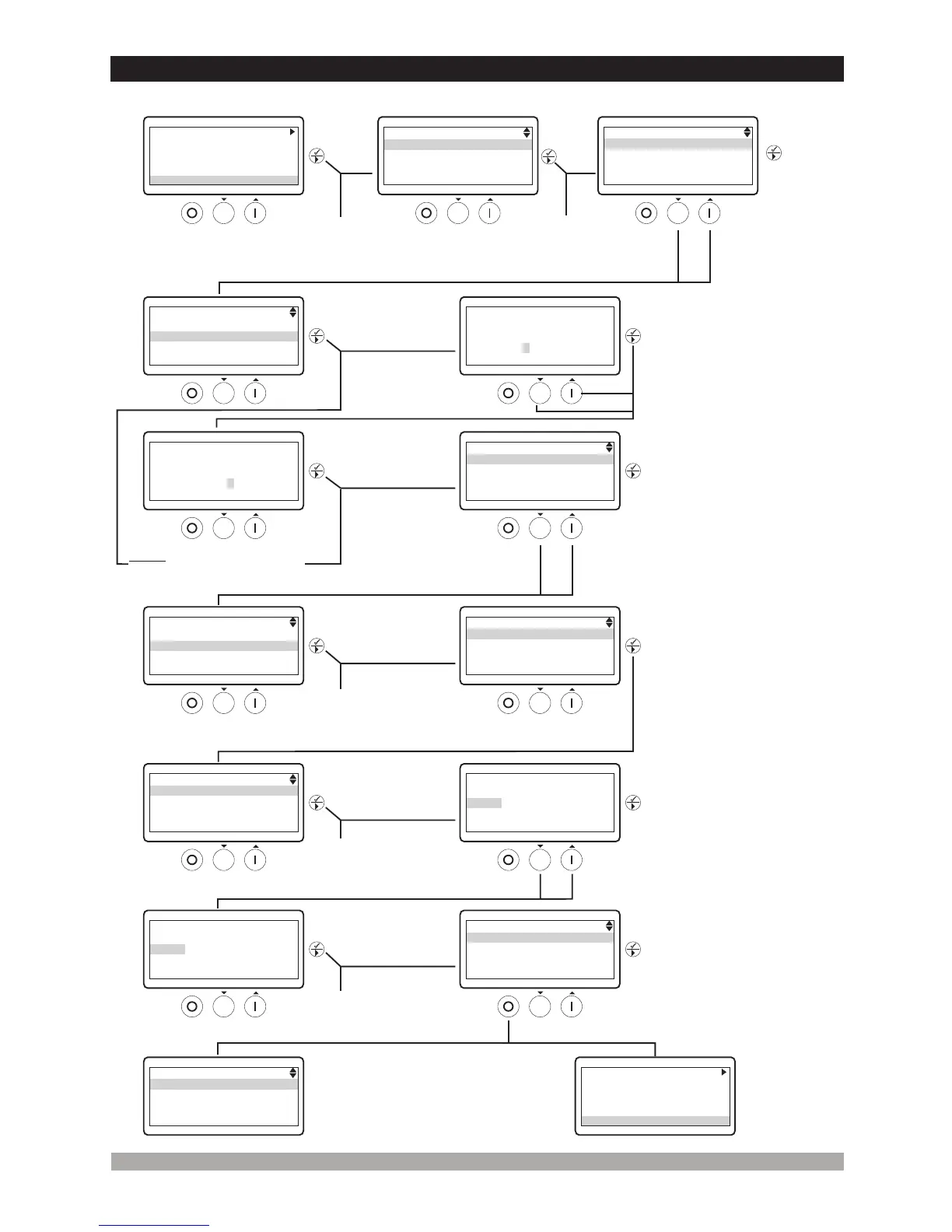
3.4Changing AndSavingParametersValues
20
OperationScreen
PresstheUporDown
buttonstoselect
thesectionyouwish
toview/change.
Pressthe
Enter
button.
Enterpasswordwith
cursor(Up,Down
andNext) .buttons
PresstheEnterbutton
toconfirmpassword.
Ifthepasswordisincorrect,
theunitwilldropoutof
programmode.
PresstheUporDown
buttonstoselectthemain
parametergroupyouwishto
view/change.
Note1: IfEnterbuttonispressed
andthetechnicianpasswordis
zero,Passwordscreenisignored.
PressEnterbuttontoaccesstoall
parameterspageincurrentlymain
parametergroup.
Parametercanbe
changedwithUpand
Downbuttons.
PressEnterbuttonto
confirmthechangedvalue.
PresstheEnter
buttontoview
parametervalue.
PressEnterbuttontoaccess
toallparametersincurrently
parameterpage.
Operation
Screen
GENERATOR
Voltlevel
Frequencylevel
Currentlevel&act.
Powerlevel
WhentheStop/Resetbuttonis
pressedanytime,previous
pagecanbeaccessed.
GENERATOR
V12:380VI1:20A
PF1:-0.84Fq:50.0Hz
Onload
Toexitfromprogrammingmode
anytime,pressStop/Reset
for2seconds.button
GENERATOR
V12:380VI1:20A
PF1:-0.84Fq:50.0Hz
Onload
ü
AUTO
RESET
PressEnterbutton
for2secondsto
accessthemenuoptions.
WhentheEnterbuttonis
pressed,theparameters
sectionisaskedfor
accessingtoparameters.
Program
Language
Eventlog
AUTO
RESET
ü
PROGRAM
Operatorsetting
Techniciansetting
Factoryadjustment
AUTO
RESET
ü
PROGRAM
Operatorsetting
Techniciansetting
Factoryadjustment
AUTO
RESET
ü
TECHNICIANSETTING
Password
0000
AUTO
RESET
ü
TECHNICIANSETTING
Password
0162
AUTO
RESET
ü
TECHNICIANSETTING
System
Generator
Engine
Inputs
AUTO
RESET
ü
TECHNICIANSETTING
System
Generator
Engine
Inputs
AUTO
RESET
ü
GENERATOR
Voltlevel
Frequencylevel
Currentlevel&act.
Powerlevel
AUTO
RESET
ü
AUTO
RESET
ü
GENERATORVOLTLEVEL
Undervoltshutdown
320Vac
AUTO
RESET
ü
GENERATORVOLTLEVEL
Undervoltshutdown
325Vac
AUTO
RESET
ü
GENERATORVOLTLEVEL
voltreset
Overvoltshutdown
Undervoltshutdown
Undervoltprealarm
Under
AUTO
RESET
ü


 To Next Page