EasyManua.ls Logo

Epson RX4111CE - How to Use; Clock Calendar Explanation; Clock Counter; Table 16 Time Calendar Setting Ex

Epson RX4111CE
61 pages
Print Icon
To Next Page IconTo Next Page
To Previous Page IconTo Previous Page
Loading...
14. How to use
RX4111CE Jump to Top / Bottom
ETM62E-02 Seiko Epson Corporation 25

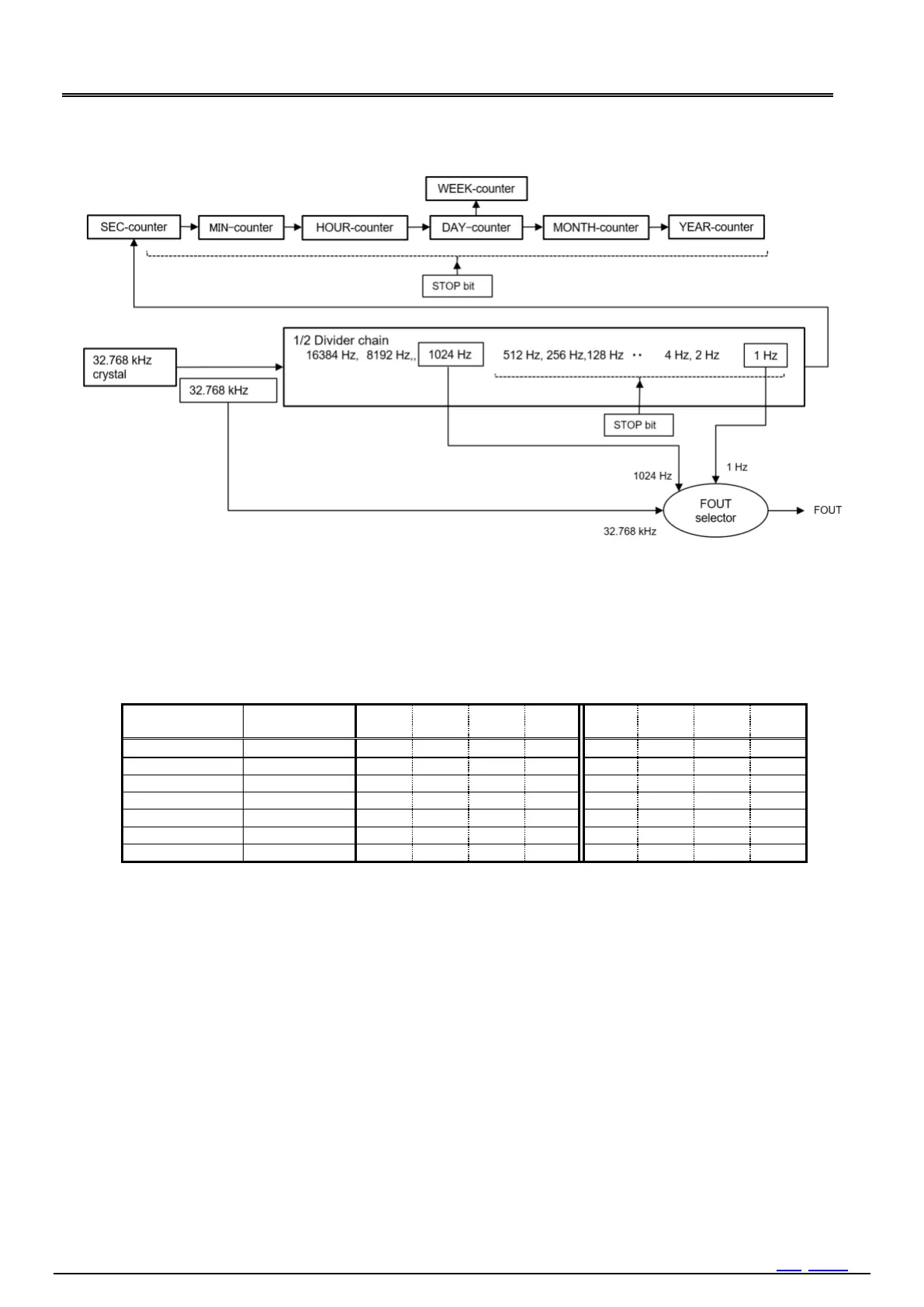
Figure 19 Basic Function 32.768 kHz oscillation, counter, FOUT
14.1. Clock Calendar Explanation


 

Table 16 Time Calendar setting Ex.
Bank1
Address
Function
bit 7
bit 6
bit 5
bit 4
bit 3
bit 2
bit 1
bit 0
0h
SEC
0
1
0
0
0
1
0
1
1h
MIN
0
0
1
1
1
0
0
1
2h
HOUR
0
0
0
1
0
1
1
1
3h
WEEK
0
0
0
0
0
0
0
1
4h
DAY
0
0
1
0
1
0
0
1
5h
MONTH
0
0
0
0
0
0
1
0
6h
YEAR
1
0
0
0
1
0
0
0
Note
With caution that writing non-existent time data may interfere with normal operation of the clock counter
Time starts at the moment of STOP bit operation (1 to 0 timing)
14.1.1. Clock Counter
1) [SEC],[MIN]register
These registers are 60-base BCD counters. When update signals were generated from a lower counter, a upper counter is one
incremented. At the timing when the lower register changes from 59 to 00, carry is generated to the higher register and thus
incremented.
When writing is performed to [SEC] register, Internal-count-down-chain less than one second (512 Hz1Hz) is cleared to 0.
2) [HOUR]register
This register is a 24-base BCD counter (24-hour format). These registers are incremented at the timing when carry is generated
from a lower register.
3) Leap second adjustment




Table of Contents

Related product manuals