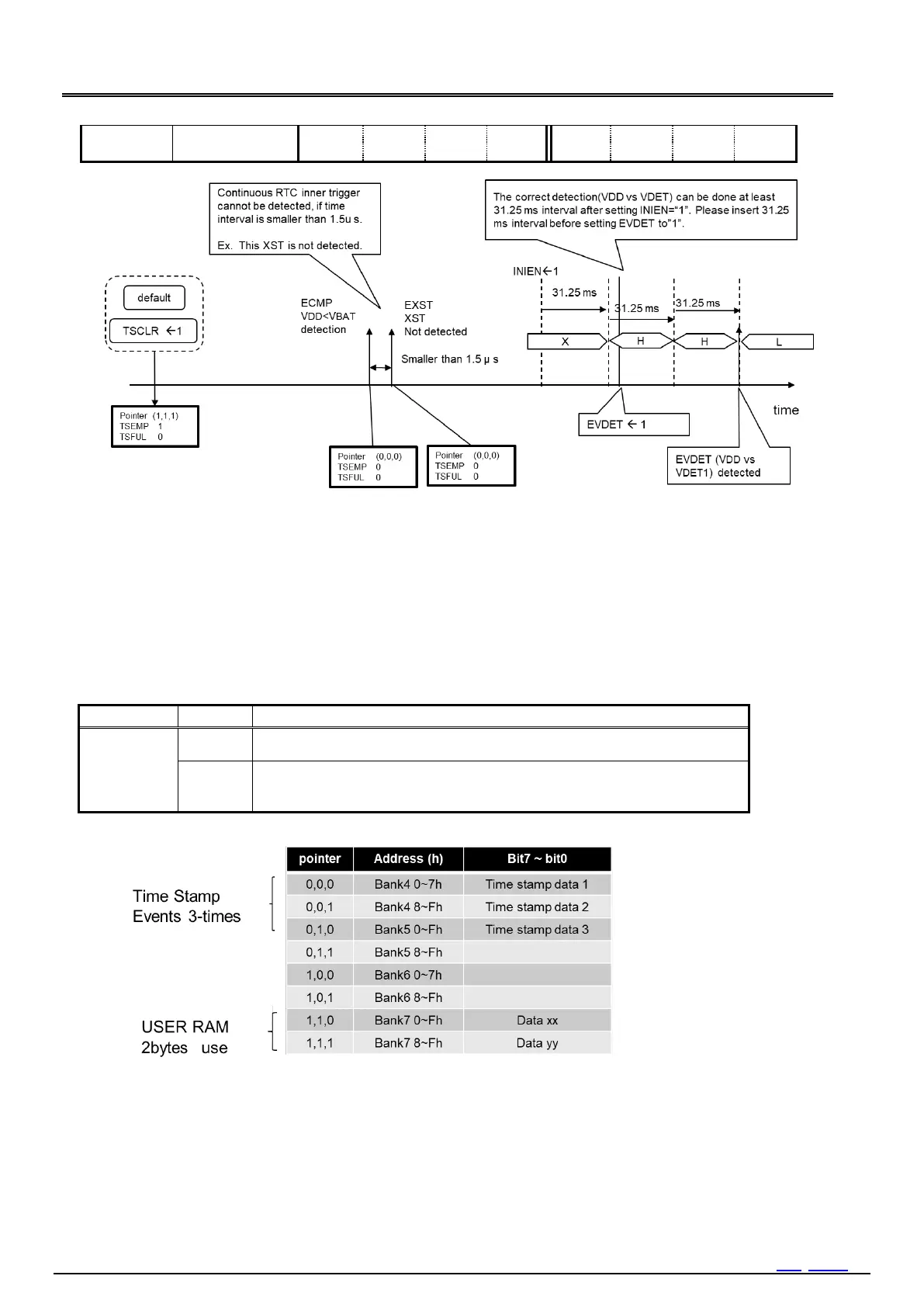
Figure 37 Careful timing process for VDET, XST time stamp
14.8.7. Multiple Time Stamp
By using following registers, user can record time stamp maximum 8-times.
Multiple timestamp related register
Multiple time stamp operation is possible by setting the following registers.
1/1024 seconds and WEEK information are not recorded in the recording area of Bank4 Bank7.
1) TSRAM bit (Time Stamp RAM)
Selection of time stamp recording area or USER RAM.
Table 63 TSRAM bit (Time Stamp RAM)
Bank4 to Bank7 is used as the time stamp recording area.
To clear the time stamp data, write 0 directly to the recording area by SPI-Bus
access.
When TSRAM = 1, the first time stamp is recorded in both Bank2 0h 8h and Bank4 0h 7h.
Figure 38 Mixed usage of USER RAM and Time stamp RAM



 To Next Page