51
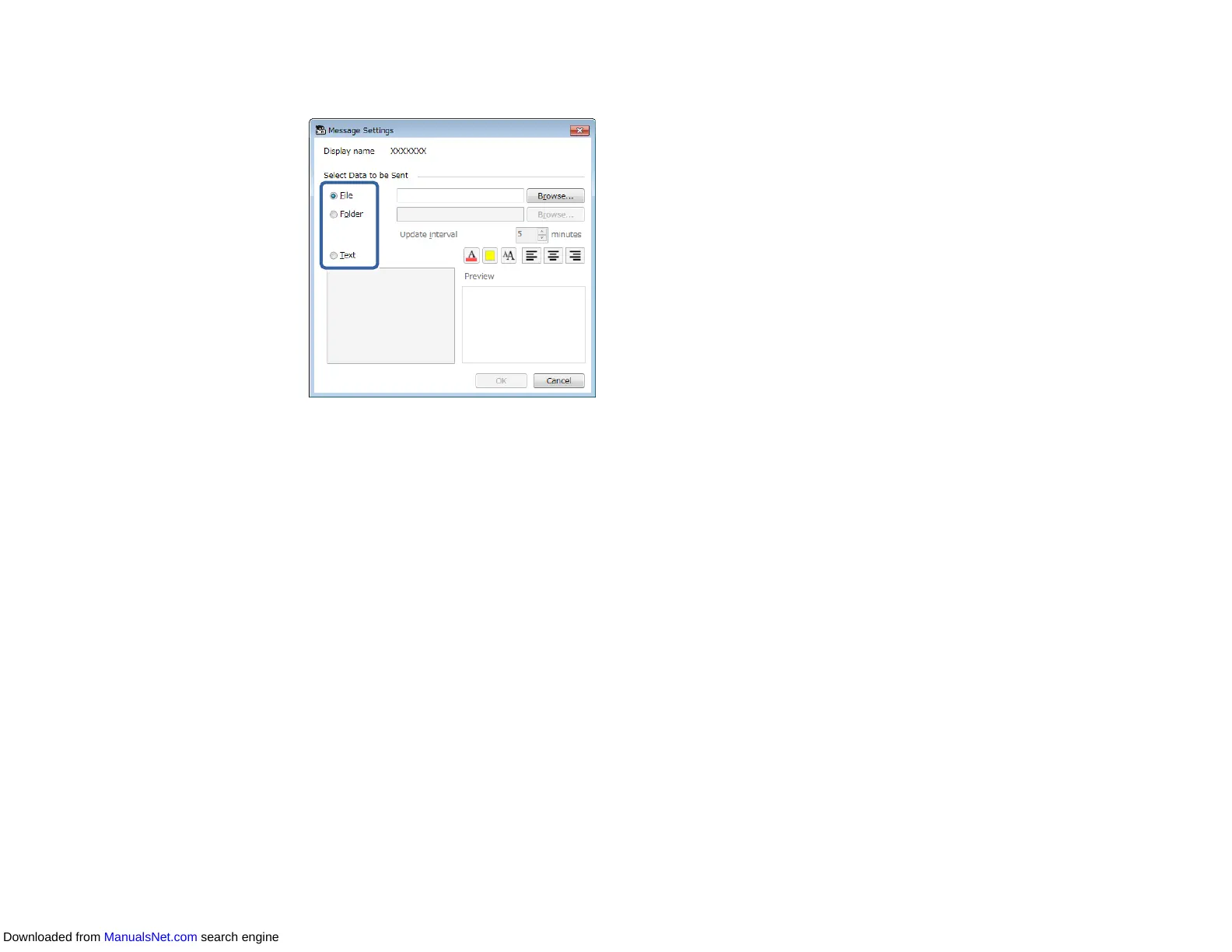
6. Select the type of information to distribute.
• Select File to distribute one JPEG file.
• Select Folder to distribute all JPEG files in the specified folder.
• Select Text to distribute a text message.
7. Select the necessary settings.
• When you select File, select Browse to specify the file to be distributed.
• When you select Folder, select Browse to specify the folder that includes the files to be
distributed. Specify an Update interval setting from 1 to 30 minutes for automatically switching
display from one image to the next.
• When you select Text, enter the message in the text box and select any available style settings.
8. Select OK.
9. Select OK.
10. Repeat steps 2 to 4 to specify the date and time to finish message broadcasting.
Note: If you do not specify the date and time to stop message broadcasting, the projector projects
the distributed message continuously.
11. Select Exit, and then select OK.
Downloaded from ManualsNet.com search engine


 To Next Page