83
E
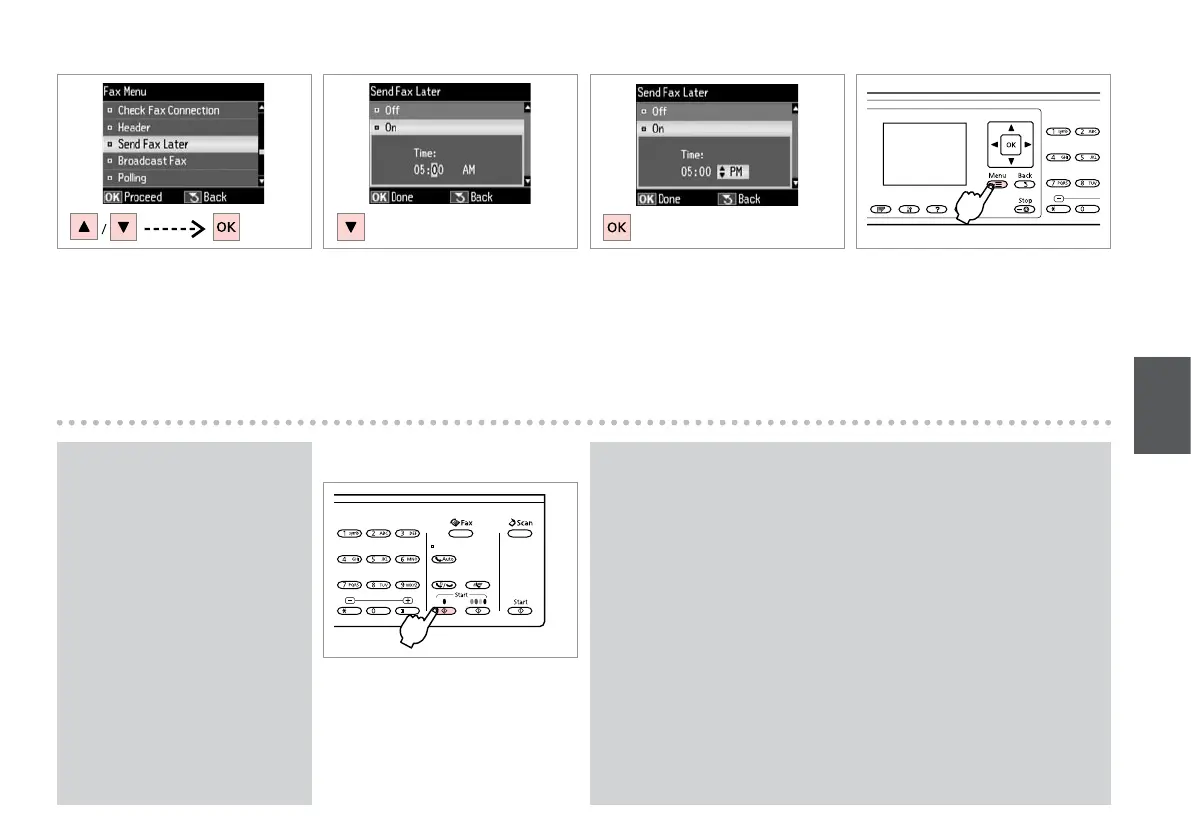
Select Send Fax Later.
Selezionare Invia fax dopo.
Seleccione Enviar fax luego.
Seleccione Env. Fax Depois.
F R & 13
Select On and set the time.
Selezionare On e impostare l’ora.
Seleccione Act y je la hora.
Seleccione Sim e dena a hora.
G
Proceed.
Procedere.
Continúe.
Continue.
H
Return to the fax send screen.
Tornare alla schermata di invio fax.
Vuelva a la pantalla de envío de
faxes.
Regresse ao ecrã de envio de faxes.
Scanned data is sent at the specied time. Until then, you cannot send
another fax.
I dati acquisiti vengono inviati all’ora specicata. Non è possibile inviare un
altro fax nel frattempo.
Los datos escaneados se enviarán a la hora especicada. Hasta entonces no
podrá mandar ningún fax.
Os dados digitalizados são enviados à hora especicada. Até lá, não
consegue enviar outro fax.
Q
I
Start scanning to send later.
Avviare la scansione per l’invio in
seguito.
Empiece a escanear lo que enviará
luego.
Comece a digitalizar para enviar mais
tarde.
Press x and select Send Settings
to change the settings. R & 94
Premere x e selezionare Impost.
di invio per modicare le
impostazioni. R & 95
Para cambiar los ajustes, pulse x
y seleccione Ajustes envío fax.
R & 96
Pressione x e seleccione Defs.
Envio para alterar as denições.
R & 97
Q














 To Next Page