– 61 –
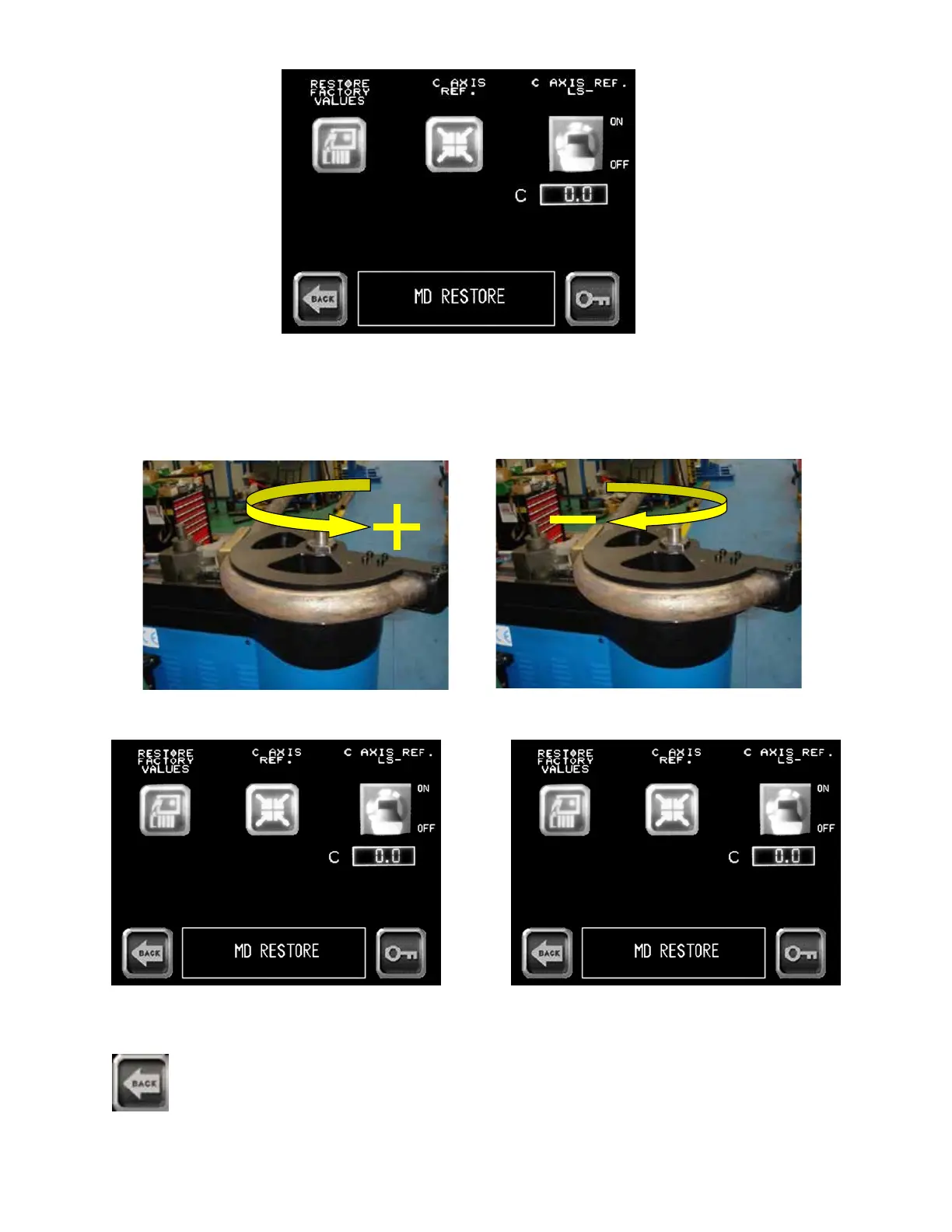
4 - Using hand-held controller, depress “+” or “-” buttons to move hex shaft to desired position.
5 - Press C AXIS REF. LS icon. 6 - Press C AXIS REF. icon to store new
reference position.
7 - Press BACK icon twice returning to Main Menu screen
TB100- TB130
TB100-TB130-USR-E-R0
www.ercolina.it
info@ercolina.it
Page 23 on 96
Note : If you press the central button of the joystick to the maximum pressure the machine will
switch to emergency mode .
You can reset the EMERGENCY status with the rotation of the emergency button and push the reset
button.
4 - Press the EXIT key to return to the Main menu
C axis positive motion
C axis negative motion
EXIT
TB100- TB130
TB100-TB130-USR-E-R0
www.ercolina.it
info@ercolina.it
Page 23 on 96
Note : If you press the central button of the joystick to the maximum pressure the machine will
switch to emergency mode .
You can reset the EMERGENCY status with the rotation of the emergency button and push the reset
button.
4 - Press the EXIT key to return to the Main menu
C axis positive motion
C axis negative motion
EXIT
3 - Press C AXIS REF. LS icon turning limit switch to off position.
C axis positive bending direction C axis negative return direction
TB100/TB13003/2015


 To Next Page