
 Need help?
Do you have a question about the Ercolina TB100 and is the answer not in the manual?
Lists essential safety rules for operating equipment and maintaining a safe work environment.
Provides guidance on machine installation, transport, and safe handling of materials and parts.
Highlights the primary capabilities and advantages of the bending machines.
Details the technical capabilities, dimensions, and performance metrics of the TB100 and TB130 models.
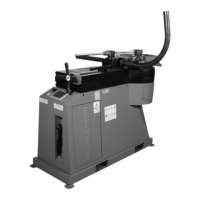
Illustrates and identifies the main physical parts of the bending machine for user reference.
Covers pre-operation checks, standard equipment, and wiring considerations before powering up.
Provides detailed instructions for connecting the machine to the power source and configuring the transformer.
Defines essential terminology used in the bending process for clear understanding.
Outlines critical factors to consider when selecting materials for bending operations.
Provides steps and guidance for installing the main shaft and associated tooling.
Offers recommendations for selecting appropriate center formers and counterbend dies based on application needs.
Details the steps for correctly mounting the center former and counterbending die.
Explains the process of properly positioning and securing the material to be bent.
Describes the machine's coordinate system and axis directions for understanding movement.
Guides on how to adjust and utilize the X-axis encoder for precise counterbending die positioning.
Details the procedure for correctly installing and securing the tie bar for machine stability.
Explains the function of different keys on the main screen and the overall operating areas.
Outlines the step-by-step process for operating the machine in manual mode without pressure die control.
Details the step-by-step procedure for operating the machine in manual mode with pressure die control enabled.
Introduces programming, covering USB key usage, program creation, and modification steps.
Explains how to use the numeric keyboard for entering and editing numerical data within the machine's interface.
Details the use of the alphanumeric keyboard for entering text, names, or comments for part programs.
Guides the user through the process of selecting and modifying existing part program data, including bend angles.
Explains how to save edited part programs onto a USB key for storage and retrieval.
Describes how to access, view, and manage programs saved on the USB key, including navigation steps.
Details the steps required to load a previously saved part program from a USB key into the machine.
Outlines the steps for initiating and operating the machine in automatic mode without pressure die control.
Guides on how to determine and input the correct springback value for precise bend angles.
Details the procedure for operating the machine in automatic mode with pressure die control enabled.
Explains how to select and adjust the bending speed within the automatic menu interface.
Guides on how to determine and input the correct springback value for precise bend angles.
Describes how to manually select bend angles within a program using the MDA mode.
Details how to select the preferred unit of measure (mm or inches) for machine operations.
Explains how to access and view the list of current alarms and messages displayed by the system.
Guides the user on how to change the display language of the machine's interface.
Provides instructions on how to adjust the 'C axis' starting position for specific tooling or large radii.
Introduces the electrical schematics section of the manual.
Lists the electrical components associated with the main control panel of the machine.
Details other electrical parts, machine components, cables, and accessories used in the system.
Lists available transformer voltage options for machine configuration.
Provides reference data for material consumption based on bend angle and pipe size.
Lists available tooling kit part numbers for different pipe and tube sizes and radius types.
Details specifications for pipe tooling, including sizes, CLR, and part numbers for center formers and counterbend dies.
Details specifications for round tube tooling, including sizes, CLR, and part numbers for center formers and counterbend dies.
Offers solutions for common problems encountered during non-mandrel bending operations.
Outlines the recommended maintenance tasks and their frequencies for the bending machine.
Details the importance and procedure for greasing machine fittings to ensure longevity.
Lists the legal terms and conditions governing the sale and use of the product.
Describes the features and capabilities of the non-mandrel rotary draw bending machines.
Compares the specifications and features across different Ercolina bender models.
Introduces other product lines offered by Ercolina, specifically pipe and tube notchers.

 To Next Page
 General