– 28 –
Entering and Editing Values
- Entering and editing numerical values -
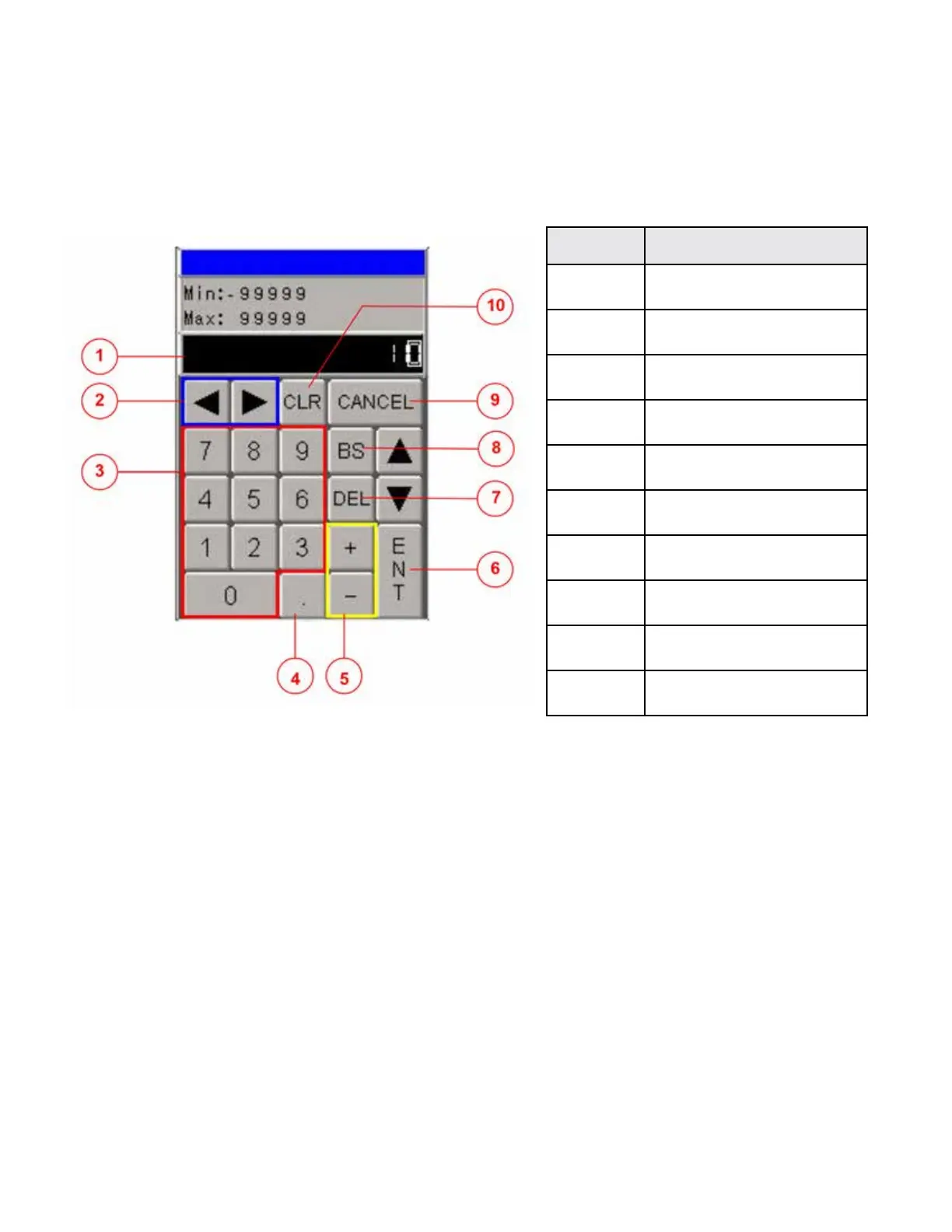
When you touch an I/O eld on the touch screen the numeric keyboard appears.
It allows you to insert or change the value of the current variable.
Numeric keyboard
Explanation of display elements
When you touch the relevant I/O eld, the numeric keyboard appears and displays the current value. You
can enter numeric values by using the numeric keyboard.
Use the key BS to the delete the character to the left of the cursor.
The minimum and a maximum input value differ according to eld selected.
The following options for entering values are available:
● The current value is deleted when you enter the rst character. Enter the value again.
● Use the directional keys to move the cursor within the current value. You can now edit the
current value or change the value.
Select ENTER to conrm your entry or CLR to cancel them.
Both actions close the numeric keyboard.
ELEMENT KEY FUNCTION
1 INPUT FIELD
2 MOVE CURSOR
3 NUMERIC
4 DECIMAL POINT
5 POSITIVE or NEGATIVE
6 ENTER
7 DELETE
8 BACK SPACE
9 CANCEL
10 CLEAR
03/2015TB100/TB130



 To Next Page