Chapter 3: DS850 User Interface 35
EVS5200_DOC_SOP_DS850
Software Version 2.10
Published: February 26, 2014
Pick Delay
The Pick Delay option is used to change the number of ballots that are picked for
scanning in a given period of time. The value in the Pick Delay field specifies the number
of seconds that the pick mechanism waits before grabbing the next ballot from the
input tray. For example, if the pick delay is set to 15 seconds, only four ballots will be
picked for scanning in one minute.
Increasing the pick delay value reduces the number of ballots that are picked for
scanning in a given period of time; decreasing the pick delay value increases the
number of ballots that are picked for scanning in a given period of time.
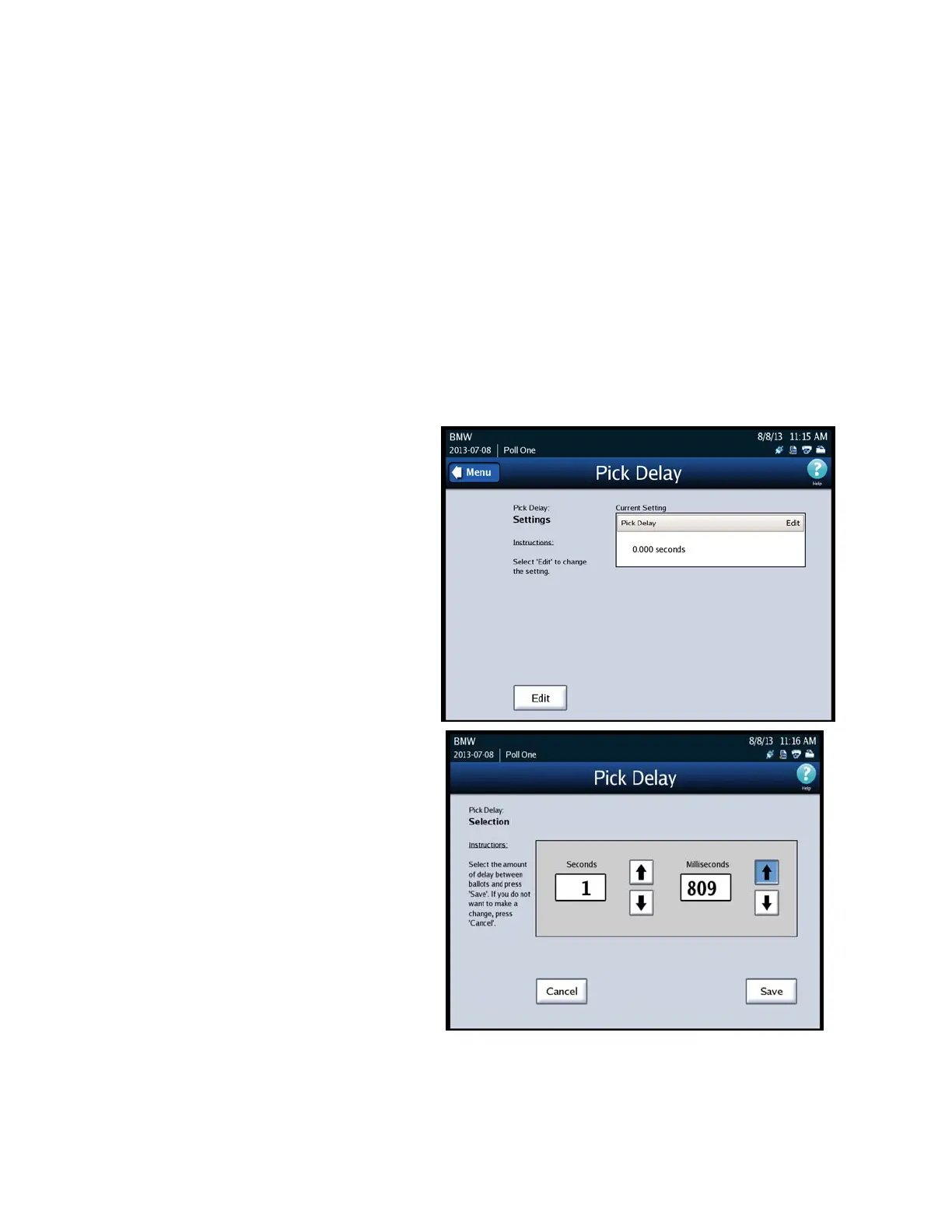
Follow the steps below to change the DS850’s pick delay setting:
1. Press Pick Delay on the Transport screen.
2. When the Pick Delay settings
screen appears showing the
current pick delay setting,
press Edit.
3. When the Pick Delay selection
screen appears showing the
current setting and the up and
down arrows, press the up
arrow to increase the pick
delay, or press the down arrow
to decrease the pick delay. The
numbers change more quickly
if you hold down on the up or
down arrow. The maximum
pick delay is 30 seconds.
4. After you select a new pick
delay, press Save to save the
new setting, or press Cancel to
cancel the change.



 To Next Page