10
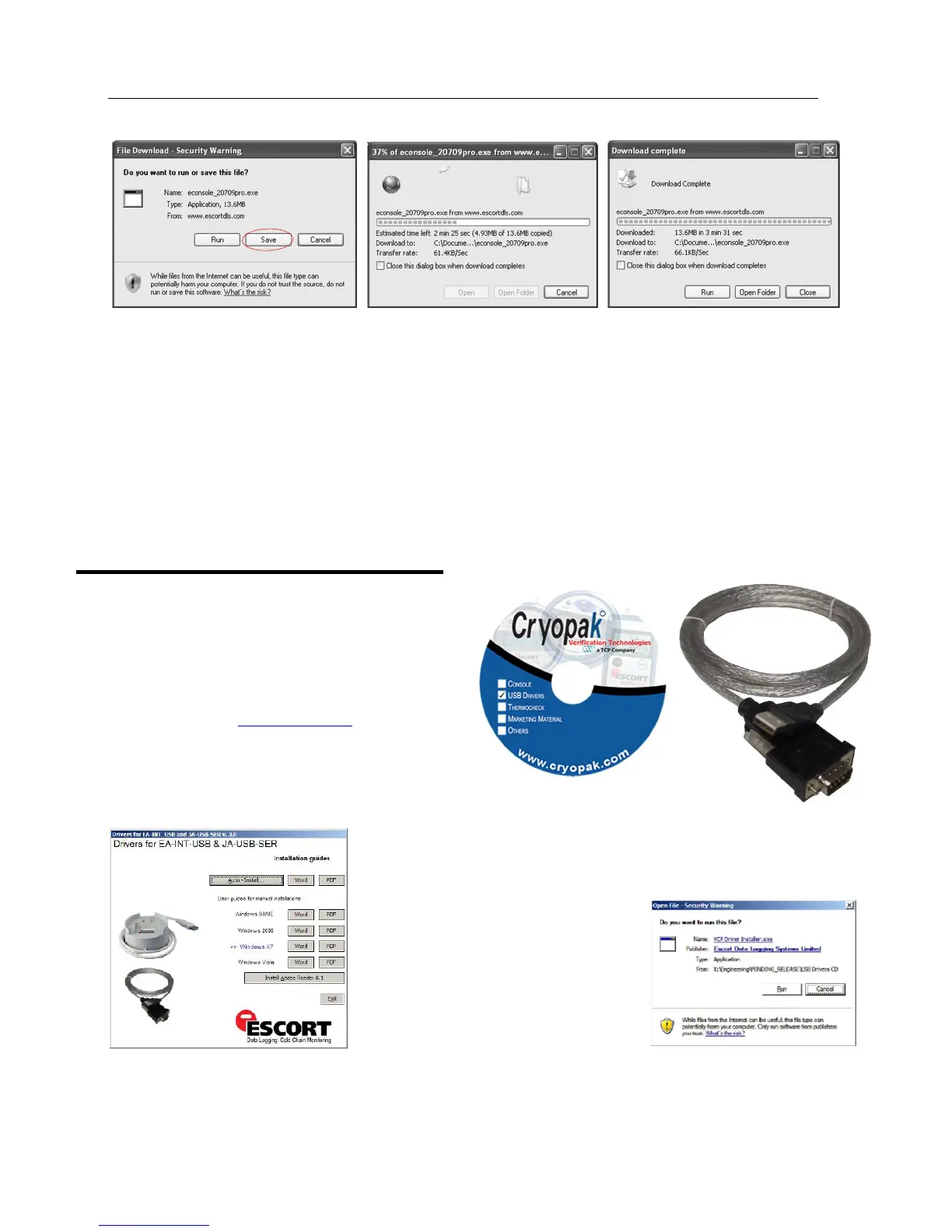
We recommend choosing the option to save the file and to save the file to your desktop. If you are an experienced user, you
may wish to save the file to a different folder of your choosing. Once the installation process has been completed, this file
can be safely deleted, as it is not required for using the software.
At the conclusion of the installation process, the final screen will provide you with an option to immediately start the
ConsolePro software.
The installation of the ConsolePro software will also provide you with two simple methods to start the ConsolePro at a later
time:
A "Shortcut" on the desktop, which you can double click to start the software.
A "Shortcut" in the "Start" menu system. If you are using Windows XP for example, you may need to click on the "All
Programs" item to locate the "Console" shortcut.
Installing the USB adaptor cable drivers
To be able to operate the iMiniPlus with ConsolePro
Software, you have to connect the iMiniPlus to your
computer with a serial to USB or serial to serial adaptor.
A USB cable requires driver software for it to be used.
This software is supplied on mini CD format with the
adaptor or from web site www.cryopak.com
Insert the driver mini CD into your computer CD
ROM and the following screen box will be
displayed. Select Auto Install
Select Run.
Select Next.
Select Finish. Reboot your PC
and insert the USB cable. If this does
not work, you will have to install using
the “Found New Hardware Wizard” on
your computer Control Panel. See
next sections.



 To Next Page