Preparing iMiniPlus for use 25
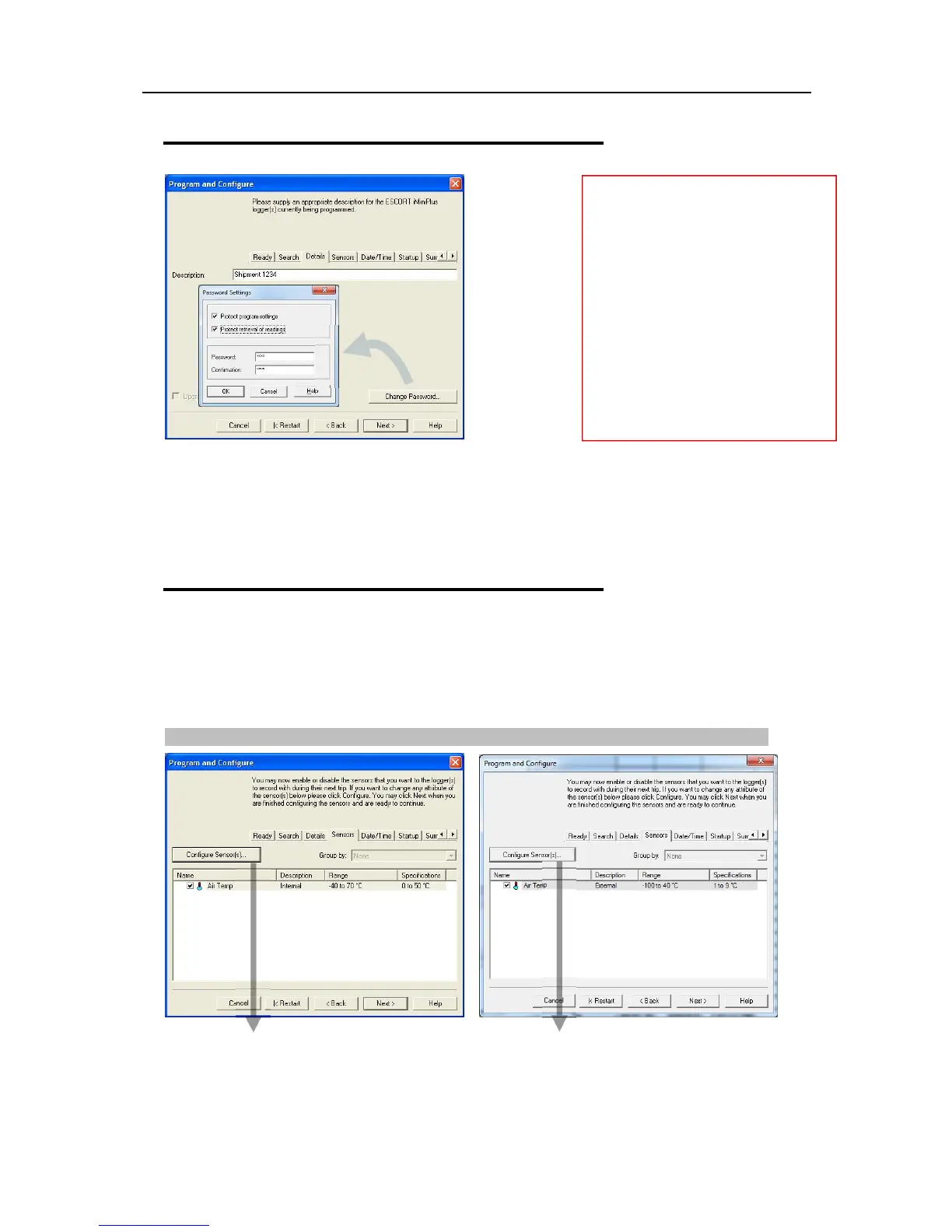
Details and Changing Password
Please keep your password safe and make sure no unauthorized person has access to it. If you forget your
password, the protection cannot be disabled and you will have to return the iMiniPlus to your nearest
distributor.
If you leave the password blank but enable the protection, to access the iMiniPlus just click OK in the
Password Required dialog.
Configure Sensors and Alarm Settings
Sensors Tab – this displays the sensor information some of which can be changed by using Configure
Sensor(s) and others that remain fixed i.e. range -40C to 70C. The description “Internal” refers to the
type of sensor as opposed to “External” which will display on the external sensor model.
Configure Sensor(s)… - click on this button to set up the alarm and LCD display parameters.
Details Tab - Enter a description of the
temperature application in the 24 characters’
box. This can be a location, product etc.
Change Password – if you have password
protected the iMiniPlus or are wanting to
add a password for the first time you can do
this here.
Protect program settings - Tick this option
if you want to protect your programming
settings for the current logger.
Protect retrieval of readings- Tick this
option to disallow viewing of data from the
current logger without a password.
Password are digits only, up to 4 characters.



 To Next Page