Quick Start Guide 15
Launching the software
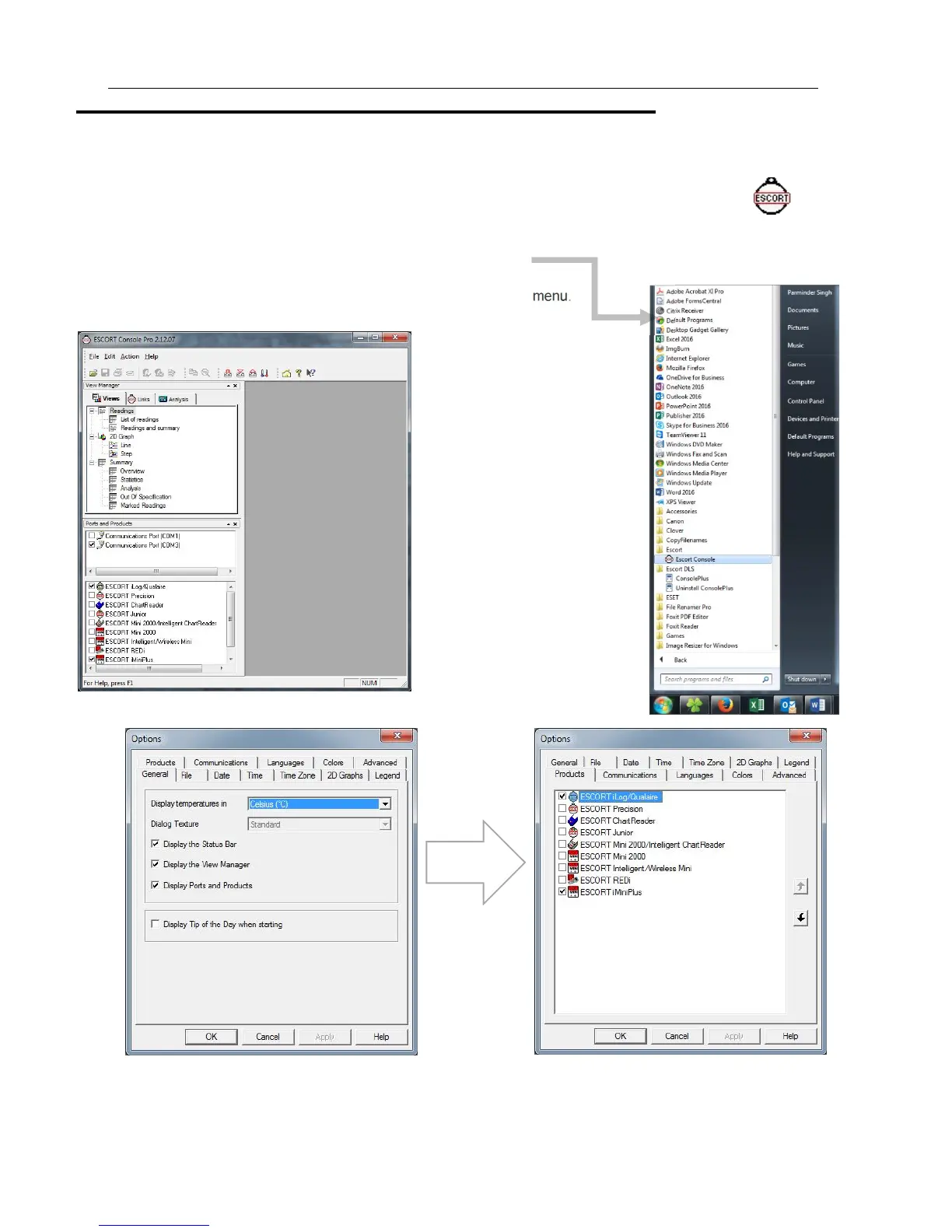
The installation of the ConsolePro software provides you with two simple methods to start the Console:
1. A "Shortcut" on the desktop, which you can double click to start the software.
2. A "Shortcut" in the "Start" menu system.
If you are using Windows XP for example, you may need to click on the "All Programs" item
to locate the "Console" shortcut, like in the following picture.
3. To program the iMiniPlus to record information,
Launch the ConsolePro software from the desktop or All Programs menu.
The software will open and display the following screen:
From the menu, select Edit, then Options
In the Products tab you will see a list of all the products supported by the ConsolePro Software. Make sure the “iMiniPlus”
box is ticked and click on OK or Apply. If you intend to use other products, you may tick as many of the boxes you require.
Next make sure you have selected the correct Communications Port. Note that the USB cable needs to be connected to the
PC before you start the ConsolePro Software otherwise it won’t show on the list below. Click on OK or Apply.
Escort Console
Select the
Products Tab



 To Next Page