iMiniPlus Profile 11
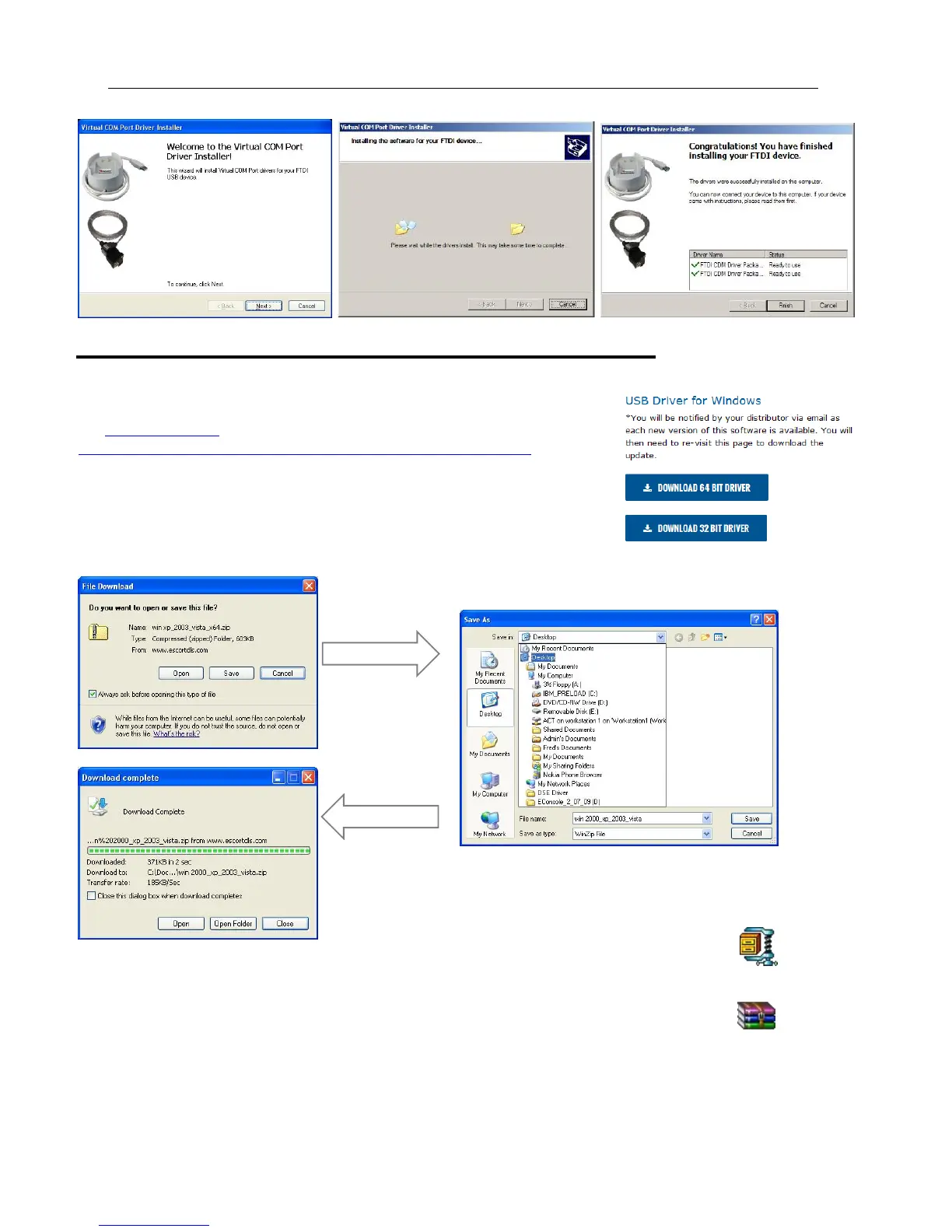
Getting a copy of the USB drivers from the web
If you misplace the driver mini CD, you can obtain the driver files from our web
site www.cryopak.com
http://www.cryopak.com/temperature-monitors/software-downloads/
Here you can
On the Software Download page, you will see a list of driver file USB driver for
windows. Download the appropriate driver file for your Windows operating system
and save to your desktop. Please note the file is in ZIP (compressed) format.
Select save.
Because the file is in compressed (ZIP) format, you will have to extract it into another
folder. The file icon on your desktop may look like one of these:
Double click on the ZIP icon and extract all the files into a new folder and name it USB
Drivers. Once the files are extracted you can delete the original ZIP file if you like.
win 2000_xp_2003_vista.zip
Select Desktop Select Desktop
win xp_2003_vista_x64.zip



 To Next Page