Chapter 3 Operation Instructions SuZhou Eshine Elevator Components Co., Ltd.
―10― YS-K01 Door Controller User Manual
Display parameter at editing state
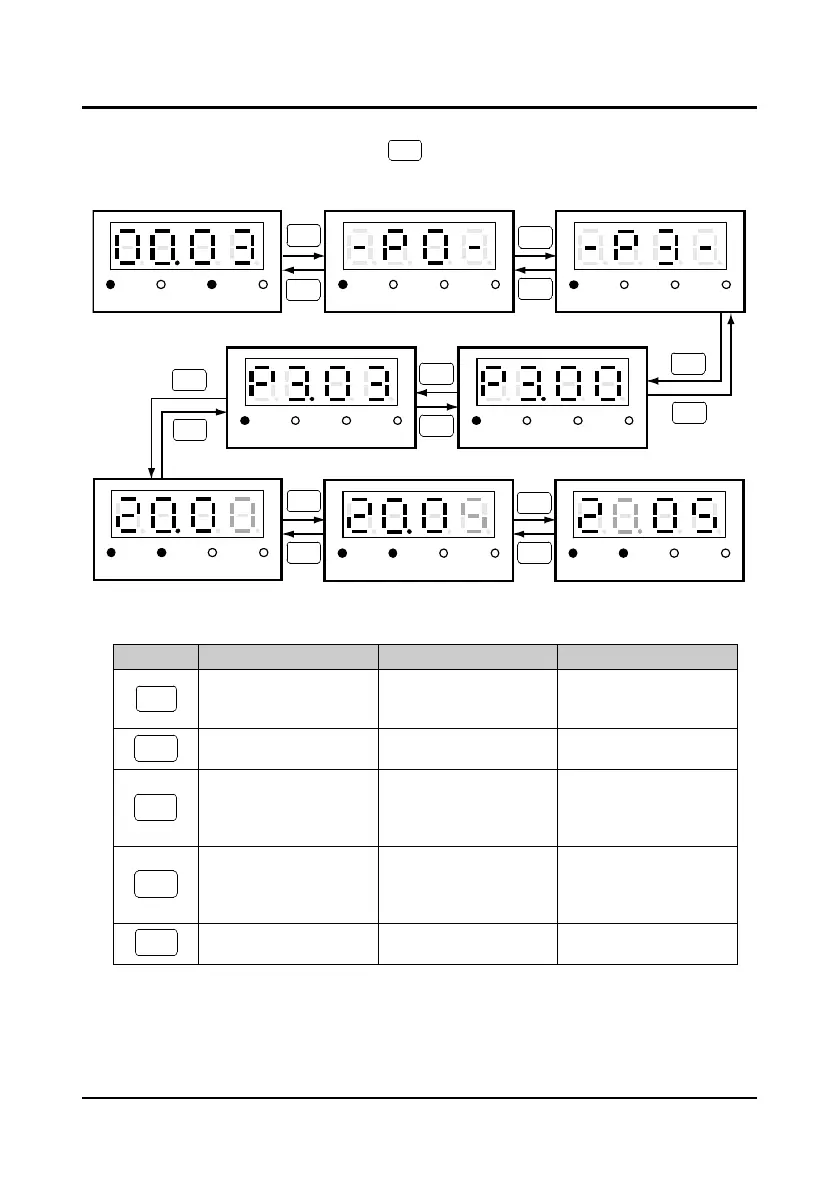
At stop, run or fault alarm state, press key to enter function parameter editing state (if
there is user password, refer to the description of P0.00). The editing process description is
shown in Figure 3-4 and the description of the keys is shown in Table 3-4.
Figure 3-4 Editing state of YS-P01 panel
Table 3-4 Switching description of keys of YS-P01 panel
Key First-level menu Second-level menu Third- level menu
Fault, return to faulty display;
Fault cleared, return to run
or stop state display.
Return to first-level menu
Do not save the present
value and return to
second-level menu
Enter to second-level menu Enter to third-level menu
Save the present value and
return to second-level menu
Select function group
Modify the internal No. of
function group. Increase by
1 according to the present
modified bit
Modify function value.
Increase by 1 according to
the present modified bit
Select function group
Modify the internal No. of
function group. Decrease by
1 according to the present
modified bit
Modify function value.
Decrease by 1 according to
the present modified bit
Invalid Invalid
Switch units, thousands,
hundreds, tens
In the setting third-level menu situation, if the parameter is not flashing to display, it indicates that
this parameter can’t be modified. The possible reasons are as follows:
• The function parameter can’t be modified, such as the actual detected parameters or recorded
parameters etc.
Hz
A V
RUN
Hz
A V
RUN
Runing state First-level menu
Hz
A V
RUN
>
ENTER
PRG
>
>>
PRG
PRG
Hz
A V
RUN
Hz
A V
RUN
>
>
Hz
A V
RUN
ENTER
PRG
Hz
A V
RUN
Hz
A V
RUN
>
>
>>
First-level menu
Second-level menuSecond-level menu
Third-level menu Third-level menu Third-level menu
>



 To Next Page