EasyManua.ls Logo

ETC Sensor3 CEM3 - Automatic Control Scenarios and Display Status

ETC Sensor3 CEM3
84 pages
Print Icon
To Next Page IconTo Next Page
To Previous Page IconTo Previous Page
Loading...
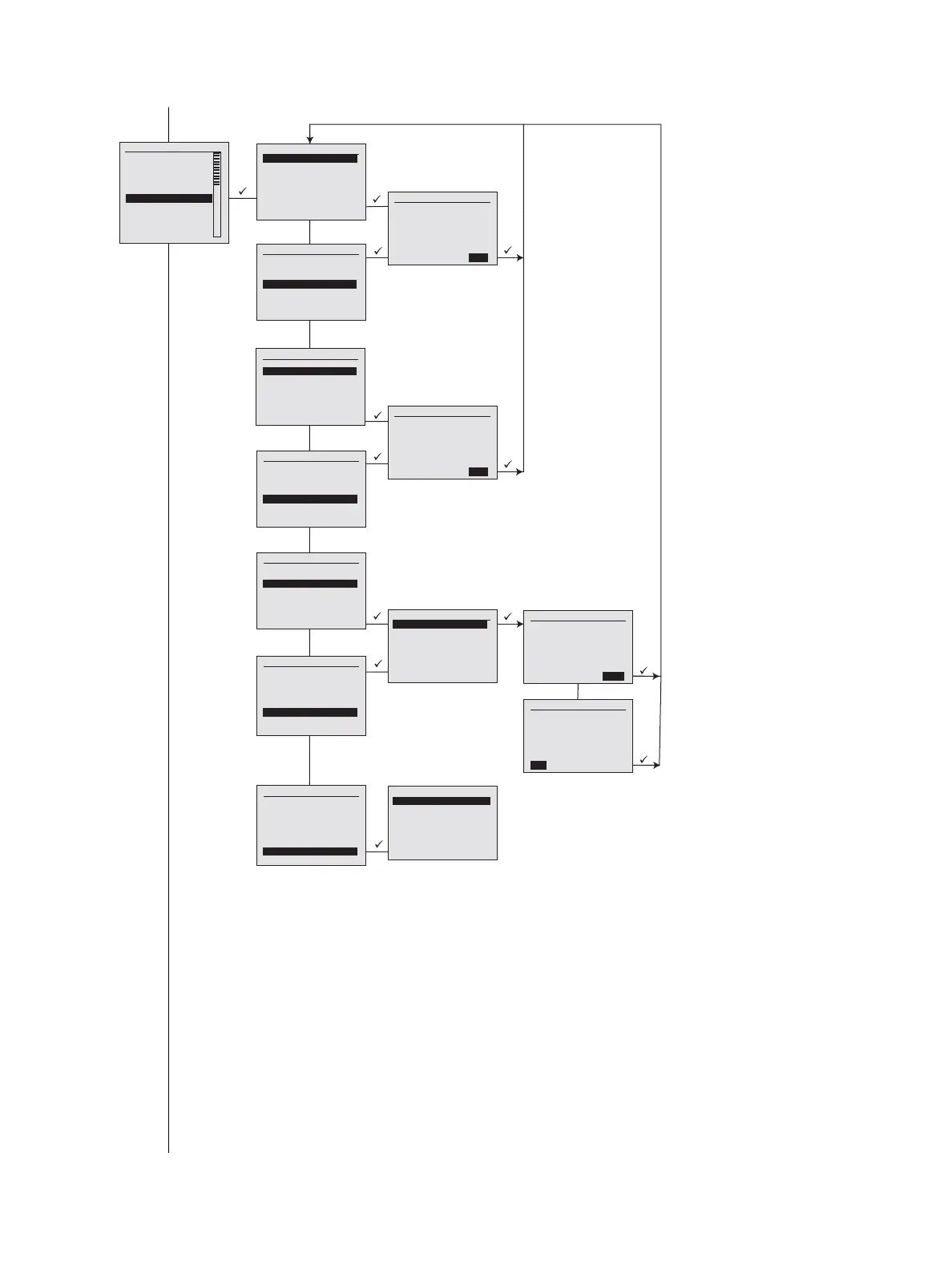
CEM3 Menu Flow Chart 55
Server Setup
Enabled: [Yes]
IP: [ 10.101.50.60]
Upgrades:sr/conductor
CFG Path:sr/conductor
File [Rack001]
AutoSave: [No]
Rack #1 - CEM3 Rack
System OK
DMX A: Off DMX B: Off
sACN: 1/1
[Quick S etup] [Info]
Setup
[Dimmers]
[Rack]
[Circuit Assignment]
[Patching]
[Network]
[File Operations]
[Panic]
[Time/Date]
[Quick Setup]
[UI Preferences]
File Operations
[Save to USB]
[Load from USB]
[Upgrade fro m USB]
[Save to Server]
[Load from Server]
[Upgrade from Server]
[Set up Server]
Save As
[Rack001].etc
[Cancel] [OK]
Load cfg file
Rack001.etc
[Cancel] [OK]
Software Upgrade
cem3_v1_6_0.bld
Software Upgrade
Are you sure you
want to upgrade the
operating software to
file:
cem3_v1_7_0.bld ?
[No] [Yes]
Software Upgrade
Are you sure you
want to upgrade the
operating software to
file:
cem3_v1_7_0.bld ?
[No] [Yes]
File Operations
[Save to USB]
[Load from USB]
[Upgrade fro m USB]
[Save to Server]
[Load from Server]
[Upgrade from Server]
[Set up Server]
File Operations
[Save to USB]
[Load from USB]
[Upgrade fro m USB]
[Save to Server]
[Load from Server]
[Upgrade from Server]
[Set up Server]
File Operations
[Save to USB]
[Load from USB]
[Upgrade fro m USB]
[Save to Server]
[Load from Server]
[Upgrade from Server]
[Set up Server]
File Operations
[Save to USB]
[Load from USB]
[Upgrade fro m USB]
[Save to Server]
[Load from Server]
[Upgrade from Server]
[Set up Server]
File Operations
[Save to USB]
[Load from USB]
[Upgrade fro m USB]
[Save to Server]
[Load from Server]
[Upgrade from Server]
[Set up Server]
File Operations
[Save to USB]
[Load from USB]
[Upgrade fro m USB]
[Save to Server]
[Load from Server]
[Upgrade fro m Server]
[Set up Server]

Table of Contents

Related product manuals