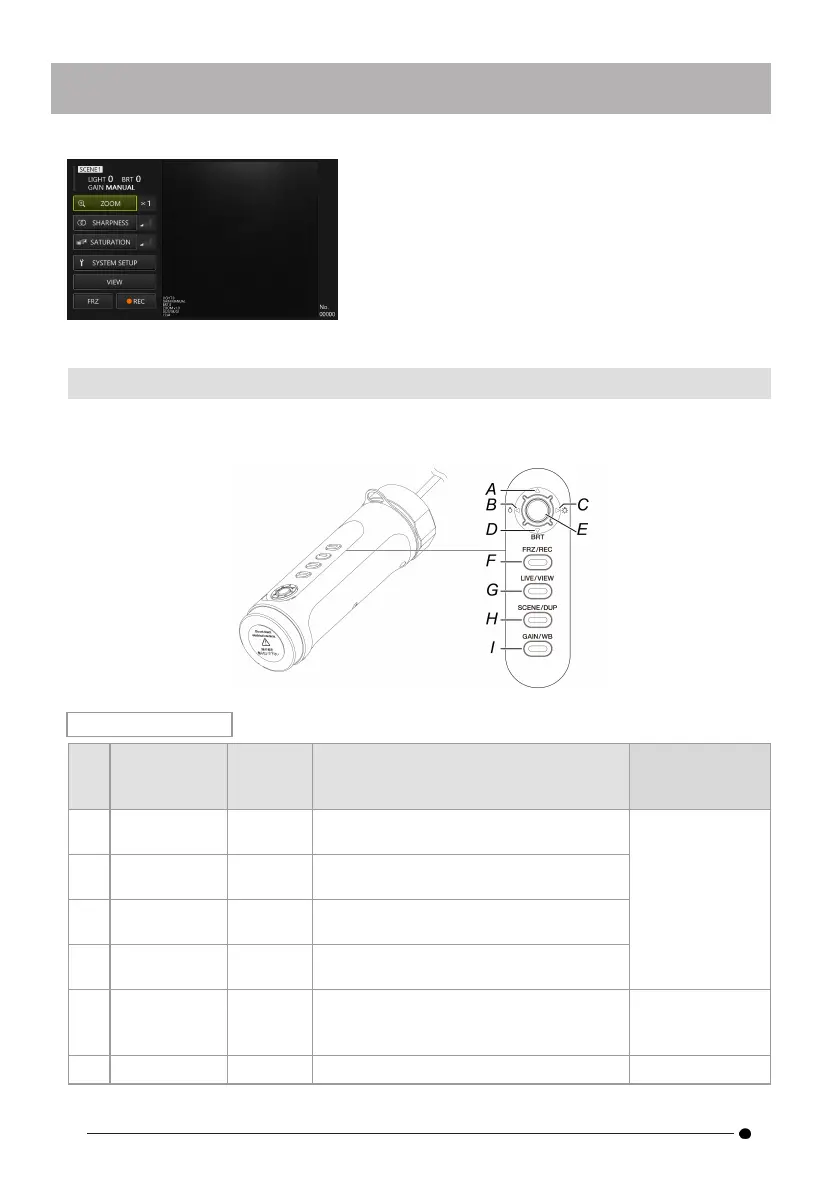
4.2.2 Control unit operation and functions
The functions of the control unit switch between "remote control mode" and "GUI mode". For
detailed functions, please check the reference in the function description reference column.
Remote control mode
Button Function
Function
description
reference
(A)
D-pad [U] Briefly
press
Increases brightness by one step.
"Adjusting
brightness "
(page 34)
(B)
D-pad [L] Briefly
press
Dims light intensity by one step.
(C)
D-pad [R] Briefly
press
Brightens light intensity by one step.
(D) D-pad [D]
Briefly
press
Decreases brightness by one step.
(E) [ENT/MODE]
Button
Press and
hold
Switches between "remote control
mode" and "GUI mode".
"Switching
operation modes
" (page 27)
(F) [FRZ/REC]
Briefly Switches between a live image and
"Freeze (freezes
28



 To Next Page